
Is your Honeywell thermostat’s return indicator blinking and leaving you puzzled? You’re not alone.
When that little light starts flashing, it’s your thermostat’s way of telling you something needs your attention—whether it’s about your daily schedule settings or a possible issue with your HVAC system. Understanding why the return light blinks can help you avoid discomfort, save energy, and keep your home’s climate just right.
You’ll discover simple explanations and easy fixes that will have your thermostat running smoothly again. Keep reading to take control of your comfort and stop that blinking light from causing you stress.
What Return Blinking Means
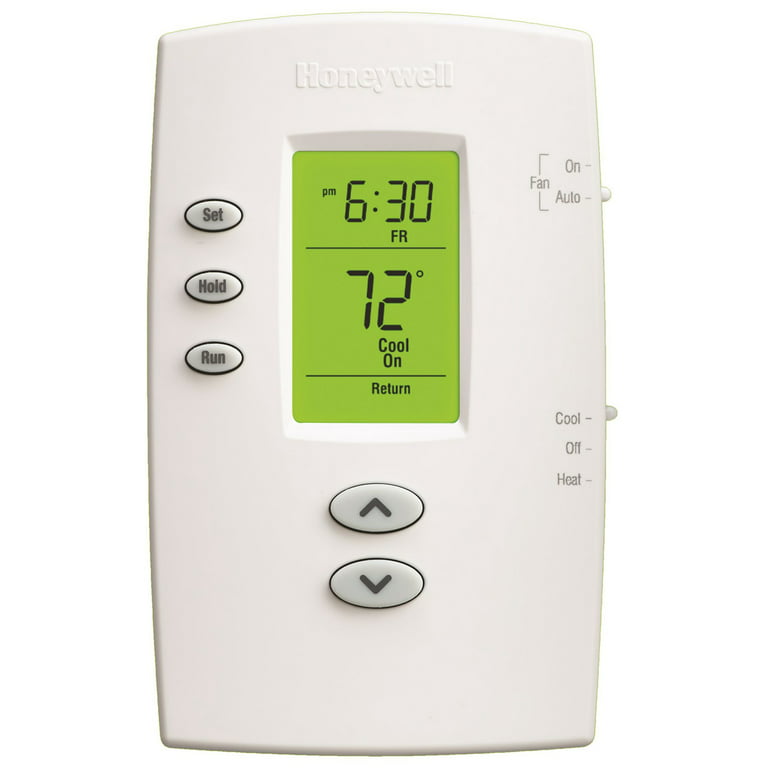
The blinking “Return” on your Honeywell thermostat shows a specific part of its daily schedule. This schedule controls temperature changes during different times of the day. The blinking light signals the thermostat is in the “Return” mode. This mode adjusts the temperature for when you come back home.
Understanding this blinking helps you know if the thermostat is working correctly. It also shows if the device follows the programmed temperature settings. Sometimes, the blinking can indicate a small issue or an accidental setting change.
Daily Programming Modes
Your Honeywell thermostat has four main daily modes. These are Wake, Leave, Return, and Sleep. Each mode changes the temperature based on your routine. “Wake” warms or cools your home when you get up. “Leave” sets the temperature while you are away. “Return” prepares the home for your arrival. “Sleep” adjusts settings for nighttime comfort.
The blinking “Return” means the thermostat runs the temperature set for your return time. This helps save energy and keeps your home comfortable.
Common Causes Of Blinking
Several reasons cause the “Return” light to blink on your thermostat. One cause is the daily schedule running normally. Another is when the thermostat detects a change in the programmed times. A power interruption or reset can also make the return light blink. Sometimes, the thermostat flashes to remind you of settings that need checking.
Checking your schedule and settings often stops unwanted blinking.
Accidental presses can trigger the blinking “Return” mode. Pressing the “Run Program” button by mistake can activate the schedule. This makes the thermostat switch to the “Return” phase unexpectedly. Small children or pets may also press buttons causing changes. To avoid this, lock the buttons or use a cover.
Review the settings after any accidental press to ensure correct temperature control.
Troubleshooting Steps
Many Honeywell thermostat users face blinking return issues. These problems often stem from simple causes. Fixing them is usually straightforward. Understanding common fixes saves time and prevents frustration. Below are key solutions to try.
Correcting Schedule Errors
The blinking return often signals a schedule error. Check your thermostat’s programmed times. Adjust the “Return” period to match your daily routine. Use clear and simple settings for each time block: Wake, Leave, Return, Sleep. Reset the schedule if it seems confusing. This step often stops the blinking.
Replacing Batteries
Weak or dead batteries cause many thermostat issues. Remove the thermostat from its base carefully. Replace old batteries with fresh, high-quality ones. Use the correct battery type recommended by Honeywell. After replacing, the blinking should stop if low power was the issue. Check battery contacts for dirt or corrosion.
Clearing System Short Cycles
Short cycling happens when the HVAC turns on and off too fast. This can trigger the blinking return signal. To fix it, clean or replace air filters regularly. Make sure vents are open and not blocked. Inspect the system for any mechanical issues. If short cycles continue, consider calling a professional for a detailed check.
Fixes For Common Problems
Preventive maintenance keeps your Honeywell thermostat and HVAC system working well. It reduces issues like the return blinking error. Simple care steps help your system last longer and run smoothly. Follow these tips to avoid unexpected problems and save energy.
Regular Filter Replacement
Change air filters every 1 to 3 months. Dirty filters block airflow and strain your system. Clean filters improve air quality and system efficiency. Mark your calendar to remember filter changes. This small step helps prevent blinking or error signals.
Cleaning Vents And Coils
Keep vents free from dust and debris. Blocked vents lower airflow and cause uneven cooling or heating. Clean evaporator and condenser coils at least once a year. Dirty coils reduce system performance and increase energy use. Use a soft brush or vacuum for gentle cleaning.
Scheduling Hvac Inspections
Arrange professional HVAC checkups twice a year. Experts find hidden problems before they grow. Inspections ensure thermostat sensors and wiring work correctly. Technicians clean parts and test system functions. Regular checkups help prevent blinking return errors and costly repairs.
Preventive Maintenance Tips
Knowing when to call a professional for your Honeywell thermostat is important. Some issues need expert help to avoid damage or extra costs. Simple blinking may fix itself, but persistent problems often signal deeper faults. Acting quickly can keep your system running smoothly and save money.
Persistent Blinking Issues
If your thermostat keeps blinking and resets repeatedly, it shows a persistent problem. This could be caused by wiring faults, power supply issues, or internal hardware failures. DIY fixes may not solve these. A technician can diagnose and repair the root cause safely and correctly.
Unresponsive Thermostat
A thermostat that does not respond to touch or changes in settings needs professional attention. This can mean a broken screen, software errors, or damaged circuits. Attempting to fix this without skill can worsen the problem. Experts have the right tools to restore full function.
System Short Cycling
Short cycling happens when the heating or cooling turns on and off too quickly. It stresses the HVAC system and raises energy bills. Often, thermostat issues cause this behavior. A professional can check the thermostat and HVAC system to find the cause and stop short cycling.
Frequently Asked Questions
What Does It Mean When It Says Return On A Honeywell Thermostat?
“Return” on a Honeywell thermostat marks the time you set to come back home. It adjusts temperature for comfort during that period.
What Does “leave And Return” Mean On A Thermostat?
“Leave and return” on a thermostat refer to preset times for temperature changes. “Leave” sets the temperature during absence. “Return” adjusts it when you come back. This helps save energy while maintaining comfort.
How Do I Stop My Thermostat From Short Cycling?
Stop thermostat short cycling by regularly changing air filters and cleaning coils. Keep vents clear and schedule professional HVAC inspections biannually. Ensure thermostat settings are correct and avoid placing it near heat sources or drafts. These steps improve system efficiency and prevent rapid on/off cycling.
How Do I Know If My Thermostat Is Blown?
A blown thermostat shows these signs: HVAC won’t turn on/off, incorrect room temperatures, short cycling, blank or unresponsive display, and higher energy bills.
What Does The Blinking “return” Mean On Honeywell Thermostat?
The blinking “Return” shows the programmed time you come back home. It signals the thermostat is adjusting temperature for your return period.
Conclusion
A blinking “Return” on your Honeywell thermostat often signals its programmed schedule. This means the thermostat is switching to the temperature set for your return time. Check your daily settings to confirm or adjust times and temperatures. Resetting the program can stop unwanted blinking if schedules were set by mistake.
Keeping your thermostat properly programmed helps save energy and keeps your home comfortable. Regular checks ensure your system works smoothly without confusion or errors. Simple fixes often solve blinking issues without needing expert help. Stay aware of your thermostat’s signals for better home control.









