
Is your Dyson V6 showing a blinking blue light and you’re not sure what it means? That flashing blue light is trying to tell you something important about your vacuum’s health.
Ignoring it won’t make the problem go away—in fact, it could stop your Dyson from working when you need it most. But don’t worry, you’re in the right place. You’ll learn exactly why that blue light blinks, what simple steps you can take to fix it, and when it might be time to replace your battery.
Keep reading to get your Dyson V6 back to top performance quickly and easily.
Blue Light Signals
The Dyson V6 uses blue light signals to communicate its status. These signals help users understand what the vacuum needs. Recognizing these signals can prevent damage and improve performance.
The blue light blinks in different patterns. Each pattern means something specific. Knowing these meanings saves time and effort when troubleshooting.
Slow Blinking: Low Battery
A slow blinking blue light means the battery is low. The vacuum needs to be charged soon. Continuing to use it without charging may cause it to stop suddenly.
Plug the vacuum into its charger. A solid blue light should appear while charging. Once fully charged, the slow blinking will stop, and the vacuum will work properly again.
Fast Blinking: Power Faults
A fast blinking blue light signals power faults. This can happen due to motor blockage or overheating. Check the vacuum for blockages in the brush bar, wand, or filters.
Remove any debris or dust that may cause the motor to struggle. Let the vacuum cool down if it feels hot. If the problem persists, the battery or internal parts may need replacement or repair.
Common Causes
The Dyson V6 blinking blue light signals an issue that needs attention. Understanding common causes helps fix problems quickly. This section explains the main reasons behind the blinking blue light on your Dyson V6.
Battery Drain
The most common cause is battery drain. The blue light blinks when the battery charge is low. Running the vacuum until the battery dies causes this too. Charging the vacuum fully usually stops the blinking. A faulty or old battery may not hold charge well. In that case, the light keeps blinking even after charging.
Blocked Filters And Airways
Blocked filters or airways can trigger the blinking blue light. Dirt and debris block airflow inside the vacuum. This makes the motor work harder and causes the light to flash. Cleaning the filters and checking for clogs in the airways helps. Removing the bin and cyclone to clear blockages is important. Regular cleaning prevents this issue from happening.
Overheating Issues
Overheating also causes the blue light to blink. Using the vacuum for a long time on high power can make it hot. The vacuum protects itself by flashing the light and shutting off. Let the vacuum cool down before using it again. Overheating may happen if airways are blocked or filters are dirty. Keeping the vacuum clean reduces the risk of overheating.
Basic Fixes
The blinking blue light on your Dyson V6 often signals simple issues. Basic fixes can solve most problems quickly. These easy steps help restore your vacuum’s normal function without extra tools or costs.
Charge The Battery Fully
A blinking blue light often means low battery power. Connect your Dyson V6 to its charger. Ensure the charger is plugged into a working outlet. Let it charge until the light turns solid blue. Avoid using the vacuum during charging. A full charge can clear the blinking light.
Clean Filters And Remove Blockages
Dirty filters or blockages cause the vacuum to struggle. Remove the bin and cyclone carefully. Take out the filters and rinse them with cold water. Let the filters dry completely before reinserting. Check the brush bar and wand for clogs. Clearing debris improves airflow and stops the blue light from blinking.
Let Vacuum Cool Down
Overheating can trigger the blinking blue light. Turn off the vacuum and unplug it. Allow it to cool down for at least 30 minutes. Avoid using the vacuum on max mode for long periods. Cooling down prevents motor stress and resets the device’s sensors.
Battery Reset
The Dyson V6 blinking blue light often signals a battery issue. Resetting the battery can fix this problem quickly. It helps the vacuum reconnect with the battery’s power supply. This process can clear minor errors causing the blue light to blink.
Battery reset is simple and safe. It involves removing and reattaching the battery or performing a full reboot. These steps can restore your vacuum’s normal function. Follow the instructions carefully to avoid any damage.
Removing And Reattaching Battery
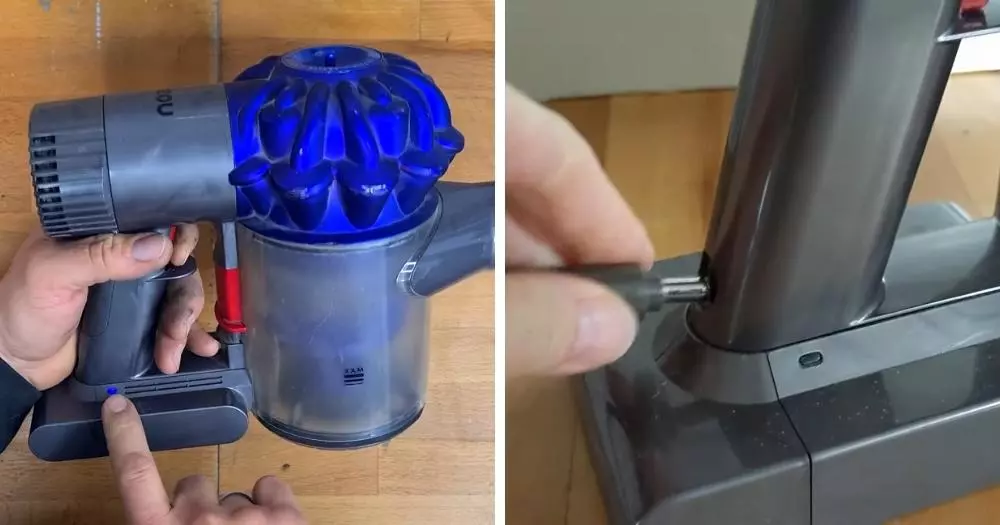
Turn off your Dyson V6 and unplug it from charging. Locate the battery release button near the handle. Press the button and gently pull the battery out. Wait for about 30 seconds to let the vacuum fully power down.
Align the battery back into its slot. Push it firmly until you hear a click. This ensures a secure connection. After reattaching, try switching the vacuum on. Check if the blinking blue light has stopped.
Performing A Full Battery Reboot
Remove the battery using the steps above. Leave it disconnected for at least five minutes. This pause helps clear any temporary faults stored in the battery. Reattach the battery firmly after the wait.
Plug the vacuum into the charger and let it charge fully. A solid blue light on the charger means it’s charging correctly. Once charged, turn on the vacuum. The blue light should now be steady or off, showing the reset worked.
When To Replace Battery
Knowing when to replace the battery in your Dyson V6 is important. The blinking blue light often signals battery issues. Recognizing these signs helps maintain your vacuum’s performance. Below are key indicators that suggest it is time for a new battery.
Short Run Times
The vacuum stops working much sooner than before. It may only run for a few minutes instead of the usual time. This sudden drop shows the battery no longer holds a strong charge. You might notice the blue light blinking during use or right after turning it on. Short run times mean the battery is weakening.
Failure To Hold Charge
Charging the vacuum does not restore power fully. The battery indicator light may blink even after a full charge. The vacuum might lose power quickly or fail to start. This problem happens when the battery cells wear out over time. If the vacuum struggles to keep a charge, replacing the battery is necessary to restore proper function.
Charger And Connection Checks
The Dyson V6 blinking blue light often signals a charging or connection issue. Checking the charger and its connection is a simple first step. This process helps confirm if the vacuum is receiving power correctly. Simple checks can save time and prevent unnecessary repairs.
Start by making sure the charger is connected properly. Then, observe the charging indicator lights. These lights give clear signs about the charging status. Following these steps ensures your vacuum charges correctly and works well.
Verify Charger Is Plugged In
Check that the charger is firmly plugged into the power outlet. Sometimes, plugs can become loose without notice. Also, confirm the charger is connected to the vacuum’s charging port securely. A loose connection stops charging and causes the blue light to blink.
Try using a different power outlet to rule out socket issues. If the vacuum still does not charge, inspect the charger for any visible damage. Damaged cables or connectors can prevent proper charging and trigger warning lights.
Check Charging Indicator Lights
Observe the vacuum’s charging light while connected to power. A solid blue light means the vacuum is charging correctly. A blinking blue light indicates a problem with charging or battery health.
Note the pattern of the blinking light. Slow blinking may suggest low battery power. Fast blinking often points to a fault in the battery or charger connection. Understanding these signals helps decide the next troubleshooting steps.
If the charging light does not turn on at all, the charger or vacuum may have a fault. Testing with another charger or vacuum can identify the faulty component. Proper charging lights ensure the Dyson V6 stays ready for use.
Frequently Asked Questions
Why Is The Blue Light Flashing On My Dyson?
A flashing blue light on your Dyson means the battery is low or not charging properly. Check for blockages, clean filters, and ensure the charger is connected. If it keeps flashing after charging, the battery may need replacement.
How Do I Reset My Dyson V6 Battery?
To reset your Dyson V6 battery, remove it from the vacuum, wait 30 seconds, then firmly reattach it. Charge fully before use. Clean filters and check for blockages to ensure proper function. Replace the battery if issues persist after resetting and charging.
How Do I Know If My Dyson V6 Battery Is Bad?
Your Dyson V6 battery is bad if it drains quickly, won’t hold charge, or the light flashes after charging.
How To Get Dyson To Stop Blinking?
Charge the Dyson battery fully and ensure the charger is connected properly. Clean filters and remove blockages. Reset the battery by removing and reattaching it. Let the vacuum cool if overheated. Replace the battery if blinking continues despite these steps.
What Does A Blinking Blue Light On Dyson V6 Mean?
A blinking blue light shows the battery is low or the vacuum has a fault. It may also indicate blockages or overheating. Check the battery and clean filters to fix it.
Conclusion
The blinking blue light on your Dyson V6 signals a battery or blockage issue. Start by charging the battery fully and checking the charger connection. Clean the filters and remove any blockages in the brush or wand. Let the vacuum cool if it feels hot.
If the light keeps flashing, the battery might need replacement. Regular cleaning helps avoid this problem. Keep your Dyson in good shape for better performance. Understanding these signs saves time and keeps your vacuum working well.









