
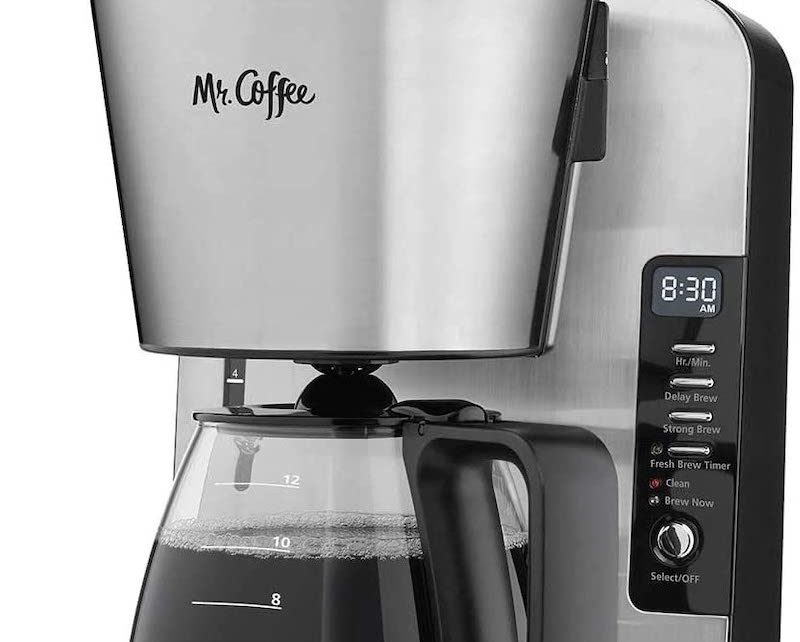
Is your Mr. Coffee machine’s “Clean” light blinking nonstop? You’re not alone.
That flashing light is your coffee maker’s way of telling you it’s time for a deep clean. Ignoring it can affect the taste of your coffee and even damage your machine over time. But don’t worry—cleaning your Mr. Coffee is easier than you think, and once you know the simple steps, you’ll keep your coffee fresh and your machine running smoothly.
You’ll discover exactly why that clean light blinks, how to reset it, and the best cleaning tips to make your coffee maker feel brand new again. Keep reading, and you’ll be brewing perfect coffee in no time!
Credit: cornercoffeestore.com
Why The Clean Light Blinks
The blinking clean light on your Mr. Coffee machine is a helpful alert. It tells you that your coffee maker needs attention to keep working well. Understanding why this light blinks helps you maintain your machine properly. This keeps your coffee tasting fresh and your machine lasting longer.
Cleaning Reminder Signal
The clean light blinks as a reminder to clean your coffee maker. It activates after a set number of brew cycles. This signal helps remove coffee oils and residue. Regular cleaning stops buildup that can affect taste and machine function. Ignoring the light can cause problems with brewing quality.
Mineral Build-up Indicators
Minerals from water can build up inside the coffee maker. The blinking light also shows when it is time to remove these minerals. This process is called descaling. Hard water leaves deposits that block water flow and damage parts. Descaling keeps your machine running smoothly and extends its life.
Differences Between Cleaning And Descaling
Cleaning and descaling are not the same tasks. Cleaning removes coffee oils, dirt, and residue from the machine parts. Descaling targets mineral deposits from hard water inside the machine. Both are important but use different methods and solutions. Follow your machine’s instructions for the right process.
Basic Cleaning Steps
Keeping your Mr. Coffee machine clean is essential for great-tasting coffee. The blinking clean light reminds you to perform basic cleaning steps. These steps remove build-up and keep your coffee fresh. Follow this simple guide to clean your coffee maker effectively.
Starting The Clean Cycle
First, place an empty carafe on the warming plate. Press the “Clean” button to start the cycle. If your model has no “Clean” button, hold the “Brew” button for a few seconds. The machine will run a cleaning cycle automatically. Wait until the cycle finishes and the light stops blinking.
Using Vinegar For Cleaning
Pour one part white vinegar and two parts water into the water reservoir. This mix helps dissolve mineral deposits and oils. Place a filter in the basket and close the lid. Start the brew cycle to let the vinegar mixture clean the internal parts. Vinegar is a natural cleaner and safe for your coffee maker.
Rinsing After Cleaning
After the vinegar cycle ends, discard the solution from the carafe. Fill the reservoir with fresh clean water only. Run two full brew cycles to rinse out any vinegar taste. Make sure to use a new filter for each rinse cycle. This step prevents vinegar residue in your next coffee brew.
Resetting The Clean Light
Resetting the clean light on your Mr. Coffee machine is a simple yet important step. This ensures your coffee maker knows it has been cleaned. The blinking clean light signals that the cleaning cycle is needed or incomplete. Resetting this light helps maintain your machine’s performance and coffee taste.
Completing The Clean Cycle
To reset the clean light, first complete the cleaning cycle. Fill the water reservoir with a mixture of vinegar and water. Place an empty carafe on the warming plate. Press the clean button or follow your model’s instructions to start the cycle. Wait for the cycle to finish fully before moving on.
Once the cycle ends, discard the vinegar solution. Run two or more cycles with fresh water. This rinses out any remaining vinegar taste. The clean light will turn off automatically after completing these steps.
Manual Reset Methods
If the clean light stays on after cleaning, try manual reset methods. Some models allow holding the clean or brew button for several seconds. This action can reset the light without running a full cleaning cycle. Check your user manual for specific reset instructions for your model.
Manual reset works when the machine’s memory needs clearing. It signals the coffee maker that cleaning is done. This helps avoid unnecessary cleaning alerts and keeps your machine ready to brew.
When To Repeat Cleaning
The clean light may blink again after some time. This means your coffee maker needs cleaning again. Frequent cleaning prevents buildup of oils and minerals. If the light blinks soon after reset, repeat the cleaning cycle. Use vinegar or a descaling solution for thorough cleaning.
Regular cleaning keeps your coffee fresh and the machine working well. Reset the light each time you finish a cleaning cycle. This simple habit extends the life of your Mr. Coffee machine.
Alternative Cleaning Solutions
Cleaning your Mr. Coffee machine keeps it working well and your coffee tasting fresh. The blinking clean light signals time for a clean. Besides the standard vinegar method, other cleaning options exist. These alternatives help remove mineral buildup and keep your coffee maker in good shape.
Using different cleaning solutions can suit your needs and preferences. Some products work fast, while natural options appeal to those avoiding chemicals. Choose the right method to maintain your coffee maker’s performance and flavor.
Commercial Descaling Products
Commercial descaling products are made specifically for coffee machines. They dissolve mineral deposits quickly and effectively. These solutions often come in liquid or powder form.
Follow the product instructions carefully for best results. Usually, you add the solution to the water reservoir and run a cleaning cycle. After that, rinse the machine by running fresh water through it twice.
These products are safe for most Mr. Coffee models. They help extend the machine’s life by preventing damage from hard water minerals.
Natural Cleaning Alternatives
Natural cleaning options use simple household ingredients. White vinegar is the most popular choice. It breaks down mineral buildup and kills bacteria inside the coffee maker.
Lemon juice is another option. It leaves a fresh scent and helps remove stains. Baking soda mixed with water can also clean the machine gently.
These natural methods are cost-effective and easy to find. They are gentle on your machine and safe for regular use. Always run a few cycles of clean water after using any natural cleaner.
Troubleshooting Persistent Blinking
The persistent blinking of the Mr Coffee clean light signals a need for attention. This blinking often means the machine senses a cleaning cycle is required. Ignoring it can affect coffee taste and machine performance. Troubleshooting can help stop the blinking and keep your coffee maker running smoothly.
Checking Water Reservoir Levels
Start by checking the water reservoir. Low water levels can trigger blinking lights. Fill the reservoir fully to the maximum mark. Make sure the water tank is seated properly. Poor contact may cause the machine to think water is low.
Inspecting Water Flow Sensors
Water flow sensors detect water movement in the machine. Dirt or debris can block these sensors. Clean the sensors gently with a soft cloth. Check for any visible damage or loose connections. Proper sensor function helps prevent false blinking signals.
Common Error Codes And Fixes
Mr Coffee machines use blinking patterns to show error codes. Count the blinks to identify the issue. For example, three blinks may mean a water issue. Refer to your user manual for specific codes. Follow recommended fixes like cleaning or refilling water. Reset the machine after fixing the problem.
Credit: cornercoffeestore.com
Maintenance Tips To Prevent Blinking
The blinking clean light on your Mr. Coffee machine signals it needs maintenance. Keeping your coffee maker clean prevents this blinking and ensures great-tasting coffee. Follow simple steps to maintain your machine and avoid frequent cleaning alerts.
Regular Cleaning Schedule
Clean your coffee maker every one to two weeks. Use warm, soapy water to wash removable parts like the filter basket and carafe. Wipe the machine’s exterior with a damp cloth. Regular cleaning removes coffee oils and residue that cause the clean light to blink.
Using Filtered Water
Fill the water reservoir with filtered or bottled water. Filtered water has fewer minerals and impurities. This reduces buildup inside your machine. Using filtered water keeps the brewing system clean longer and helps stop the clean light from blinking.
Avoiding Mineral Build-up
Mineral deposits cause the clean light to blink frequently. Run a descaling cycle every one to three months. Use a mixture of equal parts white vinegar and water. Pour it into the reservoir, then start the clean cycle. Rinse with fresh water afterward to remove vinegar taste.
Frequently Asked Questions
Why Is My Coffee Maker Flashing Clean?
Your coffee maker flashes “clean” to signal it needs cleaning. Run a cleaning cycle with vinegar or descaling solution. This removes buildup and maintains performance. After cleaning, the light will reset. Repeat if the light keeps blinking.
Is A Clean Cycle The Same As Descaling?
A clean cycle removes coffee oils and residue, while descaling eliminates mineral buildup. Both maintain your machine but target different deposits.
Why Is The Brew Light Blinking On My Mr Coffee?
The brew light blinks on your Mr. Coffee because the water reservoir lacks enough water for the selected brew size. Refill the reservoir and restart brewing to fix it.
How Long Does The Clean Cycle Take On A Mr. Coffee Maker?
The clean cycle on a Mr. Coffee Maker takes about 30 to 45 minutes, equivalent to three brew cycles.
Why Is My Mr. Coffee Blinking The Clean Light?
The blinking clean light means your coffee maker needs cleaning. It signals buildup of oils and dirt inside the machine. Cleaning helps keep your coffee tasting fresh.
Conclusion
The blinking clean light on your Mr. Coffee signals it needs cleaning. Regular cleaning keeps your coffee tasting fresh and the machine working well. Running the clean cycle with vinegar removes buildup and oils effectively. Remember to rinse with fresh water to avoid vinegar taste.
If the light stays on, try a second clean cycle. Following these steps helps your coffee maker last longer and brew better. Simple care makes a big difference in your daily coffee routine. Keep your machine clean, and enjoy every cup.









