
Is your Honeywell thermostat’s “Cool On” light blinking, but your air conditioner isn’t kicking in? You’re not alone—and this blinking signal can be confusing and frustrating.
It’s your thermostat’s way of telling you something isn’t quite right with your cooling system. But don’t worry, this guide will help you understand why this happens and what you can do to fix it quickly. Keep reading to get your home cooling comfortably again without calling in a costly repair.
Blinking Cool On Indicator
The Honeywell thermostat’s cool on blinking indicator often catches users off guard. This blinking light signals something important about your cooling system’s status. Understanding what it means helps you react quickly and keep your home comfortable.
This section explains the meaning of the blinking cool on light and the common symptoms you might notice. Knowing these details will guide you in troubleshooting or deciding when to call a professional.
What The Blinking Light Means
The blinking cool on indicator usually shows the system is in a protective mode. It may signal the compressor is off to avoid damage. This can happen if the thermostat detects a problem or if the system recently turned off.
Sometimes, it means the thermostat is trying to start the cooling but is waiting for a safe time. The compressor needs a delay before restarting. This prevents short cycling, which can harm your AC unit.
Common Symptoms With Blinking
When the cool on light blinks, you might notice the air conditioner not running. The fan may be on, but no cold air comes from the vents. This is a common sign of the system protecting itself.
Other symptoms include irregular cooling or the thermostat showing unusual messages. You might also hear clicking sounds from the AC unit. These signs often accompany the blinking indicator and hint at system issues.
Quick Troubleshooting Steps
When your Honeywell thermostat’s “Cool On” light blinks, quick checks can solve the issue fast. These simple troubleshooting steps help identify common problems. Start with basic parts of your cooling system before calling a professional. Follow the steps below to restore your thermostat’s function quickly.
Check Air Filters
Dirty air filters block airflow and cause system errors. Remove the filter and examine it closely. If it looks dusty or clogged, replace it with a new one. Clean filters improve cooling and prevent blinking issues. Check filters every month during heavy use for best results.
Verify Power Supply
Power issues often cause the “Cool On” light to blink. Confirm that the furnace or air handler switch is on. Check your home’s circuit breaker to ensure it has not tripped. Reset the breaker if needed. Proper power supply keeps your thermostat running smoothly.
Inspect And Replace Batteries
Low or dead batteries can cause thermostat errors and blinking lights. Open the thermostat cover and remove the batteries. Replace them with fresh, high-quality batteries. Using new batteries helps maintain clear screen display and proper thermostat operation.
Potential Causes
The blinking “Cool On” indicator on a Honeywell thermostat often signals an issue with the cooling system. Understanding the potential causes helps in identifying the right fix quickly. Several common problems can cause this blinking light to appear.
Some causes are simple, like dirty filters or power issues, while others are more complex and may need professional help. Below are the main reasons why the “Cool On” light might blink.
Frozen Evaporator Coils
Frozen evaporator coils stop the air conditioner from cooling properly. This freezing happens due to poor airflow or low refrigerant. Dusty or clogged filters reduce airflow, causing the coils to freeze. Ice buildup on coils triggers the thermostat’s blinking “Cool On” light. The system tries to protect itself by cycling the compressor on and off.
Low Refrigerant Levels
Low refrigerant means the air conditioner cannot cool the air well. Leaks in the system reduce refrigerant over time. The thermostat detects the drop and blinks the “Cool On” light as a warning. Low refrigerant also causes coils to freeze, worsening the problem. A trained technician must check and refill the refrigerant safely.
Faulty Wiring Or Thermostat
Loose or damaged wiring can cause communication errors between the thermostat and the AC unit. This problem may cause the “Cool On” light to blink. A failing thermostat faceplate or sensor can also trigger this blinking. Electrical issues confuse the system, preventing proper cooling. Inspecting and fixing wiring or replacing the thermostat can solve this issue.
Compressor Protection Feature
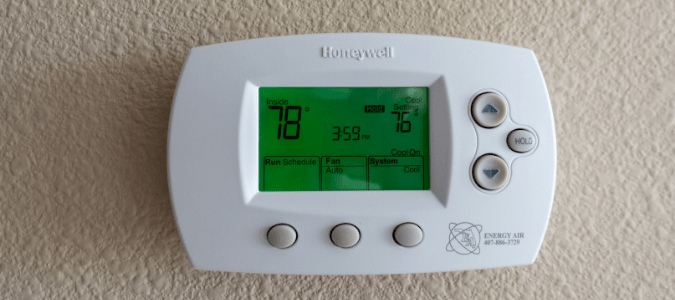
The compressor protection feature in Honeywell thermostats helps protect your air conditioning system. It prevents the compressor from turning on too quickly after it has been off. This feature stops damage caused by rapid cycling. Rapid cycling can wear out the compressor and reduce its lifespan.
This safety function is important for maintaining your HVAC system’s health. It ensures the compressor has time to equalize pressure before restarting. This delay can cause the “Cool On” light to blink on your thermostat. Understanding this feature helps you know why the system may seem unresponsive at times.
How It Works
The compressor protection feature uses a built-in timer. After the air conditioner turns off, the timer starts counting down. The compressor cannot restart until the timer finishes. This pause prevents short cycling, which can cause high pressure in the system.
By delaying the compressor restart, the system pressure balances out. This protects the compressor from damage. The thermostat’s “Cool On” light may blink during this time. The blinking shows the system is waiting before it cools again.
When It Activates
This feature activates every time the compressor stops running. It is most common after the cooling cycle ends. It also triggers after power interruptions or thermostat resets. The delay usually lasts about 5 minutes, but it can vary by model.
During this delay, the thermostat blinks the “Cool On” indicator. This blinking means the system is protecting the compressor. Once the delay ends, the compressor will start cooling as usual. If the blinking continues too long, it might signal a different issue.
Power Cycling Issues
Power cycling issues often cause the Honeywell thermostat’s “Cool On” light to blink. This blinking means the thermostat keeps turning on and off quickly. Such behavior can stop the air conditioner from working properly. Understanding power cycling helps fix the problem fast.
What Triggers Power Cycling
Power cycling happens due to several reasons. A faulty sensor can send wrong signals. Loose wiring also causes the thermostat to reset repeatedly. Sometimes, a power outage makes the system restart multiple times. Another cause is a short circuit in the HVAC system. These triggers confuse the thermostat, leading to blinking “Cool On” lights.
How To Reset The Thermostat
Resetting the thermostat can stop power cycling. First, turn off the thermostat using the main power switch. Wait for about 30 seconds to let it fully power down. Then, turn it back on to see if the blinking stops. If the problem continues, try removing the batteries for one minute. Reinsert them and power the thermostat on again. This simple reset often clears errors causing power cycling.

When To Call A Professional
Knowing when to call a professional for your Honeywell thermostat blinking “Cool On” is key to avoiding bigger problems. Some issues require specialized tools and skills beyond basic troubleshooting. Acting early can save time and money while keeping your system safe.
Signs Of Refrigerant Leaks
Refrigerant leaks cause your air conditioner to lose cooling power. You may notice warm air or uneven cooling in your home. Frost or ice buildup on the evaporator coil is another sign. A hissing or bubbling sound near the unit can also indicate a leak. These leaks affect system performance and can harm the environment. Repairing refrigerant leaks requires professional tools and certification. Attempting to fix leaks without training can cause damage or injury.
Complex Electrical Problems
Electrical issues often cause the “Cool On” light to blink repeatedly. Frequent tripping breakers or blown fuses may point to wiring problems. Loose or corroded connections inside the thermostat or HVAC system also cause errors. Complex electrical faults can create fire hazards if ignored. Professionals use diagnostic equipment to identify and fix wiring or circuit board faults. Handling electrical components without expertise risks electric shock or further damage to your system.
Preventive Maintenance Tips
Proper care can prevent many issues with your Honeywell thermostat. Regular preventive maintenance keeps the system working well. It helps avoid blinking “Cool On” problems. Small efforts save time and repair costs later.
Focus on two main tasks: changing filters and checking the system. Both improve performance and extend the life of your cooling system. These easy steps keep your home comfortable all year.
Regular Filter Replacement
Replace air filters every 1 to 3 months. Dirty filters block airflow and strain your system. This can cause the thermostat to blink “Cool On.”
Clean filters improve air quality and system efficiency. Use the correct filter size for your unit. Check filters monthly during heavy use seasons.
Routine System Checks
Inspect your cooling system regularly. Look for dirt, debris, or damage on outdoor units. Clear any obstructions near vents and coils.
Test thermostat batteries and wiring connections. Loose wires may cause blinking or false signals. Turn the system on and off to ensure smooth operation.

Frequently Asked Questions
Why Does My Thermostat Say Cool On But The Unit Is Not Running?
Your thermostat shows “cool on” but the unit doesn’t run due to compressor delay, power issues, or sensor errors. Check filters, breakers, and batteries. Faulty wiring or low refrigerant may also cause this. Wait a few minutes for the compressor protection to reset before calling a professional.
Why Is The Cool Setting On My Thermostat Blinking?
The blinking cool setting on your thermostat usually signals a compressor delay or system protection. Check filters, power, and batteries first. Persistent blinking may indicate frozen coils, low refrigerant, or wiring issues. Contact a professional if problems continue to ensure proper cooling and avoid damage.
Why Is My Honeywell Thermostat’s Cool Light Blinking?
A blinking cool light usually means the system is in compressor protection mode. It prevents damage by pausing the AC for a few minutes. This is normal if the AC just turned off.
What Causes The Honeywell Thermostat To Blink Cool But Not Cool?
The blinking cool without cooling often signals airflow problems or sensor errors. Dirty filters or blocked vents can stop the AC from working. Check these first before calling a technician.
How Do I Fix A Honeywell Thermostat Blinking Cool On?
Try resetting the thermostat by turning it off and on again. Also, check power supply, batteries, and circuit breakers. Clean or replace air filters to improve airflow.
Conclusion
A blinking “Cool On” light on your Honeywell thermostat often signals a system delay or minor issue. Simple checks like cleaning filters and verifying power can help. Persistent blinking may need professional help to inspect refrigerant or wiring. Acting early prevents bigger problems and keeps your home comfortable.
Stay calm and follow basic steps to fix the issue. Your thermostat will work properly again soon.









