
Is your Samsung fridge display blinking and leaving you puzzled? You’re not alone, and it’s more common than you might think.
That blinking screen isn’t just a random glitch—it’s trying to tell you something important about your fridge’s health. Whether it’s a temperature alert, a power hiccup, or a sensor issue, understanding why your Samsung fridge display blinks can save you time, stress, and even costly repairs.
Keep reading, and you’ll learn simple, effective steps to diagnose and fix the problem, so your fridge gets back to cooling perfectly—and your peace of mind returns.
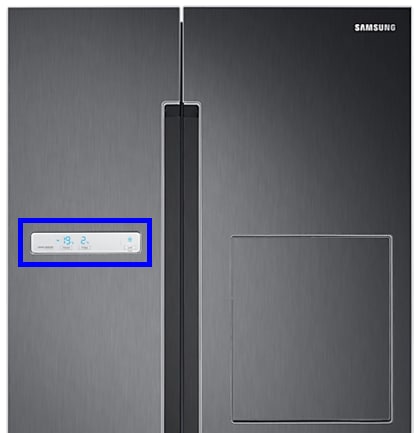
Causes Of Display Blinking
The blinking display on a Samsung fridge often signals an underlying issue. It does not always mean a serious problem but needs attention. Understanding the causes can help you decide the next step. Below are common reasons why the display blinks.
High Temperature Alerts
The fridge display blinks if temperatures rise above the set level. This can happen if the door stays open too long. Warm air entering the fridge triggers the alert. The blinking warns you to check the fridge temperature.
Power Interruptions
Power outages or sudden surges can cause the display to blink. The fridge may reset itself after power returns. Blinking may continue during this reset process. This is a normal response to interrupted power supply.
Sensor Malfunctions
Faulty sensors can send wrong signals to the control board. The display blinks to show sensor errors. Temperature sensors or door sensors may fail. Replacing or repairing sensors often stops the blinking.
Control Board Issues
The control board manages all fridge functions and the display. If it malfunctions, the display may blink or show errors. Damage from electrical surges or wear can affect the board. Repair or replacement of the control board may be needed.
Ice Buildup Effects
Excess ice inside the fridge can block sensors and fans. This causes the display to blink as the fridge struggles to cool properly. Defrosting the fridge can remove the ice buildup. Keeping the fridge ice-free helps prevent blinking issues.
Basic Troubleshooting Steps
Samsung fridge display blinking can be confusing and frustrating. Basic troubleshooting steps help identify simple problems fast. These steps require no tools and are easy to follow. Start with these checks before calling for professional help. They often solve the issue quickly and save time.
Checking Door Seals And Vents
Make sure all door seals are clean and free of damage. Dirty or broken seals cause cold air to escape. This can trigger the display to blink. Check vents inside the fridge for blockages. Clear any food or items blocking airflow. Proper airflow keeps temperature steady and stops blinking.
Resetting The Refrigerator
Resetting the fridge can clear minor electronic glitches. Locate the control panel and press the reset button. Hold it for a few seconds until the display turns off. Release and wait for the fridge to restart. This often fixes blinking caused by software errors.
Inspecting For Frost And Ice
Look inside the freezer for frost or ice buildup. Ice can block sensors and fans, causing the display to blink. Remove any frost gently with a soft cloth. Avoid sharp objects that can damage parts. Defrosting the freezer may solve the blinking issue.
Power Cycling The Display
Turn off the fridge’s power supply for a short time. Unplug the fridge or switch off the circuit breaker. Wait at least five minutes before restoring power. This process resets the display and clears temporary errors. Power cycling is a simple fix that often stops blinking.
Advanced Fixes
Advanced fixes for a Samsung fridge display blinking involve technical steps. These solutions go beyond simple resets or power cycles. They address hardware issues that cause the display to malfunction. Proper diagnosis and careful handling are necessary. Below are key advanced fixes to restore your fridge’s display function.
Replacing Temperature Sensors
Temperature sensors monitor the fridge’s internal environment. Faulty sensors can cause the display to blink erratically. To replace a sensor, first disconnect power to the fridge. Remove the sensor from its housing carefully. Install the new sensor in the exact spot. Reconnect power and test if the display stops blinking.
Repairing Or Replacing Control Boards
The control board manages the fridge’s electronic functions. Damage or failure here can lead to display blinking. Inspect the board for visible damage or burn marks. If repair is possible, solder loose connections carefully. Otherwise, replace the control board with an exact model match. This fix often requires professional help due to complexity.
Fixing Evaporator Fan Problems
The evaporator fan circulates cold air inside the fridge. A malfunctioning fan can cause sensor errors and display issues. Check the fan for blockages or ice build-up. Clear any obstruction and ensure the fan blades spin freely. Replace the fan motor if it fails to run smoothly. This step improves cooling and stabilizes the display.
Handling Light Module Flickering
Light module flickering may affect the display’s performance. Loose wiring or faulty LED modules cause flickering. Inspect wires for secure connections and no damage. Replace the LED light module if flickering continues. Use the correct replacement part to avoid further issues. Proper handling of the light system supports display stability.

Preventive Maintenance Tips
Preventive maintenance helps keep your Samsung fridge running smoothly. Small, regular care steps stop problems like the display blinking. This section shares simple tips to maintain your fridge. Follow these to avoid costly repairs and extend your fridge’s life.
Regular Defrosting Practices
Frost buildup can cause the display to blink. Defrost your fridge regularly to prevent this. Remove any ice from the freezer and vents. Use a soft cloth or sponge to wipe excess moisture. Avoid sharp tools that can damage parts.
Ensuring Proper Airflow
Good airflow keeps the fridge cool and stable. Do not block the vents inside the fridge and freezer. Leave space around the fridge for air to circulate. Clean dust from the condenser coils often. This helps the fridge work efficiently.
Routine Sensor Checks
Sensors control temperature and display functions. Check sensors for dirt or damage every few months. Gently clean sensors with a dry cloth to keep them clear. Replace faulty sensors quickly to stop blinking issues.
Power Surge Protection
Power surges can harm your fridge’s electronics. Use a surge protector to shield your appliance. Avoid plugging many devices into one outlet. Unplug the fridge during storms or power outages. This protects the display and other components.
When To Call A Technician
Knowing when to call a technician for your Samsung fridge display blinking can save time and prevent further damage. Some issues are simple and fixable at home. Others need professional care to ensure safety and proper repair. Understanding the signs helps you decide the right moment to get expert help.
Persistent Blinking Issues
If the display keeps blinking despite basic troubleshooting, it shows a deeper problem. Repeated blinking may signal a faulty control board or sensor. Trying multiple resets without success means you need a technician. Professionals can diagnose and fix the root cause safely.
Complex Electrical Repairs
Electrical problems are risky and tricky. Blinking may result from wiring issues or damaged electronic parts. Handling electrical repairs without experience can cause injury or worsen the problem. A technician has the right tools and knowledge. They ensure the fridge is fixed correctly and safely.
Warranty And Service Support
Check your fridge’s warranty before attempting repairs. Calling an authorized technician protects your warranty status. Service centers offer genuine parts and expert service. Using official support can save money on future repairs. It also keeps your fridge running smoothly for longer.

Frequently Asked Questions
How To Reset Display On Samsung Refrigerator?
To reset the display on a Samsung refrigerator, turn off the display power switch behind the protective casing. Wait 30 seconds, then turn it back on. This power cycle refreshes the screen and clears minor glitches. Ensure the fridge has power and doors are fully closed.
How To Fix A Blinking Refrigerator Light?
To fix a blinking refrigerator light, first unplug the fridge. Then, check and replace the light bulb or light module if faulty. Inspect electrical connections for damage. Finally, plug the fridge back in and test the light.
How Do You Reset A Samsung Refrigerator After A Power Outage?
Restore power to the refrigerator. Press and hold the Power Freeze and Power Cool buttons together for 10 seconds to reset. Wait for the display to stop blinking. Ensure doors are closed and temperature stabilizes. If blinking continues, unplug the fridge for 5 minutes, then plug it back in.
What Is The Most Common Samsung Fridge Error?
The most common Samsung fridge error is a blinking temperature display. It signals high temperature or sensor issues. Check door seals, vents, and reset power. Persistent blinking may indicate a faulty sensor or control board needing replacement.
Why Is My Samsung Fridge Display Blinking?
A blinking display usually signals a system alert or error. It can mean temperature issues or a power problem.
Conclusion
A blinking display on your Samsung fridge often signals a simple issue. Check if the doors are fully closed and vents are clear. Power outages may cause the display to blink, so try resetting the fridge. Sometimes, sensors or fans need attention.
Regularly inspecting these parts can prevent blinking problems. Quick troubleshooting can save you time and stress. Stay calm and follow easy steps to fix the blinking display. Your fridge will return to normal soon.









