
Is your Litter Robot blinking a red light and leaving you wondering what’s wrong? You rely on this smart litter box to keep your home clean and your cat happy, so seeing that red alert can be frustrating and confusing.
But don’t worry—this blinking red light is your Litter Robot’s way of telling you something needs attention. You’ll discover exactly what the red light means, common causes behind it, and simple steps you can take to fix the issue fast.
Keep reading to get your Litter Robot back to smooth operation and keep your furry friend comfortable.
Causes Of Red Light
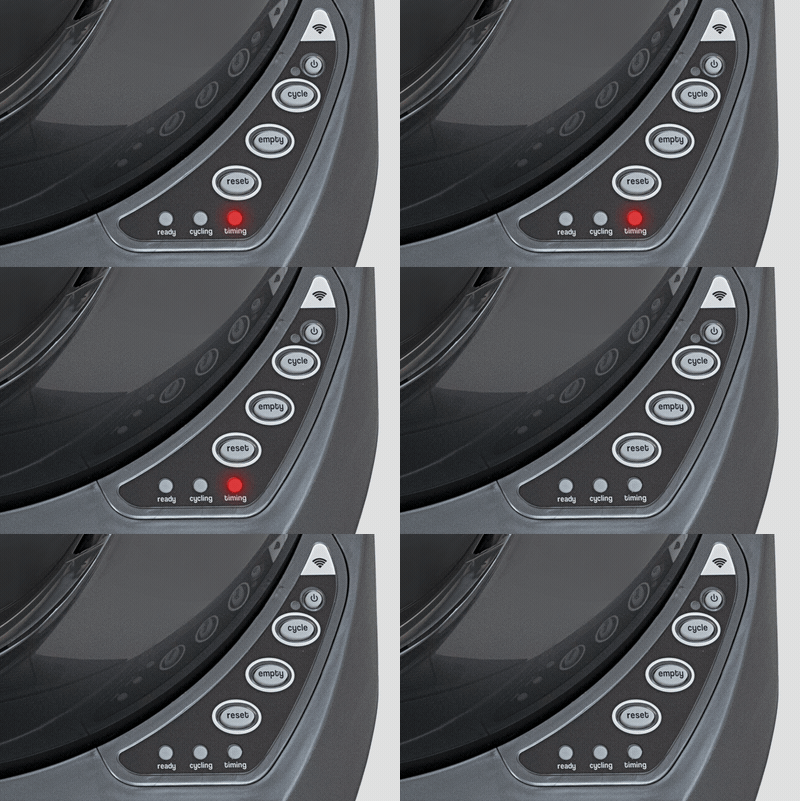
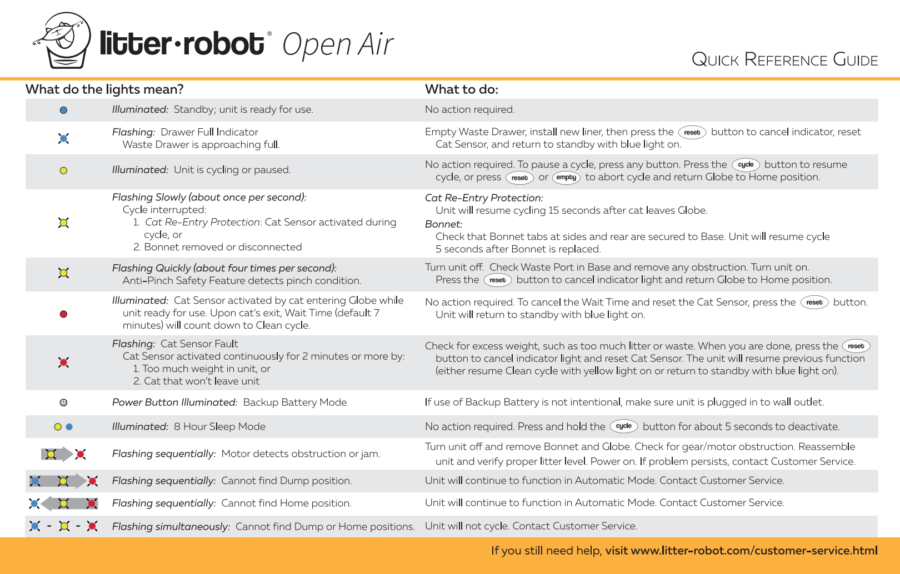
The Litter Robot blinking red light signals a problem that needs attention. This warning helps users identify issues that affect the unit’s function. Understanding the causes of the red light can save time and avoid frustration.
Several common reasons trigger the red light. These include sensor malfunctions, power interruptions, overload errors, and cycle interruptions. Knowing these causes helps in quick troubleshooting and proper care.
Sensor Issues
The Litter Robot uses sensors to detect your cat and litter levels. Dirt, dust, or debris can block these sensors. When sensors fail to work properly, the red light blinks to alert you. Cleaning the sensors gently often fixes this problem. Faulty sensors may need professional repair or replacement.
Power Problems
Power supply issues can cause the red light to flash. Loose plugs or damaged cords interrupt power flow. A sudden power outage can also trigger the warning. Ensure the unit is plugged into a working outlet. Check power cables regularly to prevent damage.
Overload Errors
The Litter Robot may stop working if overloaded with litter or waste. Too much weight inside the globe causes strain on the motor. This overload triggers the red light. Empty the waste drawer and remove excess litter to fix the error. Avoid overfilling to keep the unit running smoothly.
Cycle Interruptions
The cleaning cycle must complete without interruption. If the cycle stops or pauses, the red light appears. Interruptions happen if the globe is moved or the unit is turned off mid-cycle. Wait for the cycle to finish before touching the unit. Restarting the cycle can clear this error.
Quick Reset Methods
Quick reset methods can help fix the Litter Robot blinking red light fast. These resets clear minor errors and recalibrate sensors. Resetting often restores normal function without complex steps. Use these simple techniques to get the Litter Robot working again quickly.
Press the Reset button on the control panel once. This action recalibrates the weight sensor inside the unit. The light may flash white briefly, indicating the reset started. Wait a few seconds for the unit to stabilize. This reset solves small sensor glitches or litter changes.
Hard Reset Steps
Hold the Power button down for six seconds while the unit is on. Release the button and wait for the robot to reboot fully. This clears deeper errors and resets all internal processes. Run a test cycle to check if the blinking red light disappears. Use this reset if the soft reset fails.
Power Cycling Tips
Unplug the Litter Robot from the power source. Leave it unplugged for at least 30 seconds. Plug the unit back in and wait for it to power on. Power cycling refreshes the system and clears temporary faults. This method often fixes error lights without resetting settings.
Sensor Calibration
The Litter Robot blinking red light often signals an issue with sensor calibration. Proper sensor calibration ensures the device detects your cat correctly and operates smoothly. Sensors can lose accuracy over time or after maintenance. Recalibrating these sensors helps restore normal function and stops the red light from blinking.
Recalibrating Weight Sensor
The weight sensor detects the litter weight and your cat’s presence. Dirt or litter buildup may cause false readings. To recalibrate, first empty the waste drawer and add fresh litter. Press the reset button on the control panel. This action zeroes the scale and clears any errors. Wait for the white light flash, indicating successful recalibration.
Resetting Cat Sensor
The cat sensor tracks your pet’s entry and exit from the unit. A misaligned or dirty sensor can trigger the red blinking light. Clean the sensor gently with a soft cloth. Press the reset button once to reset the cat sensor. The Litter Robot will then recognize your cat accurately. Run a test cycle to confirm the reset worked correctly.

Troubleshooting Overload
The Litter Robot blinking red light often signals an overload issue. This happens when the unit senses too much weight or resistance. Troubleshooting overload helps restore normal function quickly. Start by checking simple causes before moving to complex fixes.
Checking Litter Levels
Too much litter can cause the Litter Robot to overload. Check the litter level inside the globe. It should not exceed the maximum fill line. Excess litter adds extra weight and blocks the sensor. Remove some litter if the level looks too high. Keep the litter clean and dry for best results.
Removing Excess Weight
Heavy objects or clumps inside the globe can cause overload. Look for large clumps that may stick to the sides. Remove any extra waste or foreign items carefully. Make sure the waste drawer is not full or heavy. A full drawer adds weight and triggers the red light. Empty the drawer regularly to avoid this issue.
Network And Connectivity
The Litter Robot’s blinking red light often signals a network or connectivity issue. This problem can interrupt the unit’s remote functions. Understanding network and connectivity aspects helps restore smooth operation. Checking the WiFi setup and app connection is essential. These steps fix most common connection errors quickly.
Wifi Setup Checks
Start by confirming your WiFi is working normally. The Litter Robot needs a strong 2.4 GHz WiFi signal. It will not connect to 5 GHz networks. Make sure your router is near the unit. Avoid walls or metal objects blocking the signal. Restart your router to refresh the connection. Check that your WiFi password is correct. Remove any special characters that might cause issues. Reboot the Litter Robot after verifying the network. This often clears the blinking red light.
App Troubleshooting
Open the Whisker app and check the device status. A red blinking light usually means the app lost connection. Log out and back into the app. Close other apps running in the background. Update the app to the latest version. Delete and reinstall the app if problems continue. Confirm the Litter Robot firmware is up to date. Follow in-app instructions to reconnect the device. This process usually fixes network errors fast.
Maintenance Tips
Proper maintenance keeps your Litter Robot working smoothly. Regular care prevents blinking red light errors. Follow these easy tips to maintain your device.
Cleaning Sensors
Sensors detect your cat’s presence and litter levels. Dust or debris can block them, causing errors. Wipe sensors gently with a soft, dry cloth. Avoid using water or harsh chemicals. Clean sensors once a week for best performance.
Inspecting Moving Parts
The globe and motor must move freely. Check for any blockages or litter build-up around these parts. Remove any stuck litter or debris carefully. Ensure the globe rotates without resistance. Inspect moving parts monthly to avoid problems.
When To Contact Support
The Litter Robot blinking red light signals a problem needing attention. Sometimes, simple troubleshooting works. Other times, professional support is necessary. Knowing when to contact support saves time and keeps your unit working well.
Persistent Red Light Issues
If the red light keeps blinking after resets, contact support. Persistent blinking often means a sensor or motor issue. Troubleshooting steps may not fix hardware problems. Support can guide you through advanced fixes. They may also determine if a repair or replacement is needed.
Do not ignore continuous red blinking. It could lead to further damage or poor performance. Contacting support early helps maintain your Litter Robot’s reliability and safety for your cat.
Warranty And Repair Options
The Litter Robot usually comes with a warranty covering defects. Support can check if your unit qualifies for free repair or replacement. Warranty terms depend on the purchase date and model. Keep your proof of purchase ready for quicker service.
If the unit is out of warranty, support offers repair services for a fee. They can also suggest authorized repair centers. Using official repair options ensures your unit stays safe and functions properly.
Support may also provide information on trade-up programs or upgrades. This helps you decide on the best option for your needs and budget.
Upgrade And Trade-in Options
Upgrade and trade-in options offer a smart way to replace your old Litter Robot. These programs help you save money while getting the latest model. They provide a simple path to enhance your cat’s litter experience without full cost.
Many users find these options useful to fix issues like the blinking red light. Upgrading can solve recurring errors and improve reliability. The trade-in process is straightforward and customer-friendly.
Trade-up Program Details
The Trade-Up Program allows you to exchange your current Litter Robot. You receive a discount on the newest model by sending in your old unit. This offer is available through the official Whisker website.
Start by visiting the Trade-Up page and follow the instructions. You will ship your old Litter Robot to Whisker. After verification, you get a credit toward your new purchase.
This program is not a return or repair service. It is a discount on an upgrade, making it budget-friendly. The newest models come with improved sensors and better error handling.
Eligibility And Discounts
Eligibility depends on owning an automatic Litter Robot model. Older or non-automatic models may not qualify. Check the specific rules on the Whisker website before applying.
Discounts vary but usually provide a significant price reduction. This helps offset the cost of the new unit. The exact amount depends on your current model and timing of your trade.
Keep your Litter Robot clean and functional for a smoother process. The program rewards users who maintain their units well. It is a great way to keep your cat’s litter box fresh and efficient.
Frequently Asked Questions
How Do I Do A Hard Reset On My Litter-robot?
To hard reset your Litter-Robot, hold the Power button for six seconds while the unit is on. Release the button and wait for the unit to reboot. Run a test cycle to confirm it works properly after the reset.
Can I Trade My Litter-robot For A New One?
You can trade up your current Litter-Robot for a discount on a new model through Whisker’s Trade-Up program. Visit their website to check eligibility and details. This program offers savings, not a return option, and usually excludes reconditioned units or stacking with other discounts.
Why Does My Litter-robot Keep Turning Too Far And Blinking Yellow Fast?
Your Litter-Robot turns too far and blinks yellow fast because the anti-pinch safety sensor detects an obstruction, interrupting the cycle. Check for blockages or misaligned parts to resolve this issue.
How Do You Fix Litter-robot Globe Overload?
To fix Litter-Robot globe overload, remove excess litter from the globe. Press the Reset button twice to recalibrate sensors. Run a test cycle to confirm normal operation.
What Does The Litter Robot Blinking Red Light Mean?
The blinking red light signals an error or sensor issue. It often indicates the unit needs attention or resetting.
Conclusion
A blinking red light on your Litter-Robot signals an issue needing attention. Simple steps like resetting the device often fix common errors quickly. Always check the sensors and litter levels to ensure proper function. Running a test cycle after resets confirms the problem is solved.
Keeping the unit clean helps prevent future alerts. Understanding these basics saves time and keeps your Litter-Robot working smoothly. Stay calm, follow the steps, and enjoy a hassle-free litter box experience.









