
Is your Netgear router’s power light blinking and leaving you confused? You’re not alone.
That small blinking light can signal a range of issues, from simple power glitches to connection problems that stop your internet in its tracks. Understanding what that blinking means is the first step to fixing it quickly and getting your network back on track.
Keep reading, and you’ll discover easy ways to diagnose and solve the problem without frustration or hassle. Your internet’s smooth performance is closer than you think.
Reasons For Blinking Power Light
The blinking power light on your Netgear router can signal different issues. It acts as a warning to help you identify what is wrong. Knowing the reasons can save time and avoid frustration. Here are common causes of a blinking power light.
Firmware Update In Progress
A blinking power light often means the router is updating its firmware. The update improves performance and fixes bugs. During this time, the router restarts and the light blinks. Do not turn off the router during the update. Wait until the light stops blinking.
Power Supply Issues
Power supply problems can cause the light to blink. A loose or faulty power cable affects the router’s function. Check if the power adapter is plugged in correctly. Try using a different power outlet or adapter. Stable power is essential for the router to work properly.
Hardware Malfunction
Hardware problems inside the router can cause the blinking light. Overheating or damaged components affect its normal operation. If the light blinks continuously, the router might need repair or replacement. Avoid using the router in hot or dusty places.
Network Connectivity Problems
The blinking power light can also mean network issues. The router may struggle to connect to the internet. Loose cables or service outages cause this problem. Check the modem connection and contact your internet provider if needed. A stable network connection keeps the light steady.

Basic Troubleshooting Steps
Seeing the power light on your Netgear router blink can be confusing. It often signals a problem with the device. Start with basic troubleshooting to fix the issue quickly. These simple steps can help restore your router’s normal function.
Restarting The Router
Turn off the router by pressing the power button or unplugging it. Wait for about 30 seconds to let it cool down. Plug it back in or turn it on. This can clear minor errors and refresh the system. Watch if the power light stops blinking after the restart.
Checking Power Connections
Make sure the power cable is firmly connected to both the router and the outlet. Check for any damage on the cable or plug. Try using a different power outlet to rule out socket issues. Proper power supply is essential for the router to work well.
Resetting To Factory Settings
Locate the reset button on the back of your router. Use a paperclip to press and hold it for 10 seconds. Release the button and wait for the router to restart. This resets all settings to default and can fix deeper problems. Remember, you will need to set up the router again after this.
Advanced Fixes To Try
Advanced fixes help solve tricky problems with your Netgear router. These steps go beyond basic checks. They focus on technical adjustments and hardware checks. Use these methods to fix the blinking power light issue. They might require more time but improve router function.
Updating Router Firmware Manually
Firmware controls how your router works. Old firmware can cause errors like blinking lights. Visit the Netgear support website to download the latest firmware. Use a computer connected to the router via Ethernet. Log in to the router’s admin page and upload the firmware file. This process often fixes bugs and improves stability.
Using A Different Power Adapter
Power adapters can wear out or fail. A bad adapter might cause the power light to blink. Check the adapter’s voltage and current ratings. Use a compatible adapter with the same ratings. Plug it into your router and watch the light. A stable power source ensures proper router operation.
Inspecting For Overheating
Routers can overheat if placed in tight spaces. Heat affects internal components and causes blinking lights. Move your router to a cool, open area. Clean any dust from vents and fans. Overheating stops when airflow improves. Keep the router away from direct sunlight and heat sources.
Contacting Netgear Support
Support agents can provide expert help. They know common issues and solutions. Have your router model and purchase details ready. Explain the blinking power light problem clearly. Support may offer advanced troubleshooting or replacement options. This step is useful if other fixes fail.
Preventive Measures
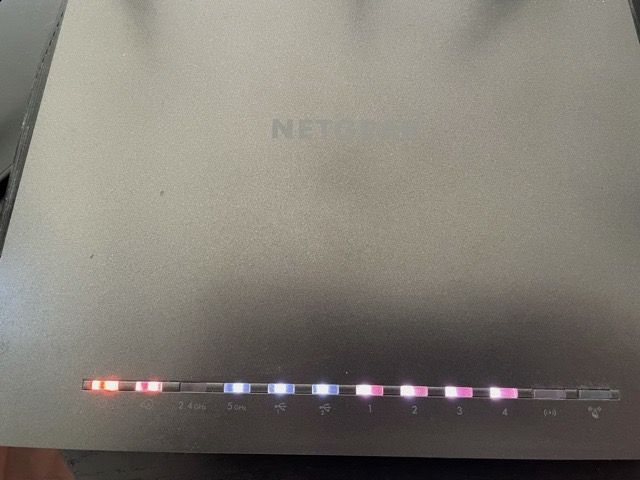
Preventive measures help keep your Netgear router working well. They reduce issues like the power light blinking. Taking simple steps can save time and avoid connection problems. Keep your router updated, cool, and powered correctly.
Regular Firmware Updates
Firmware controls how your router works. Updates fix bugs and improve performance. Check Netgear’s website often for new updates. Install updates as soon as they are available. This keeps your router stable and secure.
Proper Ventilation
Heat can cause your router to act up. Place the router in a cool, open area. Avoid putting it inside cabinets or near heat sources. Good airflow stops overheating and blinking lights. Keep vents clear from dust and blockages.
Stable Power Source
Power issues cause blinking lights on routers. Use a reliable power outlet for your Netgear device. Avoid power strips that switch off easily. Unstable power can damage your router over time. Use a surge protector to guard against power spikes.
Frequently Asked Questions
Why Is My Netgear Router Power Light Blinking?
A blinking power light means the router is starting up or updating firmware. Wait a few minutes for it to finish. If it keeps blinking, there might be a problem.
What Does A Blinking Power Light On Netgear Router Indicate?
It often signals the router is trying to connect to the internet or a firmware update is in progress. This is normal for a short time. Persistent blinking suggests a connection or hardware issue.
How Do I Fix A Blinking Power Light On Netgear Router?
Try restarting your router by unplugging it for 10 seconds, then plug it back in. Check your cables and internet connection. Reset the router if the light still blinks.
Can A Blinking Power Light Mean Router Hardware Failure?
Yes, a continuous blinking power light can indicate hardware problems. If rebooting and resetting don’t work, the router might need repair or replacement.
Is Firmware Update Causing My Netgear Router Power Light To Blink?
Yes, during firmware updates the power light blinks to show progress. Avoid turning off the router until the light stops blinking to prevent issues.
Conclusion
A blinking power light on your Netgear router shows a problem. Try restarting the router first. Check all cables and connections next. Update the router’s firmware if possible. These steps often fix the issue quickly. If the light keeps blinking, contact Netgear support for help.
Staying patient helps solve tech troubles. Keep your internet running smoothly.









