
Is your Shark vacuum blinking white lights and leaving you wondering what’s wrong? Those flashing lights aren’t just random—they’re trying to tell you something important about your vacuum’s health.
Whether it’s a battery issue, a blockage, or a sensor alert, understanding what those white lights mean can save you time and frustration. You’ll learn exactly why your Shark vacuum is blinking white lights and, more importantly, how to fix it quickly so your cleaning routine gets back on track.
Keep reading to unlock simple troubleshooting steps that anyone can follow.
Causes Of White Light Blinking
The blinking white light on a Shark vacuum often signals an issue. It alerts users to check the device for problems. Understanding the causes helps fix the vacuum quickly. Common causes include battery, brush roll, wheels, and sensors. Each cause needs a different approach to solve.
Low Battery Issues
A blinking white light can mean the battery is low. The vacuum needs charging to work properly. Sometimes, the battery contacts are dirty or misaligned. Clean the charging contacts and ensure the vacuum is placed correctly on the dock. This often stops the blinking light.
Overheating Battery
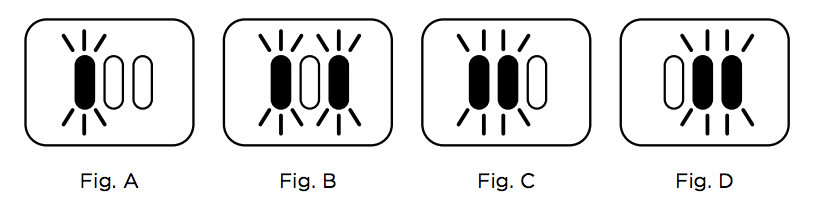
The vacuum may blink white if the battery is too hot. Overheating prevents the battery from charging safely. Let the vacuum cool down in a shaded, cool area. Avoid charging right after heavy use. Once cooled, the blinking usually stops.
Blockages In Brush Roll
Hair and debris can get stuck in the brush roll. This causes the white light to blink as a warning. Remove the brush roll and clean it carefully. Clear all obstructions to allow free movement. A clean brush roll helps the vacuum run smoothly.
Stuck Wheels Or Parts
Blocked or stuck wheels can trigger the blinking white light. Check wheels and parts under the vacuum for debris. Remove any objects that block the movement. Make sure the wheels spin freely. This fixes the blinking and improves vacuum performance.
Sensor And Connection Errors
Dirty or faulty sensors can cause the white light to blink. Clean all sensors with a soft, dry cloth. Check for loose parts or connections inside the vacuum. Reset the vacuum by turning it off and on again. Sensor errors often clear after a reset.
Quick Cleaning Tips
Quick cleaning helps keep your Shark vacuum working well. Regular care prevents blinking white lights caused by simple issues. Spend a few minutes on these easy steps. They improve suction and extend battery life.
Clear Brush Roll Debris
Turn off the vacuum before cleaning. Remove the brush roll cover. Pull out hair, threads, and dust wrapped around the brush. Use scissors to cut tough tangles carefully. Replace the brush roll and cover securely. This clears blockages that cause blinking lights.
Clean Charging Contacts
Dirty contacts stop the vacuum from charging properly. Find the metal contacts on the vacuum and charger. Wipe them gently with a dry cloth or cotton swab. Avoid water or cleaners. Clean contacts ensure a smooth power connection and stop blinking white lights.
Wipe Down Sensors
Sensors detect obstacles and guide the vacuum. Dust or dirt on sensors can cause errors. Use a soft, dry cloth to wipe all sensor areas. Be gentle to avoid damage. Clean sensors help the vacuum navigate and reduce blinking light issues.
Charging Troubleshooting
Charging problems often cause the Shark vacuum to blink white lights. These blinking signals show that the vacuum is not charging properly or the battery is having issues. Simple checks can fix many of these problems. Follow these steps to get your vacuum charging again without hassle.
Ensure Proper Dock Alignment
Place the vacuum correctly on its charging dock. The charging contacts on the vacuum and dock must line up perfectly. Misalignment stops the vacuum from charging. Adjust the vacuum’s position until the lights stop blinking. Clean the contacts with a dry cloth to remove dust and dirt.
Allow Battery To Cool
The vacuum may stop charging if the battery is too hot. Overheating causes blinking white lights. Turn off the vacuum and let the battery cool down for at least 30 minutes. Avoid charging in direct sunlight or near heaters. Once cooled, place the vacuum back on the dock and check the light.
Check For Charging Faults
Inspect the charging dock and power cord for damage. Faulty wires or loose plugs can cause charging errors. Try plugging the dock into a different outlet. Look for any error messages or unusual blinking patterns in the vacuum’s lights. Reset the vacuum if needed by pressing the power button for 10 seconds.

Resetting Your Shark Vacuum
Resetting your Shark vacuum is a key step in fixing blinking white lights. These lights often mean the vacuum needs a quick refresh to clear minor issues. Resetting can solve battery, sensor, or motor glitches without extra tools. Simple reset methods save time and avoid service calls. Below are easy ways to reset your Shark vacuum safely and effectively.
Soft Reset Methods
Start with a soft reset to clear small errors. Remove the vacuum from the charger. Hold the power button for 10 seconds. Release the button and wait 30 seconds. Press the power button again to turn it on. This resets the internal system without losing settings. Soft resets fix many blinking light problems fast.
When To Power Cycle
Power cycling is a stronger reset for deeper issues. Turn off the vacuum and unplug it if possible. Leave it off for 1 to 2 minutes. Plug it back in and turn it on. This clears memory and resets hardware components. Power cycling often stops persistent blinking white lights. Use it if a soft reset does not work.
App-based Error Checks
Some Shark vacuums link to a mobile app. Use the app to check error codes and notifications. It guides you to specific fixes for blinking lights. The app can also reset your vacuum remotely. Connect your vacuum to Wi-Fi and open the app. Follow the instructions for error checks and resets. App-based checks offer detailed help without guesswork.
When To Contact Support
Knowing when to contact support for your Shark vacuum blinking white lights saves time. Some issues need expert help beyond basic troubleshooting. This section explains key situations requiring professional assistance.
Persistent Flashing Lights
Lights that keep flashing after several resets show a deeper problem. It means your vacuum cannot fix the error on its own. Continuous blinking may signal sensor failure or internal faults. Contact support if the issue does not clear with simple steps.
Battery Or Control Board Failures
Battery problems often cause white lights to blink repeatedly. A failing battery or control board stops proper charging and operation. These parts need testing and replacement by trained technicians. Reach out to support if your vacuum shows battery or control board errors.
Warranty Service Options
Check if your Shark vacuum is still under warranty. Warranty covers repairs or part replacements at no extra cost. Support can guide you through the warranty claim process. Using warranty service ensures quality fixes without additional expenses.
Frequently Asked Questions
Why Is My Shark Vacuum Battery Blinking White?
A blinking white light on your Shark vacuum battery means it needs charging. If both top and bottom lights flash, the battery’s temperature is too high, pausing charging temporarily. Clean contacts and ensure proper docking to fix charging issues.
What Does It Mean When My Shark Vacuum Lights Blink?
Blinking lights on a Shark vacuum usually indicate low battery, overheating, or brush roll blockage. Clean debris, check sensors, and ensure proper charging.
What Do The Flashing Lights On The Shark Mean?
Flashing lights on a Shark vacuum indicate issues like low battery, overheating, or blockages. Clean brush rolls and contacts. Check the app for error codes. Cool down the battery if overheating. Contact support if problems persist.
Most Shark vacuum cleaners do not have a dedicated reset button. You can reset by unplugging, waiting 60 seconds, then plugging back in. Some models require pressing and holding the power button to reset. Always check the user manual for specific reset instructions.
Why Is My Shark Vacuum Blinking White Lights?
Blinking white lights usually mean the battery needs charging or is not charging properly. Check the charger connection and clean charging contacts to fix this.
Conclusion
Shark vacuum blinking white lights usually signal a simple issue. Often, the battery needs charging or cooling down. Sometimes, debris blocks the brush roll or wheels. Cleaning these parts can stop the blinking lights. Make sure the vacuum parts fit tightly and sensors stay clean.
Checking the Shark app can also help find exact problems. Regular maintenance keeps your vacuum running smoothly. Remember, blinking lights guide you to fix small issues fast. This way, your Shark vacuum works well every time you use it.









