
Is your Samsung refrigerator’s temperature display blinking and leaving you puzzled? When you see those flashing numbers, it’s not just a random glitch—your fridge is trying to tell you something important about its cooling system.
Maybe the temperature is too high, or a door might be left open, risking your food’s freshness. You want to fix this quickly and avoid food spoilage or costly repairs. You’ll discover simple, step-by-step solutions to stop the blinking, reset your fridge, and get it cooling perfectly again.
Keep reading to take control of your Samsung refrigerator and protect your groceries with ease!

Causes Of Blinking Temperature Light
The blinking temperature light on a Samsung refrigerator signals an issue. It alerts users to check the fridge’s condition. Several reasons can cause this blinking. Identifying these causes helps in fixing the problem quickly. Below are common causes behind the blinking temperature light.
High Internal Temperature
When the fridge’s inside temperature rises above the set level, the light blinks. This can happen after placing many warm items inside. The fridge struggles to cool down fast enough. It signals that the temperature is unsafe for food storage.
Door Left Open
If the fridge door stays open for a long time, cold air escapes. Warm air enters, raising the internal temperature. The blinking light warns that the door is not properly closed. It helps prevent food spoilage and energy waste.
Power Interruptions
Power cuts or fluctuations can disrupt the fridge’s cooling cycle. After power returns, the fridge may show a blinking temperature light. It indicates the system is trying to stabilize the temperature again. This helps users know the fridge needs time to cool down.
Faulty Sensors
The fridge uses sensors to monitor temperature. If sensors malfunction or send wrong signals, the light blinks. Faulty sensors can cause incorrect temperature readings. This triggers the warning light even if the temperature is okay.
Compressor Or Inverter Issues
The compressor and inverter control cooling in the fridge. Problems with these parts can reduce cooling efficiency. The blinking light may alert users to such mechanical faults. Early detection prevents food spoilage and costly repairs.
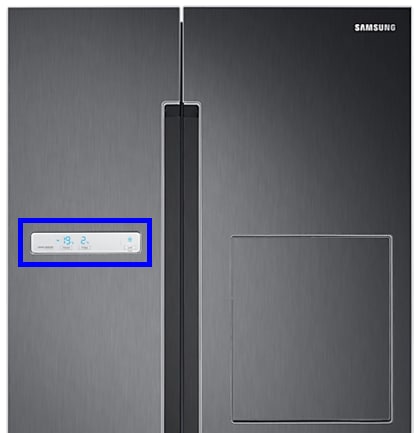
Initial Checks
When your Samsung refrigerator temperature starts blinking, begin with some initial checks. These simple steps often reveal easy fixes. They help ensure your fridge works properly and keeps food fresh.
Inspect Door Seals
Check the door seals carefully. Look for cracks, tears, or any damage. Damaged seals let cold air escape and warm air enter. This causes the temperature to fluctuate and the display to blink. Replace any faulty seals to maintain proper cooling.
Verify Door Closure
Make sure the refrigerator doors close tightly every time. A slightly open door lets warm air inside. This forces the fridge to work harder and triggers the blinking temperature alert. Push the doors firmly and listen for a click to confirm they are fully closed.
Clean Door Gaskets
Dirty door gaskets reduce the seal’s effectiveness. Wipe them with a damp cloth regularly to remove dirt and grime. Clean gaskets help the door close better and keep the cold air inside. This simple cleaning can stop the temperature light from blinking.
Quick Reset Methods
Quick reset methods offer a fast way to fix Samsung refrigerator temperature blinking issues. These resets help clear minor glitches in the control system. They do not require tools or technical skills. Following simple steps can stop the blinking and restore normal function. Choose a soft or hard reset based on the problem’s severity. Both methods are safe and effective for common errors.
Soft Reset Steps
Locate the control panel inside the fridge or on the door. Press and hold the Power Freeze and Power Cool buttons together for 10 seconds. The display will turn off and then back on. This action resets the temperature control system. Wait a few minutes to let the fridge stabilize. Check if the blinking stops and the temperature display shows the correct reading. Soft reset is quick and often solves small errors.
Hard Reset Via Power Cycle
Unplug the refrigerator from the power outlet. Wait for 5 minutes to let all systems shut down completely. Plug the fridge back in to restart the control board. This power cycle clears deeper glitches and resets the electronics. After powering up, the display should stop blinking. Set the temperature settings again if needed. Hard reset helps when soft reset fails or the fridge behaves strangely.

Adjusting Temperature Settings
Adjusting the temperature settings on your Samsung refrigerator helps keep your food fresh and prevents blinking temperature alerts. Correct settings maintain the right coolness level and avoid overworking the fridge. Knowing how to change these settings quickly can save time and prevent food spoilage.
Find the control panel inside the fridge or on the door. Press the “Fridge” button to change the fridge temperature. Each press changes the temperature by one degree. Stop pressing when you reach your desired temperature. Use the “Freezer” button the same way to set freezer temperature. The display shows the current temperature setting. Wait a few seconds after adjusting for the new temperature to register.
Activating Power Cool And Power Freeze
Power Cool quickly lowers the fridge temperature. Hold the “Fridge” button for a few seconds to activate it. This feature is useful when adding many warm items to the fridge. Power Freeze works the same way for the freezer. Hold the “Freezer” button to start rapid freezing. Both functions turn off automatically after a few hours. Use these modes to cool or freeze food faster and stop the blinking temperature alerts.
Troubleshooting Persistent Blinking
Persistent blinking of the temperature display on a Samsung refrigerator signals a problem. This blinking often means the fridge is not cooling properly. Troubleshooting helps find the exact cause and fix it quickly. Below are key areas to check to solve this issue.
Checking Evaporator Fan Motor
The evaporator fan motor moves cold air inside the fridge. If it stops working, temperatures rise. Listen for fan noise inside the freezer. No sound could mean the fan is stuck or broken. Remove ice buildup that may block the fan blades. Replace the motor if it does not spin freely.
Testing Temperature Sensors
Temperature sensors monitor cooling levels and send signals to the control board. A faulty sensor causes wrong temperature readings and blinking lights. Use a multimeter to check sensor resistance. Replace sensors showing no or irregular readings. Proper sensor function keeps the fridge running smoothly.
Identifying Compressor Problems
The compressor compresses refrigerant to cool the fridge. A faulty compressor causes poor cooling and blinking temperature alerts. Check if the compressor is hot or making unusual noises. A compressor that fails to start may need professional repair or replacement. Compressor health is vital for stable fridge temperature.
When To Call Professional Service
Knowing when to call professional service for a Samsung refrigerator is key. The blinking temperature light signals a problem you cannot ignore. Some issues need a trained technician to fix. Acting too late can cause food spoilage or damage to the fridge.
Simple fixes like resetting may help sometimes. But certain signs show the fridge needs expert care. Understanding these signs saves time and money. Read on to learn when to call for help.
Signs Of Cooling Failure
The fridge fails to keep food cold enough. You notice warm air inside the compartments. Frost builds up quickly on the freezer walls. Food spoils faster than usual. The temperature display keeps blinking despite resets. These are clear signs the cooling system is failing.
Compressor And Inverter Repair
The compressor runs but does not cool properly. Strange noises come from the fridge’s back or bottom. The inverter board may malfunction, causing erratic temperature changes. These parts require special tools and skills to repair. Professionals can diagnose and fix these complex problems safely.
Warranty And Support Options
Check your Samsung fridge warranty status before calling service. Many repairs are covered under warranty if done by authorized technicians. Samsung offers customer support through phone or online chat. Using official service centers ensures genuine parts and quality work. Keep your receipt and model information handy for faster service.
Preventive Maintenance Tips
Preventive maintenance helps keep your Samsung refrigerator working smoothly. It stops common issues like temperature blinking. Regular care improves performance and extends the fridge’s life.
Simple habits can avoid temperature problems. These tips focus on cleaning, monitoring, and using the doors correctly.
Regular Cleaning
Clean the fridge inside and out often. Dirt and dust can block vents and sensors. Wipe shelves and walls with a mild detergent. Remove food spills quickly to prevent odors.
Clean the condenser coils at least twice a year. Dusty coils make the fridge work harder. Use a vacuum or soft brush gently. This helps keep the temperature steady and saves energy.
Routine Temperature Monitoring
Check the fridge and freezer temperatures daily. Use a separate thermometer for accuracy. Ideal fridge temperature is 37-40°F (3-4°C). Freezer should be at 0°F (-18°C).
Watch for sudden changes or blinking displays. They may signal a cooling problem. Adjust settings carefully to keep the right cold level. Regular checks help catch issues early.
Proper Door Usage
Open fridge doors only as long as needed. Frequent or long openings let warm air inside. This causes the temperature to rise and blink warnings.
Make sure doors close tightly. Check door seals for cracks or dirt. Clean seals with warm, soapy water. Replace seals if they are damaged. Good sealing keeps cold air in and reduces blinking alerts.
Frequently Asked Questions
Why Is My Samsung Fridge Temperature Light Flashing?
A flashing Samsung fridge temperature light signals high internal temperature or an open door. Check seals and close doors firmly. Power cycle the fridge to reset if blinking continues.
How To Reset Samsung Refrigerator Temperature?
Locate the control panel inside or on the door. Press the Fridge or Freezer button repeatedly to set your desired temperature. For blinking displays, close doors properly or power cycle the unit by unplugging for 5 minutes, then plug it back in to reset temperature settings.
Why Is My Samsung Refrigerator Blinking 85c?
The blinking 85C on your Samsung refrigerator indicates a temperature sensor error or overheating. Check door seals and reset the fridge by unplugging it for a few minutes. If blinking persists, contact Samsung support for professional repair.
How To Reset Samsung Fridge Temperature Display?
Locate the control panel on your Samsung fridge. Press and hold the Fridge and Freezer buttons together for 10 seconds. The display will reset and stop blinking. Ensure doors close properly to avoid temperature errors.
Why Is My Samsung Refrigerator Temperature Blinking?
A blinking temperature usually means the fridge is too warm or the door is open. It signals the fridge is trying to cool down to the right temperature. Check the door seal and close it firmly.
Conclusion
A blinking temperature on your Samsung refrigerator signals a problem. It often means the fridge is too warm or the door is open. Check the door seal and close it properly. Try resetting the fridge by unplugging it for a few minutes.
Adjust the temperature settings to the recommended levels. Regularly clean the coils to help cooling efficiency. If blinking continues, contact a professional for help. Keeping your fridge at the right temperature protects your food. Simple steps can fix most issues quickly and easily.
Stay attentive to prevent bigger problems later.