
Is your Samsung dryer’s light blinking and leaving you wondering what’s wrong? You’re not alone.
When that little light starts flashing, it’s trying to tell you something important about your dryer’s health. Ignoring it won’t make the problem go away—in fact, it could lead to bigger issues or even a costly repair. But don’t worry; understanding why the Samsung dryer light is blinking and how to fix it is easier than you think.
You’ll discover simple steps to troubleshoot the problem, how to reset your dryer safely, and when it’s time to call a professional. Keep reading to get your dryer back to working smoothly without the stress.
Causes Of Blinking Light
The blinking light on your Samsung dryer signals a problem. Understanding the causes helps in quick troubleshooting. Several common issues can make the light blink. Each relates to different parts of the dryer. Identifying the cause prevents further damage.
Power Supply Issues
Unstable or interrupted power can cause the light to blink. Loose plugs or tripped breakers are common culprits. Ensure the dryer is firmly connected to a working outlet. Voltage fluctuations may also trigger error signals.
Blocked Vent Or Lint Filter
A clogged vent or lint filter restricts airflow. This can cause the dryer to overheat and blink the light. Clean the lint filter after every use. Check the vent for blockages and remove lint build-up regularly.
Faulty Heating Element
The heating element warms the dryer drum. If it breaks or burns out, the dryer may blink the light. This prevents unsafe operation. A faulty element needs replacement by a technician to restore normal function.
Sensor Or Fuse Problems
Dryers have sensors to monitor temperature and moisture. A broken sensor or blown fuse can cause blinking lights. These parts control safety and performance. Testing and replacing them fixes the issue.
Control Board Errors
The control board manages dryer operations. Software glitches or hardware faults may cause blinking lights. Sometimes, a reset clears minor errors. Persistent problems usually require professional repair or board replacement.

Performing A Power Reset
Performing a power reset on your Samsung dryer can often clear minor glitches. This process helps refresh the dryer’s control board and stops the light from blinking. The reset is quick and easy to do. It requires no special tools or skills. Follow the steps below carefully to ensure success.
Unplugging The Dryer
First, disconnect the dryer from the power source. Unplug the power cord from the wall outlet. This step cuts off electricity to the dryer. It helps reset the internal electronics safely. Make sure the dryer is completely off before proceeding.
Waiting For Electrical Discharge
After unplugging, wait for at least one minute. This pause lets stored electricity drain from the control board. The waiting time prevents damage during the reset. It also ensures the dryer’s memory clears fully. Be patient during this step to get the best result.
Restoring Power
Plug the dryer back into the outlet. Press the power button to turn it on. Restoring power restarts the dryer’s system fresh. Watch for the blinking light to stop. This action often fixes temporary errors causing the light to blink.
Running A Test Cycle
Set the dryer to a short test cycle. Start the cycle and observe the machine. Check if the blinking light returns during or after the test. A successful reset usually stops the blinking. If the light continues, further troubleshooting may be needed.
Troubleshooting Common Errors
Troubleshooting common errors with your Samsung dryer can save time and money. Many issues cause the dryer light to blink. These errors might seem complex but often have simple fixes. Understanding basic troubleshooting steps helps you act quickly and confidently.
Start by checking error codes shown by the blinking light. Avoid repeated resets to protect the dryer’s system. Identify persistent problems early to prevent damage. Know when professional help is necessary for safe and effective repairs.
Checking For Error Codes
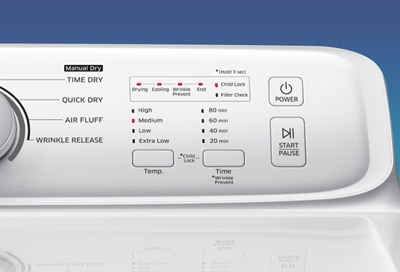
Samsung dryers display error codes through blinking lights. Each pattern points to a specific issue. Look at your user manual to decode the blinking sequence. Common codes include problems with heating, sensors, or the motor. Write down the code for reference before trying any fixes.
Use the control panel to access error details if your model supports it. This step narrows down the cause of the blinking light. Fixing the right problem avoids unnecessary repairs and saves effort.
Avoiding Repeated Resets
Resetting the dryer can clear some errors temporarily. Power cycling often fixes minor glitches by rebooting the system. Unplug the dryer, wait a few minutes, then plug it back in. Start a test cycle to see if the issue is resolved.
Do not reset the dryer multiple times quickly. Repeated resets erase important diagnostic data. This makes it harder for technicians to find the real problem. Use resets only after confirming no other issues exist.
Identifying Persistent Problems
Some errors return even after resetting. Persistent blinking usually signals serious faults. Check for blocked vents or dirty lint filters first. Clean these parts to improve airflow and dryer performance.
Inspect the heating element and sensors for damage. These parts often fail and cause blinking lights. Use simple tools and caution when checking internal components. If unsure, skip further disassembly to avoid injury or damage.
When To Seek Professional Help
Call a professional if the error code reappears after basic fixes. Component failures like broken fuses or sensors need expert repair. Avoid trying complex repairs without experience.
Technicians use special tools to diagnose and fix deep electrical problems. Professional service ensures safety and restores dryer function quickly. Do not delay calling support if the blinking light persists.

Maintaining Your Samsung Dryer
Maintaining your Samsung dryer helps avoid issues like the light blinking repeatedly. Regular care keeps the dryer running efficiently and extends its lifespan. Simple habits prevent common problems that cause error signals and interruptions. Follow these easy steps to keep your dryer in top shape.
Cleaning The Lint Filter Regularly
Remove lint from the filter after every load. This improves airflow and drying performance. A clean filter reduces the risk of overheating and error lights. Use a soft brush or your hand to clear all lint. Regular cleaning keeps your dryer safe and efficient.
Inspecting And Clearing Vents
Check dryer vents for blockages at least twice a year. Dust and debris can build up inside vents and ducts. Blocked vents cause poor drying and blinking lights. Use a vacuum or vent brush to clear any obstructions. Proper vent cleaning ensures good airflow and dryer health.
Avoiding Overloading
Do not put too many clothes in the dryer at once. Overloading stresses the motor and drum, causing errors. Clothes need space to tumble and dry evenly. Follow the dryer’s load capacity in the manual. Light loads help prevent blinking lights and extend machine life.
Ensuring Proper Ventilation
Place your dryer in a well-ventilated area. Good air circulation prevents overheating and sensor errors. Avoid tight spaces or enclosed spots for the appliance. Check that vents lead outside and are not blocked. Proper ventilation supports smooth dryer operation and fewer warning lights.
Signs To Replace Your Dryer
Knowing the signs that indicate your Samsung dryer needs replacement can save time and money. Some problems hint at serious issues beyond simple repairs. Acting on these signs helps avoid bigger breakdowns and inconvenience.
Wet Clothes After Cycle
Your dryer should leave clothes dry and warm. Wet or damp clothes at the end of a cycle show a problem. This could mean the heating element or thermostat is failing. Constantly wet clothes reduce dryer efficiency and increase drying time.
Unusual Noises
Strange sounds during drying are warning signals. Squeaks, thumps, or rattles come from worn-out parts. Bearings, belts, or drum rollers may be damaged. Ignoring noises can cause further damage and costly repairs.
Frequent Repairs
Regular breakdowns and repair visits indicate an aging dryer. Fixing the same issues repeatedly costs more than buying new. Frequent repairs also disrupt your laundry routine. A new dryer offers reliability and better performance.
Rising Energy Bills
Older dryers use more energy to complete cycles. A sudden increase in electricity bills may signal inefficiency. Components like motors and heating elements degrade over time. Replacing your dryer can lower energy use and save money.
Extending Dryer Lifespan
Extending the lifespan of your Samsung dryer saves money and avoids inconvenience. Taking care of the appliance keeps it working efficiently. Small efforts in maintenance and use make a big difference. Below are key tips to help your dryer last longer and perform better.
Regular Maintenance Tips
Clean the lint filter after every load. This prevents overheating and improves drying speed. Check the vent hose for blockages twice a year. Remove dust and debris to avoid fire hazards. Wipe the drum and door seals to stop mold growth. Inspect the power cord and plug for damage regularly. Schedule professional servicing if the dryer shows error codes or unusual noises.
Proper Usage Habits
Do not overload the dryer with too many clothes. Overloading strains the motor and drum, causing faster wear. Use the correct drying settings for different fabrics. Avoid running the dryer for longer than needed. Start the dryer only when you can monitor it. Turn off the appliance after each use to save energy and reduce wear. Separate heavy and light fabrics to ensure even drying.
Environment Considerations
Place the dryer in a dry, well-ventilated room. Humid or dusty areas can damage the machine. Keep the dryer away from direct sunlight and heat sources. Ensure the floor is level to prevent vibration and noise. Avoid placing the dryer in tight spaces that block airflow. Regularly check the area around the dryer for dust buildup. Proper placement helps the dryer run smoothly and last longer.
Frequently Asked Questions
How To Force Reset A Samsung Dryer?
To force reset a Samsung dryer, unplug it or turn off the breaker for 5 minutes. Then, restore power and run a test cycle. This clears the control board and resolves minor errors. Avoid frequent resets to prevent erasing diagnostic codes.
What Is The Average Lifespan Of A Samsung Dryer?
The average lifespan of a Samsung dryer is about 10 to 13 years. Regular maintenance can extend its durability.
How Do You Know If A Fuse Is Blown On A Samsung Dryer?
A blown fuse in a Samsung dryer causes it to stop working. Check continuity with a multimeter. No continuity means the fuse is blown. Replace the fuse to restore function.
What Does It Mean When All The Lights Are Flashing On My Dryer?
Flashing lights on your dryer usually signal an error or malfunction. Check the manual for specific codes. Power cycle the dryer by unplugging it for a few minutes, then plug it back in. Persistent flashing may require professional repair to address sensor or component issues.
Why Is My Samsung Dryer Light Blinking?
A blinking light on your Samsung dryer often signals an error or a malfunction. It can mean a blocked vent, door issue, or sensor problem. Checking the error code can help identify the exact cause.
Conclusion
Samsung dryer light blinking often signals a simple issue. Try unplugging the dryer, wait a few minutes, then plug it back in. This reset can clear minor errors and restore normal function. Persistent blinking may point to a blocked vent or faulty parts.
Avoid repeated resets, as they erase diagnostic codes. If problems continue, contact a professional technician for help. Regular maintenance and timely repairs keep your dryer working well. Stay attentive to error signals to avoid bigger issues later.









