
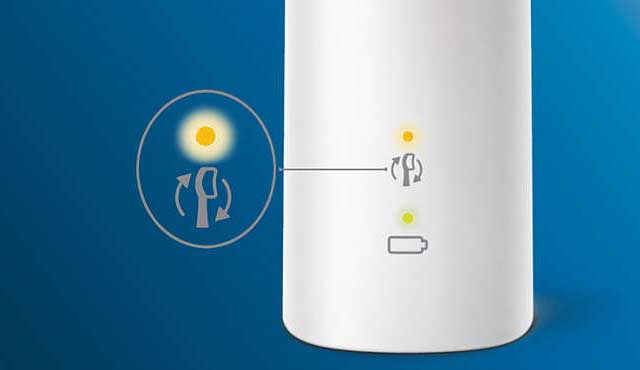
Is your Philips Sonicare toothbrush flashing an orange light and you’re not sure what it means? That blinking orange light is trying to tell you something important about your device.
Ignoring it could affect your brushing routine and the health of your smile. You’ll discover why that orange light keeps blinking, what you need to do to fix it, and simple steps to keep your toothbrush working at its best.
Keep reading—you’re just moments away from solving this common issue and getting back to a fresh, confident clean.
Orange Light Meaning
The Philips Sonicare toothbrush blinking an orange light signals a need for attention. This warning helps users avoid damage and maintain oral health. Several common causes trigger the orange light. Knowing these can help you fix the issue fast.
Worn Brush Head
The brush head wears out after regular use. The toothbrush senses this and blinks orange. This reminds you to replace the brush head. Using a worn brush head reduces cleaning power. It can also harm your gums.
Battery Issues
The battery may be low or failing. A low battery causes the orange light to blink quickly. This shows the toothbrush needs charging soon. A battery that no longer holds a charge may require replacement. Watch for shorter usage time between charges.
Charging Problems
Charging issues often cause the orange light. Dirt or debris on the charging base can block power. The charger may also be faulty or not plugged in correctly. Ensure the toothbrush fits well on the charger. Clean the charging contacts regularly for best results.
Common Causes
The Philips Sonicare toothbrush blinking orange light can signal a few common issues. Quick fixes often solve these problems fast. Try these simple steps to get your toothbrush working properly again.
Replace Brush Head
The orange light may mean the brush head is worn out. Philips Sonicare brushes have a built-in reminder to change the head. Remove the old brush head and attach a new one. Make sure it clicks into place. A fresh brush head improves cleaning and stops the orange light.
Recharge Toothbrush
A blinking orange light can also mean the battery is low. Place the toothbrush on its charging base. Let it charge fully until the light turns solid or goes off. Avoid using the toothbrush while charging. This quick step often fixes the blinking light issue.
Clean Charging Base
Dirt or toothpaste buildup on the charging base can cause charging problems. Wipe the base with a dry cloth. Remove any grime or residue around the metal contacts. Keep the base dry and clean to ensure good power connection. This helps stop the orange light from blinking.
Quick Fixes
Resetting your Philips Sonicare toothbrush can solve many common issues. It clears settings and refreshes the device. This step is useful if the orange light blinks or the brush acts oddly. Resetting helps to restore normal function quickly. There are different reset methods depending on the problem you face. Choose the right one for your model and situation.
Soft Reset For Brush Reminder
The soft reset clears the brush head replacement reminder. Place the toothbrush handle on the charger. Hold the power button down. Release it after hearing two short beeps or seeing blinking lights. This confirms the brush head reminder is reset or turned off. The orange blinking light should stop after this. Use this reset to fix false brush head alerts.
Hard Factory Reset
The hard reset restores the toothbrush to factory settings. It removes all custom settings and Bluetooth connections. Locate the reset instructions in your user manual. Some models need you to press and hold specific buttons. Others require a sequence of button presses. Perform the reset carefully to avoid damaging the device. This reset can fix persistent errors or unresponsive behavior.
Using Sonicare App Reset
The Sonicare app offers an easy reset option for Bluetooth models. Open the app and connect your toothbrush. Navigate to the device settings menu. Look for the reset or factory reset option. Follow the on-screen instructions to complete the reset. This method keeps your device software up to date. It also helps fix syncing and performance issues.
Resetting Toothbrush
Seeing an orange light blinking on your Philips Sonicare toothbrush can be confusing. It often signals an issue needing attention. This section offers simple troubleshooting tips to help you fix the problem quickly. Follow these easy steps to keep your toothbrush working well.
Dirt and moisture can cause the power button to malfunction. Gently wipe the button with a soft, dry cloth. Avoid using water or harsh cleaners. Make sure the button moves freely and is not stuck. Cleaning it often solves blinking light issues.
Check For Firmware Updates
Firmware updates improve toothbrush performance and fix bugs. Connect your Sonicare to the official app on your smartphone. Follow the app instructions to check for updates. Installing the latest firmware can stop the orange light from blinking. Keep your device software current for best results.
Contact Customer Support
Persistent blinking may mean a deeper issue. Contact Philips customer support for help. They can guide you through advanced troubleshooting steps. Use official contact details from the Philips website. Support teams are trained to assist with your specific model.
Troubleshooting Tips
Maintaining your Philips Sonicare toothbrush properly ensures it lasts longer and works efficiently. Regular care avoids common issues like the orange light blinking. Simple maintenance steps keep your device clean, charged, and ready for use every day.
Proper Cleaning Habits
Rinse the brush head and handle after each use. Remove toothpaste residue and debris to prevent buildup. Wipe the handle with a damp cloth to keep it clean. Replace the brush head every three months or when the orange light blinks. This keeps the bristles effective and protects your teeth.
Storage Recommendations
Store the toothbrush in a dry, well-ventilated place. Avoid keeping it in a closed container where moisture builds up. Standing the toothbrush upright helps it dry faster. Keep it away from direct sunlight and heat. Proper storage prevents damage and reduces bacterial growth.
Battery Care
Charge the toothbrush fully before first use and avoid letting the battery drain completely. Unplug the charger once the battery is full to prevent overcharging. If not used for a long time, recharge it every few weeks. Proper battery care extends the life of your Sonicare toothbrush and prevents the orange light from blinking due to low power.

Frequently Asked Questions
Why Is My Philips Sonicare Toothbrush Blinking Orange?
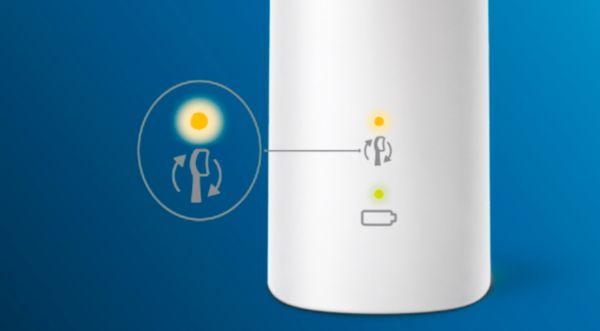
Your Philips Sonicare toothbrush blinks orange to signal the brush head needs replacement or the battery is low. Recharge or change the brush head promptly.
Why Is My Toothbrush Flashing Orange?
Your toothbrush flashes orange to signal the brush head needs replacement or the battery is low and requires charging soon.
How Do I Reset A Sonicare Toothbrush?
To reset a Sonicare toothbrush, place it on the charger. Hold the power button until you hear two beeps or see lights flash. For Bluetooth models, use the Sonicare app to perform a factory reset. Consult your manual for model-specific instructions.
What Is The Life Expectancy Of A Sonicare Toothbrush?
A Sonicare toothbrush typically lasts 3 to 5 years with proper care. Replace brush heads every 3 months.
Why Is My Philips Sonicare Toothbrush Blinking Orange?
The orange blinking light means the brush head needs replacement. It signals the brush head is worn and less effective.
Conclusion
The orange light blinking on your Philips Sonicare toothbrush signals a need for action. It may mean the brush head needs replacing or the battery is low. Paying attention to these signals keeps your toothbrush working well. Regularly charging and changing the brush head ensures better cleaning.
Following simple steps can fix most blinking light issues quickly. Taking care of your toothbrush helps maintain healthy teeth and gums. Stay aware of these signs for the best brushing experience.









