
Is your Linksys router blinking and leaving you wondering what it means? That flashing light isn’t just random—it’s trying to tell you something important about your internet connection.
If you’ve ever felt frustrated by sudden slowdowns or dropped signals, understanding these blinking patterns can save you time and stress. You’ll discover exactly why your Linksys router is blinking and how you can fix it quickly. Keep reading to regain control over your Wi-Fi and enjoy a smoother online experience.

Common Causes Of Blinking Lights
Blinking lights on your Linksys router can signal many things. These lights help show the router’s current state. Understanding why these lights blink helps you fix issues fast. Some causes are simple, others need careful attention.
Power And Connection Status
The power light shows if the router is on. A blinking power light may mean the router is starting up. It can also mean a power problem. Connection lights blink when data moves through the router. Fast blinking often means heavy internet use. Slow blinking can indicate a weak connection. No light can show no power or a broken cable.
Firmware Updates
Routers use firmware to run smoothly. Blinking lights may appear during an update. This means the router installs new software. Updates can fix bugs or add features. Interrupting this process can cause problems. Keep the router on until the light stops blinking.
Overheating Issues
Routers get hot after long use. Overheating can cause blinking or unusual light patterns. Heat affects performance and can damage parts. Make sure the router has good airflow. Avoid placing it in tight spaces or near heat sources.
Hardware Malfunctions
Hardware problems cause irregular blinking lights. Internal faults or damaged parts can trigger this. Sometimes, the router’s circuit board or ports fail. This needs professional repair or replacement. Check for physical damage or loose cables first.
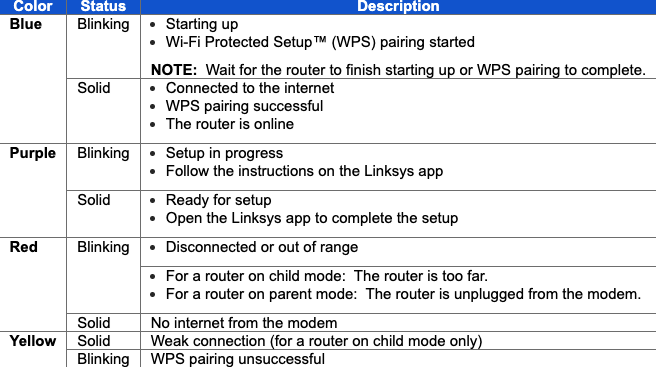
Identifying Blinking Patterns
Understanding the blinking patterns on your Linksys router is key to solving connection issues. Each light on the router tells a story about your network’s health. Recognizing what these signals mean helps you act fast.
Many users ignore these lights, but they provide vital clues. Let’s explore how to identify these blinking patterns clearly.
Solid Vs. Blinking Lights
A solid light usually means a stable connection or power status. It shows the router is working normally.
Blinking lights indicate activity or a problem. The router might be sending data or facing an error.
Noticing whether a light is steady or flashing helps spot the issue quickly.
Different Light Colors
Linksys routers use different colors to signal various statuses. Green often means good connection and power.
Amber or orange lights suggest caution. They may point to setup or connection problems.
Red lights usually signal serious errors. Immediate attention is needed if you see red.
Blinking Frequency Meanings
Slow blinking usually means the router is searching for a connection. It tries to connect to the internet or devices.
Fast blinking often means heavy data traffic. The router is sending or receiving lots of information.
Irregular blinking could indicate hardware issues or firmware problems. Watching the pattern helps diagnose the cause.
Basic Troubleshooting Steps
Basic troubleshooting helps fix common Linksys router blinking issues fast. These easy steps help find simple problems. You can try them at home without special tools. Follow the instructions carefully for best results.
Restarting The Router
Turn off your Linksys router by pressing the power button. Wait for 30 seconds. Turn it back on. This clears temporary glitches that cause blinking lights. Restarting often solves connection problems quickly. Watch the lights after restart to check if the blinking stops.
Checking Cable Connections
Look at all cables connected to your router. Ensure the power cable is firmly plugged in. Check the Ethernet cables between the modem and router. Loose or damaged cables cause blinking lights. Replace any broken cables with new ones. Tighten all connections for a stable link.
Resetting To Factory Settings
Find the small reset button on the back of your router. Use a paperclip to press and hold it for 10 seconds. This returns the router to default settings. Resetting solves persistent blinking caused by wrong settings. After reset, you must set up your router again. Save your Wi-Fi password and network name before this step.

Firmware And Software Solutions
Firmware and software issues often cause a Linksys router to blink unexpectedly. Fixing these problems can stop the blinking and restore your connection. Simple updates and reinstallations can solve many router glitches. Follow these steps to troubleshoot your router through firmware and software methods.
Updating Router Firmware
Firmware controls how your router works. Outdated firmware can cause blinking lights or slow connections. Check the Linksys website for the latest firmware version for your model. Download and install the update carefully. This process can fix bugs and improve stability. Make sure not to turn off the router during the update.
Using Linksys Smart Wi-fi
Linksys Smart Wi-Fi is a free tool for managing your router. It helps monitor your device and network status. Log in to the Smart Wi-Fi portal using your router details. You can check for firmware updates and change settings easily. This tool simplifies fixing common software issues that cause blinking lights.
Reinstalling Network Drivers
Network drivers help your computer connect to the router. Corrupt or outdated drivers may cause connection problems. Open your computer’s device manager and find network adapters. Uninstall the current driver and restart your computer. Windows will usually reinstall the driver automatically. This step can resolve blinking caused by driver errors.
Advanced Fixes
Advanced fixes for a Linksys router blinking light help solve deeper issues. These methods improve signal strength and network stability. They require some technical steps but can be done easily.
Adjusting Router Placement
Place the router in a central location in your home. Avoid walls and metal objects that block signals. Keep it away from microwaves and cordless phones. Elevate the router on a shelf for better range. Proper placement reduces blinking caused by weak signals.
Changing Wireless Channels
Routers use channels to send signals. Other routers nearby may use the same channel. This causes interference and blinking lights. Access your router settings and try different channels. Choose the channel with less traffic for a stable connection.
Configuring Network Settings
Access the router’s admin page through a browser. Update the firmware to the latest version. Set the wireless mode to match your devices. Adjust bandwidth settings to avoid overload. Save changes and restart the router. Correct settings stop blinking caused by network conflicts.
When To Contact Support
Knowing when to contact support for your Linksys router is important. Some problems you can fix yourself. Others need expert help. Recognizing the signs helps you save time and avoid frustration.
Support teams have tools and knowledge to diagnose issues quickly. They guide you through solutions or arrange repairs if needed. Here are times to reach out to them.
Persistent Connection Issues
If your router keeps blinking and your internet drops often, it is time to call support. Restarting or resetting may not fix ongoing problems. Support can check for network or firmware issues. They help ensure your connection stays stable.
Hardware Replacement Options
Sometimes blinking means a hardware fault. Support can tell if your router needs parts replaced. They explain replacement steps and how to send your device for repair. This avoids buying a new router too soon.
Warranty And Service Info
Support provides details on your warranty coverage. They inform you about service options without extra costs. Knowing warranty terms helps with repairs and replacements. It keeps your router protected during the coverage period.
Frequently Asked Questions
What Does A Blinking Light On Linksys Router Mean?
A blinking light shows the router is working or trying to connect. It can mean data is moving or the device is restarting.
Why Is My Linksys Router Blinking Orange Or Red?
A blinking orange or red light often signals a connection problem. Check your internet cable or restart the router to fix it.
How Can I Stop My Linksys Router From Blinking?
Restart the router by unplugging it for 10 seconds, then plug it back in. Ensure cables are secure and internet is active.
What Does A Blinking Blue Light On Linksys Router Indicate?
A blinking blue light usually means the router is ready to connect. It shows the device is in setup mode or syncing.
When Should I Contact Support For Blinking Linksys Router?
Contact support if the blinking light stays on after a reset. Also call if internet does not work or lights show error.
Conclusion
A blinking Linksys router often signals a small problem. Check your cables and restart the device first. Sometimes, a simple reset fixes the issue quickly. Keep your router’s firmware updated for better performance. If blinking continues, consider contacting support for help.
Staying calm and following these steps saves time. Your internet can work smoothly again soon.









