
Is your Kenmore washer’s lid lock blinking and leaving you stuck wondering what’s wrong? You’re not alone, and it’s more common than you might think.
That blinking light is your washer’s way of telling you there’s an issue—whether the lid isn’t closing properly, the lock motor isn’t working, or there’s a simple glitch in the system. But don’t worry, you don’t need to call a repairman just yet.
You’ll discover easy, clear steps to diagnose and fix the blinking lid lock on your Kenmore washer. Keep reading to get your laundry routine back on track quickly and without stress.
Causes Of Lid Lock Blinking
The blinking lid lock on a Kenmore washer signals an issue preventing normal operation. Understanding the common causes helps fix the problem faster. The blinking light usually means the washer detects something wrong with the lid lock system. This section explains the main reasons behind the blinking lid lock.
Lid Not Fully Closed
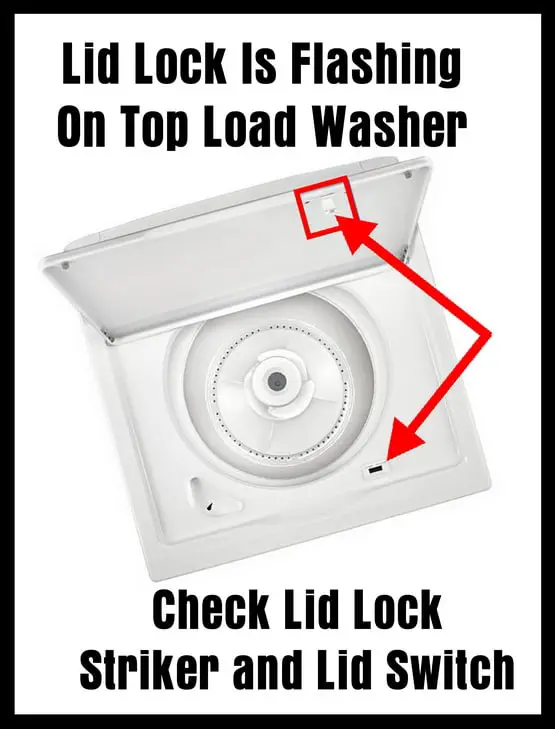
The washer lid must close completely for the lock to engage. Dirt or debris can stop the lid from closing properly. Sometimes, clothes get caught, blocking the lid. The machine senses the lid is open and blinks the lock light. Check the lid and close it firmly to solve this.
Lock Motor Power Issues
The lid lock has a small motor that locks and unlocks the lid. If this motor does not get enough power, the lock will not work. A loose wire or a broken connection can cause this problem. The washer blinks the lid lock to warn about power issues in the motor.
Mechanical Interference
Parts inside the lid lock can jam or break. A bent latch or a stuck lock can cause mechanical interference. This stops the lock from moving as it should. The washer detects this blockage and blinks the lid lock light to show the error.
Control Board Glitches
The control board manages the lid lock function. Software glitches or electrical faults can confuse the board. This causes the lid lock light to blink even if the lock works fine. Resetting the washer or updating the control board firmware may help fix this issue.

Basic Power Cycle Reset
The Basic Power Cycle Reset is a simple step to fix the blinking lid lock on your Kenmore washer. It helps clear small electrical glitches that cause the lid lock light to flash. This reset often restores normal function without complex repairs. Follow these easy steps to perform the reset correctly.
Unplugging The Washer
Start by unplugging your Kenmore washer from the power outlet. Removing power cuts off electricity to the machine. This stops all current operations and resets the control board. Make sure the washer is fully disconnected before moving on.
Waiting Period
Wait at least one minute after unplugging the washer. This pause lets stored energy drain from the internal parts. Waiting ensures the control board resets completely. Avoid rushing this step for the best results.
Restarting A Cycle
Plug the washer back into the outlet. Turn on the machine and select a regular wash cycle. Press the start button to begin the cycle. Check if the lid lock light stops blinking. The power cycle reset often clears the blinking issue.
Advanced Diagnostic Reset
The Advanced Diagnostic Reset is a key step to fix the Kenmore washer lid lock blinking issue. It helps clear errors and recalibrate the machine’s controls. This reset goes beyond the basic power cycle. It targets the control board and sensor settings. This process can restore normal function without replacing parts. Follow the steps carefully to avoid confusion. The reset requires entering a special mode on the washer. You then perform calibration to align the lid lock system. Finally, confirm the reset to ensure success. This method often solves blinking lid lock problems effectively.
Entering Diagnostic Mode
Start with the washer turned off but plugged in. Press and hold the “Start” button while turning the knob. Rotate the knob to the “Rinse” or “Done” setting. Release the “Start” button once the light above the setting glows. The status lights should flash, showing you entered diagnostic mode. If the lights do not flash, try repeating the steps. Some models may have slightly different sequences. Check your model’s tech sheet if needed. This mode allows access to advanced controls for reset and calibration.
Calibration Steps
In diagnostic mode, rotate the knob to the “Rinse” or “Done” light. Press the “Start” button to begin calibration. The washer will run through a series of movements. The lid lock motor will engage and disengage several times. Wait for the cycle to complete without opening the lid. This process aligns the lid lock sensor and motor. It resets errors related to lid position detection. Do not interrupt the calibration to avoid errors. Once done, the washer will return to standby mode.
Confirming Reset Success
After calibration, turn the knob to the “Off” position. Unplug the washer for 30 seconds, then plug it back in. Turn the washer on and select a normal wash cycle. Close the lid fully and check the lid lock light. The light should stay solid, not blink. If the blinking stops, the reset worked correctly. If blinking continues, repeat the process or check for hardware issues. Confirming the reset ensures the washer is ready for use. This step prevents unnecessary repairs or part replacements.

Model-specific Reset Methods
Kenmore washers vary by model, and so do their reset methods. Using the correct reset method helps clear lid lock blinking issues fast. Each model may have a unique sequence or button hold approach. Knowing the right steps saves time and prevents further problems.
Below are common model-specific reset methods. Follow them carefully for best results.
Dial Sequence Reset
This reset uses the washer’s control dial to clear errors. Turn the dial to specific cycles in order. For example, turn to “Rinse,” then to “Spin,” and back to “Off.” Each model has a slightly different sequence. Check your user manual for exact steps.
After the sequence, the washer will attempt a self-reset. This can stop the lid lock from blinking. It is a simple way to reset the machine without tools.
Some models require holding buttons to reset. Press and hold the “Start/Pause” or “Power” button for 5-10 seconds. This forces the washer to reset its control board. Release the button once the lights flash or turn off.
This method clears temporary glitches in the control system. It is especially useful if the lid lock light keeps blinking after a cycle ends. Try this reset before calling for repairs.
Testing After Reset
After any reset, run a test cycle to check the lid lock. Close the lid firmly and start a quick wash or rinse cycle. Watch if the lid lock light stays steady or stops blinking.
If the blinking stops, the reset worked. If the light keeps flashing, the lid lock or sensor may need repair. Testing helps confirm if the reset solved the problem or if further action is needed.
Troubleshooting Hardware Issues
Troubleshooting hardware issues is key when the Kenmore washer lid lock blinks. This blinking often signals a problem with the lock system or the washer’s control. Checking physical parts helps find the cause fast. Follow these steps to inspect and fix the hardware.
Inspecting Lid Lock Mechanism
Start by examining the lid lock mechanism closely. Look for any damage or dirt that may block the lock. The lid must close fully for the lock to engage. Clean any debris around the lock area. Check if the latch moves freely without sticking. A stuck lock can cause the blinking light.
Checking Lock Motor Function
The lock motor powers the lid lock to secure it during cycles. Test if the motor runs by listening for a humming sound when the lid closes. Use a multimeter to check for power supply to the motor. No power means a wiring or control issue. If the motor runs but the lock does not engage, the motor may be faulty and need replacing.
Examining Control Board
The control board manages the lid lock signals. Inspect it for signs of damage, such as burnt components or corrosion. Loose or damaged wiring on the control board can cause blinking. Resetting the control board may clear minor glitches. If problems persist, the control board may require professional repair or replacement.
When To Call A Technician
Knowing when to call a technician for a Kenmore washer with a blinking lid lock is crucial. Some issues need professional help to avoid damage or safety risks. A technician can diagnose and fix problems that simple resets cannot solve. Here are signs that show it is time to seek expert service.
Persistent Blinking After Reset
If the lid lock light keeps blinking after multiple resets, the problem may be deeper. A simple power cycle reset may not fix software errors or hardware faults. Continuous blinking means the washer’s control system might have a fault. At this point, a technician’s diagnosis is necessary to prevent further damage.
Mechanical Damage Signs
Look for physical damage around the lid lock. Broken or bent parts can cause the lock to malfunction. If the lid does not close properly or feels loose, the locking mechanism might be damaged. A technician can replace or repair broken components to restore proper function and safety.
Electrical Component Failures
Electrical issues often cause the lid lock light to blink. Problems like faulty wiring, burned-out motors, or damaged sensors require technical skills. These failures can be dangerous and tricky to fix without proper tools. Calling a technician ensures safe and accurate repair of electrical parts.
Preventive Maintenance Tips
Preventive maintenance helps keep your Kenmore washer lid lock working well. Simple care steps stop blinking issues and extend your washer’s life. Follow these easy tips to avoid common problems with the lid lock.
Regular Cleaning
Clean the lid lock area often to remove dirt and soap buildup. Use a soft cloth and mild cleaner. Avoid harsh chemicals that can damage parts. Keep the lock dry to prevent rust and electrical faults. Regular cleaning ensures smooth lid locking and unlocking.
Proper Lid Usage
Always close the washer lid gently but firmly. Avoid slamming or forcing it shut. Make sure nothing blocks the lid from closing fully. Proper lid use helps the lock engage correctly and stops blinking errors. Teach family members to handle the lid carefully.
Routine Inspections
Check the lid lock and surrounding parts regularly for wear or damage. Look for loose wires or broken components. Tighten screws if needed to keep the lock secure. Early detection of issues prevents bigger repairs later. Schedule quick inspections every month or two.
Frequently Asked Questions
Why Is My Washing Machine Lid Lock Blinking?
Your washing machine lid lock blinks when the lid isn’t fully closed, the lock motor fails, or the lock doesn’t engage properly.
How To Do A Hard Reset On Kenmore Washer?
To hard reset a Kenmore washer, unplug it for 1 minute, then plug it back in. Turn on and start a cycle. For advanced reset, enter diagnostic mode by turning the knob to “Rinse” or “Done” and press Start. This clears software glitches effectively.
How To Reset Washing Machine Lid Lock?
Unplug the washing machine or turn off the breaker. Wait one minute, then plug it back in. Close the lid firmly and start a short wash or spin cycle to reset the lid lock.
How To Test Lid Lock On Kenmore Washer?
To test the Kenmore washer lid lock, close the lid firmly. Start a cycle and check if the lid lock light stays solid. If it blinks, inspect for obstructions or faulty lock motor. Use a multimeter to test lock switch continuity for proper function.
Why Is My Kenmore Washer Lid Lock Blinking?
The lid lock blinks when the washer detects the lid is not fully closed. It can also blink if the lock motor has power issues. This prevents the washer from starting the cycle.
Conclusion
A blinking Kenmore washer lid lock light signals a problem with locking. Check if the lid closes fully and nothing blocks it. Power cycling your washer often clears temporary errors. Running a diagnostic reset can fix software glitches inside. Persistent blinking may mean a hardware issue needing repair.
Regular maintenance helps keep your washer working smoothly. Knowing these steps saves time and avoids frustration. Stay calm and follow the simple fixes to get your washer back on track.









