
Is your GE oven door locked and blinking, leaving you frustrated and unsure what to do next? You’re not alone.
Many GE oven users face this exact issue, where the door won’t unlock and the control panel flashes a locked door message. This can feel like a major roadblock, especially when you’re ready to cook or finish cleaning. But don’t worry—understanding why your oven is locked and the blinking light is flashing is the first step to fixing it quickly.
You’ll discover simple, effective solutions to get your oven door unlocked and back in working order. Keep reading, and you’ll be able to tackle this problem with confidence and ease.
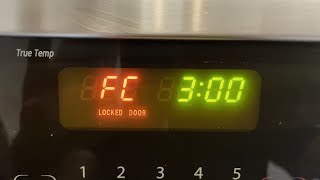
Causes Of Blinking Locked Door
The blinking locked door on a GE oven often signals an issue with the door lock system. Understanding the causes helps in troubleshooting and fixing the problem. Several factors can trigger the blinking light, each related to different components of the oven.
Control Lockout Activation
The control lockout feature prevents accidental changes to settings. If this mode is activated, the oven door may show a blinking locked icon. This safety feature blocks door opening during certain operations. Deactivating the control lockout usually stops the blinking.
Self-clean Cycle Lock
During the self-clean cycle, the oven locks the door automatically. This lock stays on until the oven cools down to a safe temperature. The blinking light indicates the door is locked for safety. Trying to open the door during cleaning triggers the blinking locked door alert.
Door Jam Switch Issues
The door jam switch senses if the door is fully closed. Dirt or damage can cause this switch to malfunction. When the switch fails, the oven may think the door is still locked. Cleaning or replacing the switch often solves the blinking door problem.
Electronic Control Board Errors
The control board manages all oven functions. Sometimes, it sends wrong signals to the door lock system. These electronic errors cause the door lock light to blink. Resetting or replacing the control board can fix this issue.
Mechanical Lock Malfunctions
The mechanical lock physically secures the oven door. Wear and tear or broken parts can cause it to stick. A malfunctioning lock may keep the door locked and cause the blinking light. Repairing or replacing the lock mechanism restores normal operation.

Quick Reset Methods
Quick reset methods help fix a GE oven locked door blinking issue fast. These simple steps clear minor errors and restore normal function. Most users can do them without tools or special skills. Follow each method carefully to avoid damage and get the oven working again quickly.
Power Cycling The Oven
Unplug the oven from the power source. Wait for about one minute. Plug the oven back in and turn it on. This resets the control board and clears error signals. Power cycling often solves blinking door lock problems without extra steps.
Resetting Control Lockout Feature
Press and hold the “Clear/Off” and “Start” buttons at the same time. Hold until the display stops blinking or shows normal status. This action resets the control lockout. The oven door should unlock if the lockout caused the blinking.
Allowing Cooling Time After Cleaning
After a self-clean cycle, the oven door stays locked for safety. Let the oven cool down naturally. This may take 30 to 90 minutes depending on the model. Avoid forcing the door open during this time to prevent damage.
Inspecting And Cleaning Door Components
Inspecting and cleaning the door components of your GE oven helps fix the locked door blinking issue. Dirt and debris can block the door switch or lock mechanism. Regular checks keep the door working smoothly and avoid error messages on the display.
Cleaning and inspection do not require special tools. You only need a soft cloth and a gentle cleaner. Handle parts carefully to avoid damage. Understanding these components helps maintain your oven’s function and safety.
Checking The Door Jam Switch
Open the oven door fully. Locate the door jam switch on the oven frame. This small switch tells the oven if the door is closed or open.
Press the switch gently to see if it moves freely. Dirt or grease can stop it from working. Clean the area with a soft cloth. Make sure nothing blocks the switch’s path.
If the switch does not click or feels stuck, it might need replacement. A faulty switch can cause the door to appear locked.
Cleaning Around Lock Mechanism
Look closely at the door lock area. Dust, food particles, or grease can build up here. Use a damp cloth to wipe around the lock.
Do not use harsh chemicals or water directly on the lock parts. This can damage the mechanism. Cleaning keeps the lock moving smoothly and stops blinking errors.
Check if the lock moves freely by hand. If it feels tight or stuck, clean again or call a technician for help.
When To Replace Parts
Knowing the right time to replace parts in your GE oven saves time and money. Parts wear out after long use or due to electrical faults. Replacing them early prevents bigger problems and keeps your oven working safely.
Some signs are clear and easy to spot. Others need careful watching to avoid damage. Focus on key parts like the door lock motor and control board. These parts control the oven door’s locking and blinking signals.
Signs Of Door Lock Motor Failure
The door lock motor controls the oven door lock during cleaning and cooking. If it fails, the door may stay locked or blink without reason. Listen for unusual noises like grinding or clicking sounds.
Another sign is when the door does not lock or unlock properly. The blinking locked door light may stay on even after the oven cools down. If the door feels stuck or the motor is hot, it likely needs replacement.
Control Board Replacement Indicators
The control board sends signals to the door lock motor and oven functions. If it malfunctions, the oven may show error codes or blink the locked door light randomly. The oven might also fail to start or stop suddenly.
Look for unresponsive buttons or the display flashing without command. If resetting the oven does not fix these problems, the control board may be faulty. Replacing it can restore normal operation and stop the door lock blinking.
Preventing Future Lock Issues
Preventing future lock issues on your GE oven helps keep your cooking smooth. Regular care and correct use lower the chance of door lock problems. Knowing how to handle your oven’s features stops lock errors before they start. Follow simple tips to avoid common mistakes and maintain your oven’s good working order.
Proper Self-clean Cycle Use
Use the self-clean cycle only when the oven is empty. Remove all pans, racks, and food debris before starting. This prevents damage to the door lock mechanism during cleaning. Always let the oven cool fully before trying to open the door. Interrupting the cycle can cause the lock to stay engaged. Follow the manual’s instructions closely to avoid locking issues.
Avoiding Accidental Control Lock Activation
Check that the control lock is off before using the oven. This feature locks the controls to prevent accidental changes. Press the lock button or the correct key combination to disable it. Avoid touching the control panel with wet or dirty hands. This helps prevent the lock from turning on by mistake. Regularly clean the control panel gently to keep buttons working well.
Professional Service Recommendations
Professional service is vital when your GE oven door locks and blinks unexpectedly. Simple fixes might not solve deeper issues. Expert help ensures safe and correct repair. It prevents further damage and restores your oven’s function quickly.
Identifying Complex Electrical Problems
Electrical faults cause many oven door lock errors. These issues include faulty wiring, damaged control boards, or sensor failures. Professionals use special tools to find the exact cause. They test circuits and components carefully. This skill avoids guesswork and saves time.
Authorized GE technicians have training specific to your oven model. They use genuine parts for repairs. This guarantees quality and maintains your warranty. You can find these experts through GE’s official website or customer service. Choosing authorized service protects your appliance investment.
Frequently Asked Questions
Why Is My Ge Oven Flashing Locked Door?
Your GE oven flashes “locked door” if the Control Lockout is active or during the self-clean cycle. Check and reset the lock feature.
How Do You Reset The Door Lock On A Ge Oven?
To reset a GE oven door lock, press and hold the “Clear/Off” and “Start” buttons simultaneously until the “LOC” message disappears. This deactivates the Control Lockout, allowing normal oven use. Unplugging the oven for a few minutes can also reset the lock mechanism.
How Do You Unlock The Door On A Ge Oven?
To unlock a GE oven door, first ensure the self-clean cycle is complete. Press and hold the “Clear/Off” button for 3-5 seconds. If it stays locked, reset power by unplugging the oven for one minute. Check the control lock feature and door switch for issues.
How Long Does Ge Oven Stay Locked After Self-clean?
A GE oven stays locked for about 1 to 2 hours after the self-clean cycle completes. The door unlocks automatically once it cools down.
Why Is My Ge Oven Door Locked And Blinking?
A blinking locked door often means the Control Lockout feature is active. This prevents door opening during certain cycles for safety. Check your oven’s display for a “LOC DOOR” message.
Conclusion
A blinking locked door on your GE oven can be frustrating. Often, it means the Control Lockout feature is active or the door switch needs cleaning. Try resetting the oven by turning the power off and on. If the problem continues, the door lock motor or control board might be faulty.
Always check the owner’s manual for model-specific advice. When unsure, contact a professional technician to avoid damage. Keeping your oven in good condition ensures safe and smooth cooking every time.









