
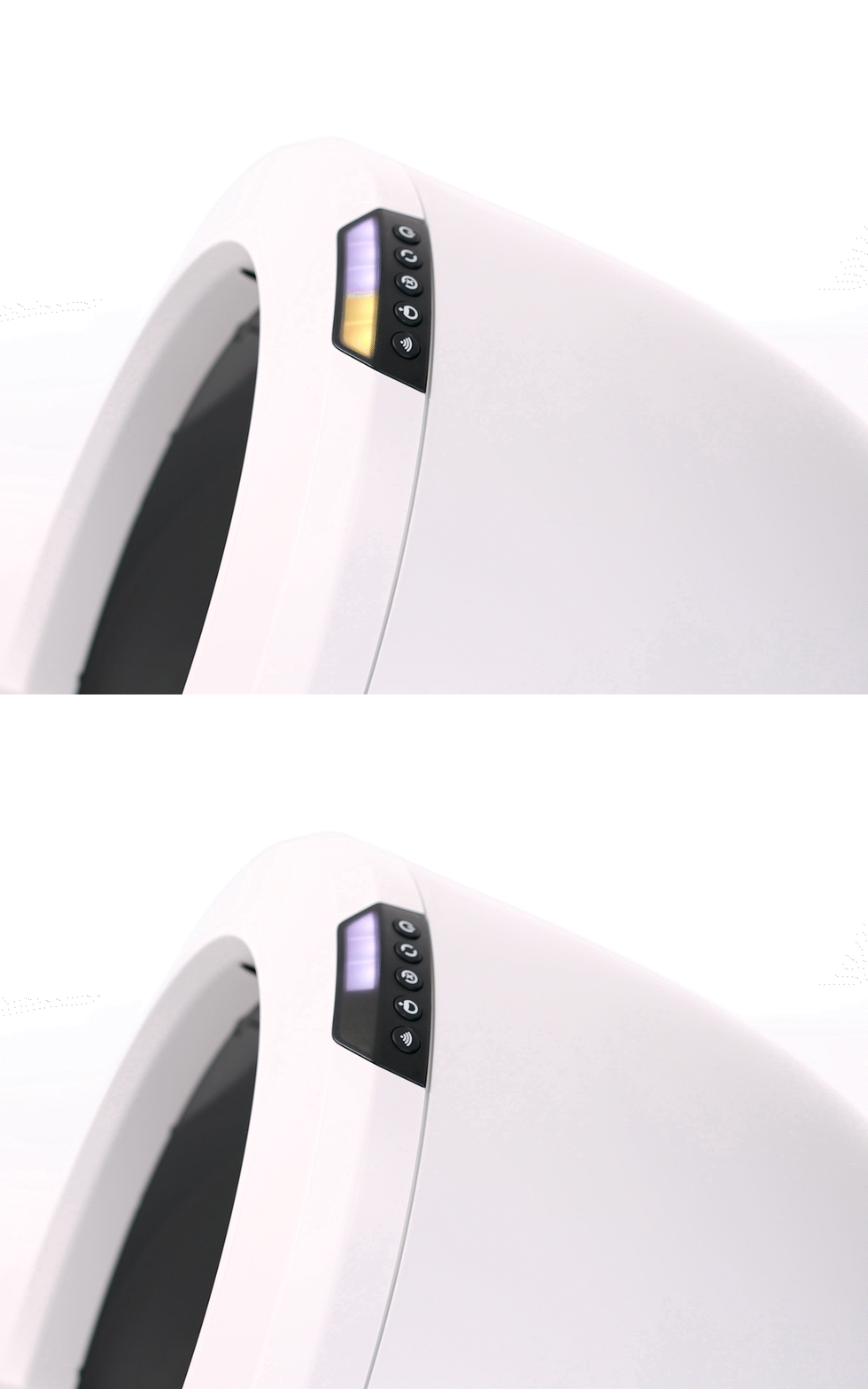
Is your Litter Robot blinking yellow and leaving you wondering what’s going on? You’re not alone.
That blinking yellow light is your robotic litter box’s way of telling you something needs your attention. But what exactly does it mean, and how can you fix it quickly? You’ll discover the common reasons behind the blinking yellow light, simple troubleshooting tips, and how to get your Litter Robot back to smooth operation fast.
Keep reading—you’ll have your cat’s favorite gadget working perfectly again before you know it.
Causes Of Blinking Yellow Light
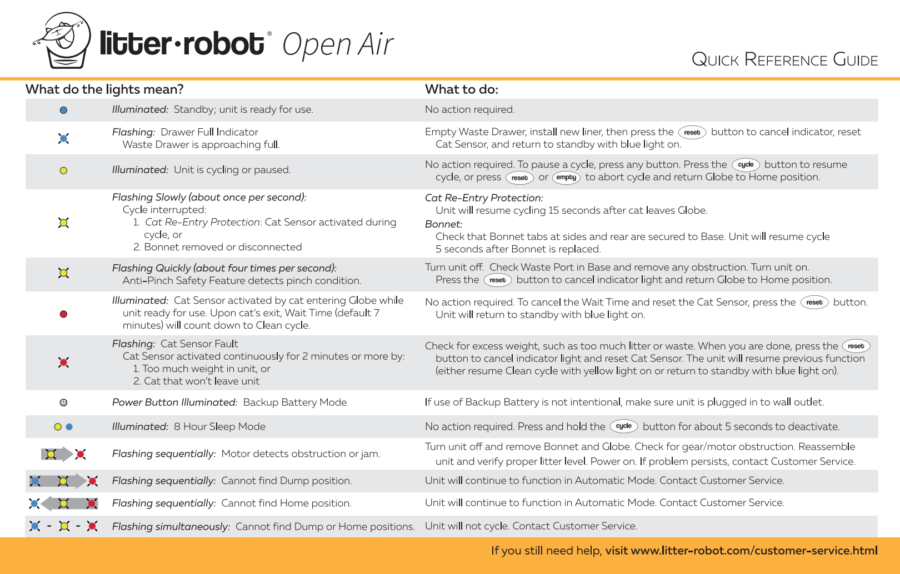
The blinking yellow light on your Litter Robot signals an issue requiring attention. It warns that the unit is not functioning normally. Several factors can trigger this alert. Understanding the causes helps in quick troubleshooting. Below are the common reasons for the blinking yellow light.
Power Supply Issues
Power problems often cause the blinking yellow light. A loose or unplugged power cord can interrupt the supply. Faulty outlets or power strips may also affect operation. Ensure the unit is firmly plugged in. Check the power source for stability and proper voltage.
Sensor Malfunctions
The Litter Robot uses sensors to detect waste levels and movement. Dirt or debris on sensors can cause errors and blinking lights. Malfunctioning sensors may fail to communicate with the control system. Cleaning the sensors gently often fixes this problem. Persistent sensor faults might need professional service.
Cycle Interruptions
The globe cycle may stop unexpectedly, triggering the yellow light. Obstructions inside the globe can interrupt the rotation. Overfilled litter or foreign objects may block movement. The unit tries to restart the cycle several times before signaling an error. Removing obstacles and resetting the unit usually resolves this.
Hardware Errors
Internal hardware issues may cause blinking yellow lights. Problems with motors, circuit boards, or other parts affect performance. These errors are less common but serious. A hard reset might clear minor faults. Persistent hardware errors require contacting customer support for repairs.
Quick Troubleshooting Steps
When the Litter Robot blinks yellow, it signals a minor issue. Quick troubleshooting helps fix this without delay. Follow these simple steps to identify and solve common problems. These easy checks save time and keep your device working smoothly.
Check Power Connections
Start by ensuring the power cord is firmly plugged in. Check the outlet for power by testing another device. Make sure the power adapter is not damaged. Loose or faulty connections can cause blinking yellow lights.
Reset The Device
Resetting the Litter Robot often clears small glitches. Unplug the unit from power for 30 seconds. Plug it back in and press the reset button. Wait for the device to restart and see if the yellow light stops blinking.
Clean Sensors And Globe
Dirty sensors can cause errors and blinking lights. Wipe the sensors gently with a soft, dry cloth. Clean the globe inside to remove dust or debris. Clean parts help the robot detect properly and operate without issues.
Inspect For Obstructions
Check inside the globe for objects blocking movement. Remove any litter clumps or toys that may cause jams. Also, inspect the waste drawer for blockages. Clear any obstacles to allow smooth operation and stop the yellow blinking.
Advanced Fixes
Advanced fixes for the Litter Robot blinking yellow light require careful attention. These steps go beyond basic troubleshooting. They involve technical adjustments and part replacements. Understanding these fixes can help restore your device’s normal function swiftly.
Calibrating The Pinch Sensor
The pinch sensor detects obstacles during the globe’s rotation. Misalignment causes the yellow light to blink. To calibrate, first power off the unit. Then gently adjust the sensor arm to ensure it moves freely. Power on the robot and test the sensor. Repeat this until the blinking stops and the globe cycles smoothly.
Replacing Faulty Components
Sometimes, blinking yellow lights result from broken parts. Common faulty components include the motor, pinch sensor, or control board. Inspect these parts for damage or wear. Order replacements from the manufacturer or trusted sellers. Carefully remove the old part and install the new one. This often resolves persistent blinking issues.
Firmware Updates
Firmware controls the Litter Robot’s functions. Outdated firmware may cause errors like blinking yellow lights. Check the manufacturer’s website for the latest firmware version. Follow the update instructions precisely using a USB or Wi-Fi connection. After updating, restart the unit. Updated firmware improves performance and fixes known bugs.
Preventive Maintenance Tips
Keeping your Litter Robot in top condition helps avoid blinking yellow light issues. Preventive maintenance ensures smooth operation and extends the lifespan of the device. Follow these simple tips to reduce errors and keep your unit running well.
Regular Cleaning Schedule
Clean the globe and waste drawer often. Remove litter clumps and debris daily. Wipe sensors gently with a soft cloth to prevent dirt buildup. Avoid harsh cleaners; use mild soap and water instead. Regular cleaning prevents sensor errors that cause blinking yellow lights.
Proper Placement And Setup
Place the Litter Robot on a flat, stable surface. Avoid uneven or soft areas that affect its balance. Keep it away from direct sunlight and moisture. Ensure the unit has enough space to rotate freely. Proper setup helps sensors work correctly and avoids false alerts.
Avoiding Power Fluctuations
Use a dedicated power outlet for the Litter Robot. Avoid extension cords or power strips that may cause voltage drops. Keep the power cord secure and undamaged. Frequent power interruptions can trigger blinking yellow lights. Stable power supply supports steady device performance.
When To Contact Support
Knowing when to contact support for your Litter Robot blinking yellow light is important. Some issues resolve quickly. Others need expert help to avoid damage or malfunction. Understanding when to reach out can save time and effort.
Below are key signs that show it is time to contact customer support. These tips help you decide if the problem is serious or minor.
Persistent Blinking Issues
If the yellow light keeps blinking after multiple resets, it signals a deeper problem. Check for common fixes like power supply and sensor cleaning first. If blinking continues without stopping, contact support. Persistent blinking means the unit cannot complete its cycle properly.
Hardware Replacement Options
Some blinking issues come from faulty parts. Support can guide you in identifying if your unit needs new hardware. They offer replacement parts or repair services. Getting the right hardware replacement can restore your Litter Robot’s function quickly.
Warranty And Service Information
Your Litter Robot may still be under warranty. Support will confirm coverage and explain service options. Warranty often covers hardware faults causing blinking yellow lights. Contacting support early ensures you get the best service and avoid extra costs.
Frequently Asked Questions
Why Does My Litter-robot Keep Blinking Yellow?
Your Litter-Robot blinks yellow to signal a cycle restart after a jam or error. It tries three times, then returns home. Check for obstructions or sensor issues to resolve blinking yellow.
What Does A Flashing Yellow Light Mean?
A flashing yellow light means proceed with caution. Slow down, stay alert, and yield to pedestrians and cross-traffic. It signals a warning, not a full stop. For a flashing yellow arrow, yield before making a safe left turn.
What Does A Blinking Yellow Power Light Mean?
A blinking yellow power light signals a caution or warning. It often indicates a device error or power issue needing attention.
Can I Trade My Litter-robot For A New One?
Litter-Robot does not offer a trade-in program. Purchase new units separately for upgrades or replacements.
What Does Litter Robot Blinking Yellow Light Mean?
A blinking yellow light on the Litter Robot means it is trying to reset. It usually indicates a cycle issue or sensor problem.
Conclusion
A blinking yellow light on your Litter Robot signals caution. It means the unit detects an issue and tries to fix it. Check the power supply and sensors carefully. Sometimes, cleaning or resetting the device helps. If the light keeps blinking, contact customer support for advice.
Staying alert ensures your Litter Robot works smoothly. Understanding this warning saves time and frustration. Keep your cat’s litter box running without problems. Simple steps often solve blinking yellow light issues quickly.









