
Is your Samsung fridge temperature blinking and leaving you worried about your food? You’re not alone.
When that temperature display starts flashing, it’s a clear sign something isn’t quite right inside your fridge. But what does it really mean? And more importantly, how can you fix it before your groceries spoil? You’ll discover simple, effective steps to troubleshoot the blinking temperature, understand the common causes, and know when it’s time to call in a professional.
Keep reading to take control and keep your fridge—and your food—safe.
Causes Of Temperature Blinking
The blinking temperature on a Samsung fridge signals a problem with its cooling system. Understanding the causes helps in fixing the issue quickly. Several factors can trigger the temperature display to blink. Identifying these causes avoids food spoilage and keeps the fridge working well.
Power Interruptions
Brief power cuts can cause the temperature display to blink. The fridge senses the change and alerts you. This blinking means the temperature inside may have risen. The fridge needs time to cool down again after power returns.
Door Seal Issues
Worn or damaged door seals let warm air enter the fridge. This causes temperature fluctuations and blinking alerts. Check if the door closes tightly. Clean the seals regularly to keep them effective.
Overloaded Fridge
Too many items inside block air circulation. Poor airflow makes cooling uneven and triggers blinking. Avoid overpacking the fridge. Leave space between items for air to move freely.
Blocked Air Vents
Air vents inside the fridge allow cold air to flow. When vents are blocked, cold air cannot reach all areas. This causes temperature differences and blinking signals. Keep vents clear of food and ice buildup.
Cooling System Failures
Problems with the compressor, fan, or sensors can cause blinking. These parts keep the fridge cold and stable. If they fail, the fridge cannot maintain the right temperature. Professional repair may be needed for these issues.

Immediate Fixes
The Samsung fridge temperature blinking can signal a minor issue. You can try some quick fixes before calling for help. These immediate actions often solve common problems fast. Start by checking simple parts that affect temperature control. Follow the steps below to get your fridge back to normal.
Check And Clean Door Seals
Dirty or damaged door seals let warm air inside. This causes temperature changes and blinking alerts. Use a soft cloth to clean seals gently. Remove dirt, food, and sticky residues. Look for cracks or tears on the gasket. Replace damaged seals to keep the cold air in.
Ensure Proper Door Closure
Doors must close tightly to maintain temperature. If the door is left open even slightly, the fridge gets warm. Check if anything blocks the door from closing fully. Adjust shelves or items inside to prevent obstruction. Close doors firmly but without force.
Reduce Fridge Overload
Overloading the fridge blocks cold air circulation. This leads to uneven cooling and blinking warnings. Remove extra food and containers to allow air flow. Organize items with space between them. Less crowding helps the fridge keep a steady temperature.
Clear Air Vents
Air vents inside the fridge must stay clear. Blocked vents stop cold air from spreading properly. Check vents for food or ice buildup. Remove obstructions carefully using a soft cloth. Keeping vents open improves cooling and stops blinking alerts.
Resetting Samsung Fridge
Resetting your Samsung fridge can fix many common problems, including a blinking temperature display. This simple process refreshes the fridge’s system and clears minor errors. Performing a reset often restores normal function without needing service calls. Below are two easy methods to reset your Samsung fridge.
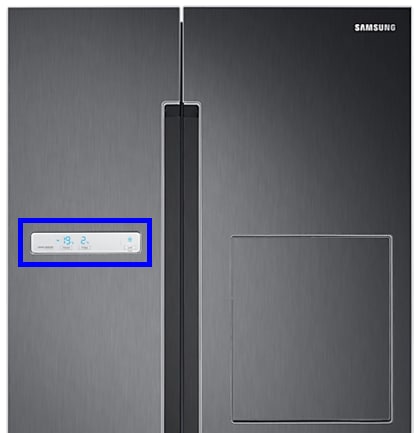
Locate the control panel on the front of your fridge. Press and hold the “Power Freeze” and “Power Cool” buttons at the same time. Hold these buttons for about 10 seconds until the display turns off or resets. Release the buttons and wait for the fridge to restart. This method resets the temperature settings and clears error signals.
Power Cycle Method
Unplug the fridge from the power outlet to turn it off completely. Leave it unplugged for 5 minutes to let the system reset. Plug the fridge back in and allow it to power up fully. This process resets the internal electronics and can stop the temperature blinking. Make sure the doors stay closed during the restart to maintain temperature.
Troubleshooting Cooling Problems
Troubleshooting cooling problems in a Samsung fridge is essential to keep food fresh. The blinking temperature display often signals an issue with the cooling system. Identifying the root cause helps avoid costly repairs. Start by inspecting key components that affect cooling performance. Simple checks can save time and money.
Inspect Evaporator Fan Motor
The evaporator fan motor circulates cold air inside the fridge. If it stops working, cooling drops quickly. Listen for unusual noises or silence from the fan. Remove the back panel inside the freezer to access the fan. Check for ice buildup or debris blocking the blades. Replace the fan motor if it does not spin freely.
Test Temperature Sensors
Temperature sensors monitor the fridge’s internal temperature. Faulty sensors send wrong signals to the control board. This causes the temperature display to blink. Use a multimeter to test sensor resistance. Refer to the fridge manual for correct readings. Replace sensors that show no or inconsistent resistance.
Assess Compressor Function
The compressor pumps refrigerant through the cooling system. A failing compressor causes poor cooling and blinking temperature lights. Check if the compressor feels hot or makes loud noises. Listen for continuous humming or clicking sounds. A faulty compressor usually needs professional repair or replacement.
Check Inverter Board
The inverter board controls the compressor speed and power. A damaged board can cause irregular cooling and blinking displays. Look for burnt marks or swollen components on the board. Reset the fridge by unplugging it for five minutes. Replace the inverter board if blinking continues after reset.
When To Call A Technician
Knowing when to call a technician for your Samsung fridge can save you time and prevent further damage. Some issues need professional help to fix safely and properly. Understanding the signs that require expert attention is important for your fridge’s health.
Persistent Temperature Blinking
If the temperature light keeps blinking even after basic checks, it signals a deeper problem. This could mean the fridge sensors are faulty or the control board is malfunctioning. Continuous blinking shows the fridge cannot maintain the correct temperature. A technician can diagnose the root cause and fix it accurately.
No Cooling Despite Fixes
When your fridge does not cool despite adjusting settings or cleaning the coils, call a technician. Cooling failure may involve the compressor, condenser, or refrigerant leaks. These parts need specialized tools and knowledge to repair. Avoid waiting too long, as spoiled food and higher energy bills can result.
Complex Electrical Issues
Electrical problems like frequent power cuts, strange noises, or error codes require a professional. Samsung fridges have sensitive electronic components that need expert handling. Attempting DIY repairs on electrical faults can be dangerous. A qualified technician ensures safety and restores your fridge’s function correctly.

Frequently Asked Questions
What Does It Mean When The Temperature Is Flashing On A Samsung Refrigerator?
A flashing temperature on a Samsung refrigerator means the internal temperature rose above safe levels. Check door seals and airflow. Persistent blinking may indicate cooling system failure, needing professional repair.
How Do You Reset A Samsung Refrigerator That’s Blinking?
To reset a blinking Samsung refrigerator, press and hold the Refrigerator and Freezer buttons together for 10 seconds. This clears error codes and resets the temperature display. Ensure doors close tightly and vents are unblocked to prevent blinking caused by temperature issues.
Why Is My Samsung Refrigerator Blinking 85c?
Your Samsung refrigerator blinking 85C means the internal temperature rose above safe levels, often due to a door left ajar or cooling failure. Check door seals, avoid overpacking, and ensure proper airflow. Persistent blinking may indicate compressor or sensor issues, requiring professional repair.
How To Reset Samsung Refrigerator Temperature?
Press and hold the Refrigerator and Freezer buttons together for 3-5 seconds. The display resets and temperature settings return to default.
Why Is My Samsung Fridge Temperature Blinking?
A blinking temperature usually means the fridge lost power recently. The internal temperature rose above the safe range. It signals the fridge is trying to cool back down.
Conclusion
A blinking temperature on your Samsung fridge signals a cooling issue. Check door seals and ensure doors close tightly. Avoid overpacking to keep air flowing inside. If blinking continues, cooling parts may need repair. Acting quickly helps protect your food and fridge.
Regular checks keep your fridge running smoothly. Stay calm and follow simple steps to fix the problem.









