
Is your Samsung EP-P5400 wireless charger blinking an orange light and leaving you wondering what’s wrong? You’re not alone.
That blinking orange light is your charger’s way of telling you something isn’t quite right. But don’t worry—this isn’t a signal to toss it out just yet. In fact, understanding why this happens can save you time, frustration, and even money.
You’ll discover the common reasons behind the blinking orange light and simple steps you can take right now to fix the issue and get your charger working smoothly again. Keep reading to unlock the solutions and make your wireless charging hassle-free.

Blinking Orange Light Meaning
The blinking orange light on the Samsung EP-P5400 charger signals an issue. It warns users that the device is not charging correctly. This light helps identify problems quickly without needing extra tools.
Understanding this indicator can save time and avoid damage. It guides users to check the charger or device for common faults. Paying attention to this light keeps your charger working well.
Common Causes
One common cause is incorrect placement of the device on the charger. The phone or accessory must be centered for proper charging. Even a slight misalignment can trigger the blinking light.
Another cause is a foreign object between the charger and device. Metal items or magnets can block charging and cause the orange light to blink. Removing these objects often fixes the problem.
Overheating is also a frequent reason. If the charger or device gets too hot, the light blinks to warn you. This helps protect the hardware from damage.
Error Indicators
The blinking orange light acts as an error code. It shows that charging has stopped or slowed down. This can happen due to a poor connection or power issues.
It may also mean the battery inside the device needs replacement. A blinking orange light can indicate battery health problems. Checking the device battery status is a good step.
Using a non-official charger or cable can cause this error. The Samsung charger expects a specific power input. Using generic parts may trigger the blinking warning.
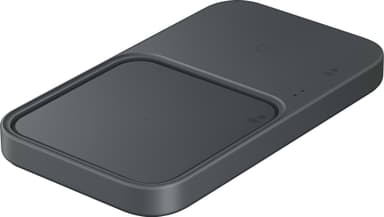
Credit: dumin.org
Positioning Issues
Positioning issues often cause the Samsung EP P5400 blinking orange light. The charger may fail to detect the device properly. This problem stops the charging process and triggers the warning light. Understanding how to position the device correctly can solve this issue quickly.
Device Alignment
Proper device alignment is crucial for wireless charging. The phone or gadget must sit flat and centered on the charging pad. Even a slight misalignment can cause the orange light to blink. Adjust the device slowly until the light stays steady, signaling a good connection. Avoid placing the device off-center or at an angle.
Removing Obstructions
Objects between the charger and device block the charging signal. Common obstructions include phone cases, metal objects, or credit cards. Remove any items that lie between the charger and your device. Clean the charging surface and device back to ensure no dirt or debris interferes. Clearing obstructions helps maintain a stable connection and stops the orange blinking light.
Power Source Problems
The Samsung EP-P5400 blinking orange light often signals power source problems. These issues prevent the charger from functioning properly. Identifying and fixing power source problems is key to restoring normal charging. This section covers two main areas to check: using official adapters and inspecting cables and ports.
Using Official Adapters
Always use the official Samsung adapter that came with your charger. Third-party adapters may supply unstable power. Unstable power causes the orange light to blink. Official adapters match the required voltage and current. This ensures safe and efficient charging for your device. Avoid using generic USB chargers or low-quality adapters. These can damage the charger or cause it to stop working.
Checking Cables And Ports
Inspect all cables connected to the charger carefully. Look for any visible damage like frays or bends. Damaged cables can interrupt power flow and trigger blinking lights. Check the charging port on the charger and the adapter. Dust, dirt, or debris in the port can block connections. Clean the ports gently with a dry brush or cloth. Make sure all connections are tight and secure. Loose or faulty connections often cause power issues and blinking signals.
Overheating Concerns
Overheating is a key reason why the Samsung EP P5400 wireless charger shows a blinking orange light. This blinking warns that the device is getting too hot. Overheating may reduce charger performance and harm its lifespan. Recognizing overheating signs early helps prevent damage and keeps your charger working well.
Signs Of Overheating
The charger feels very warm or hot to touch. The orange light blinks repeatedly or stays on longer than usual. Charging speed slows down unexpectedly. The charger may stop working until it cools down. Your phone might also heat up more than normal while charging.
Cooling Tips
Place the charger on a hard, flat surface for better airflow. Avoid using it on beds, couches, or soft materials. Keep the charger away from direct sunlight or heat sources. Remove any phone cases that trap heat during charging. Give the charger breaks between uses to cool off. Clean dust or debris from the charger’s surface regularly.
Troubleshooting Steps
The blinking orange light on your Samsung EP P5400 charger signals a problem. Troubleshooting helps find the cause and fix it fast. Follow these clear steps to solve the issue safely and easily.
Resetting The Charger
Unplug the charger from the power source. Wait for about 30 seconds to let it cool down. Plug it back in and check the light again. This simple reset often clears temporary errors.
Testing With Different Devices
Place another compatible device on the charger. See if the orange light still blinks. If the new device charges normally, the first device may have a problem. If the light blinks again, the charger might be faulty.
Replacing Components
Inspect the charging cable and adapter for damage. Swap them with known good parts if possible. Damaged cables or adapters can cause the blinking light. Replace any faulty components to restore normal charging.

Preventive Measures
Preventive measures help keep your Samsung EP P5400 wireless charger working well. Taking care of the charger stops issues like the blinking orange light. Simple habits extend the charger’s life and improve performance. Follow these easy steps to avoid common problems and keep your charger safe.
Proper Charger Maintenance
Keep the charger clean and dry at all times. Dust or moisture can cause errors and blinking lights. Use a soft cloth to wipe the surface gently. Avoid using harsh chemicals that may damage the charger. Store the charger in a cool place, away from direct sunlight. High temperatures can harm the internal parts. Check the charging cable regularly for signs of wear or damage. Replace cables that have cuts or frayed ends immediately.
Avoiding Common Mistakes
Place your device correctly on the charging pad. Misalignment can cause the orange light to blink. Remove any metal or magnetic objects between the device and charger. These objects block the charging signal. Do not use the charger with incompatible devices. Use only Samsung-approved products for best results. Avoid overloading power outlets with multiple devices. This can lead to unstable power and charger errors. Unplug the charger when not in use to prevent overheating and save energy.
Frequently Asked Questions
Why Is My Battery Charger Blinking Orange?
A battery charger blinking orange usually signals a charging error or battery issue. Check device alignment, cable, and battery health.
Why Is My Samsung Wireless Charger Blinking?
Your Samsung wireless charger blinks when the device is misaligned, overheating, or a foreign object blocks charging. Reposition your device, remove thick or metal cases, and ensure you use the original adapter for proper charging.
Why Is The Orange Light Flashing On My Wireless Charger?
The orange light flashes on your wireless charger when the device is misaligned or charging is interrupted. Remove and reposition your phone correctly on the pad. Also, check for metal objects or thick cases blocking charging.
Why Is My Power Bank Blinking But Not Charging On My Samsung?
Your power bank blinks but doesn’t charge Samsung due to overheating, poor connection, or over-discharge. Let it cool and use a reliable charger.
What Does A Blinking Orange Light On Samsung Ep P5400 Mean?
A blinking orange light signals a charging issue or device misalignment. It warns that the charger isn’t working correctly. Check device placement and connections to fix this.
Conclusion
A blinking orange light on the Samsung EP P5400 charger signals an issue. Check the device’s placement first. Remove any metal objects or thick cases blocking the connection. Use the official Samsung adapter for the best results. If the light keeps blinking, let the charger cool down.
Restarting or resetting the charger often helps too. Regular care and proper use prevent most problems. Stay patient and follow these steps to fix the blinking orange light quickly.









