
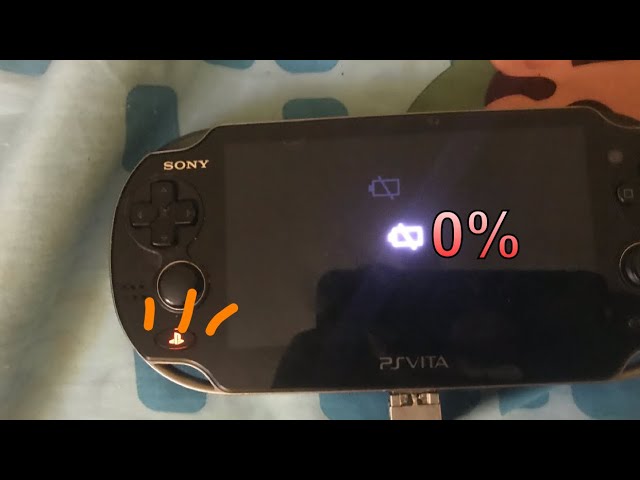
Is your PS Vita showing a blinking orange light and refusing to turn on? This frustrating signal often means your device is trying to tell you something important about its battery or charging status.
If you’ve been staring at that flashing orange light wondering what’s wrong and how to fix it, you’re not alone. Understanding why your PS Vita blinks orange can save you time and prevent unnecessary worry. You’ll discover simple, effective steps to diagnose and resolve this issue so you can get back to gaming without the hassle.
Keep reading to unlock the secrets behind that blinking orange light and bring your PS Vita back to life.

Blinking Orange Light Meaning
The blinking orange light on your PS Vita signals important information about the device’s current state. This indicator helps you understand if the console is charging, if the battery level is too low, or if the system is overheating. Knowing what the blinking orange light means can save time and prevent damage to your device. Below are the key reasons why your PS Vita might show this blinking orange light.
Charging Status Indicator
The blinking orange light often means your PS Vita is charging. When plugged in, the light flashes to show the battery is gaining power. It will stop blinking and stay solid orange once the battery reaches a certain level. Avoid turning on the device while it is still blinking orange to ensure proper charging.
Battery Too Low To Power On
A blinking orange light can also mean the battery is too low for the PS Vita to turn on. The system needs a minimum charge before it can boot up. Keep the device connected to the charger until the light stops blinking and remains solid. This prevents sudden shutdowns and protects the battery.
Overheating Warning
Sometimes, the blinking orange light signals that the PS Vita is overheating. The console may get too hot during extended use or in warm environments. Turn off the device and let it cool down in a well-ventilated area. Avoid using it until the light stops blinking to prevent damage from heat.
Common Causes
The blinking orange light on a PS Vita signals an issue that needs attention. Understanding the common causes helps solve the problem faster. These causes usually relate to power, heat, or hardware troubles.
Battery Drain Or Failure
A drained or faulty battery often causes the orange light to blink. The PS Vita needs enough power to start properly. If the battery is too low, the light blinks orange during charging. Over time, batteries lose their ability to hold a charge. A dead battery may prevent the system from turning on.
Using Non-official Chargers
Using chargers not made by Sony can cause the orange light to blink. Third-party chargers may not provide the correct power level. This mismatch can confuse the PS Vita’s charging system. Always use the official charger to ensure proper charging. Non-official chargers can damage the battery or internal circuits.
Overheating Issues
Overheating can trigger the blinking orange light on the PS Vita. Playing for a long time or charging in a hot place causes heat buildup. The device then blinks orange as a warning and may shut down. Let the PS Vita cool down in a ventilated area. Avoid direct sunlight or hot surfaces while charging or playing.
Hardware Malfunctions
Internal hardware problems also cause the orange light to blink. Faulty components like the motherboard or charging port can disrupt power flow. Physical damage or age-related wear increases the chance of malfunctions. Repair or replacement of parts may be needed to fix this issue.
Basic Troubleshooting
The blinking orange light on your PS Vita can be concerning. Basic troubleshooting helps fix common issues quickly. Follow these simple steps to identify and solve the problem. Each step targets a different cause of the blinking light. Try them one by one for best results.
Check Charger And Cable
Use the official Sony charger and cable only. Third-party chargers often cause charging problems. Inspect the cable for any damage or frays. Plug the charger firmly into the PS Vita and the power outlet. Loose connections can prevent proper charging.
Allow Time For Charging
The blinking orange light may mean the battery is very low. Let the PS Vita charge for at least 30 minutes. Avoid turning on the device during this time. The light should stop blinking and stay solid orange when charged enough.
Move To A Cool, Ventilated Area
Overheating can cause the blinking orange light. Turn off the PS Vita and move it to a cool place. Avoid direct sunlight or enclosed spaces. Wait for the device to cool down before charging or turning it on again.
Perform A Forced Restart
Press and hold the power button for about 10 seconds. This forces the PS Vita to restart. It can fix minor software glitches causing the blinking light. After restarting, check if the orange light stops blinking.
Advanced Fixes
Advanced fixes for the PS Vita blinking orange light involve deeper troubleshooting steps. These fixes address hardware and software issues beyond basic checks. Follow these methods carefully to restore your device’s normal function.
Battery Replacement
The blinking orange light often points to a failing battery. Over time, batteries lose their ability to hold a charge. Replacing the battery can solve this issue. Purchase a compatible PS Vita battery from a reliable source. Use proper tools to open the device safely. Remove the old battery and install the new one. Charge the device fully before turning it on. This fix often restores power and stops the blinking light.
Charging Port Cleaning
Dirt and debris can block the charging port. This blockage causes poor connection and the blinking orange light. Use a soft brush or compressed air to clean the port gently. Avoid using sharp objects that might damage the connectors. After cleaning, plug in the charger firmly. Check if the blinking stops and the light turns solid. Regular cleaning prevents future charging problems.
Software Update Or Restore
Software glitches can cause the orange light to blink. Updating the PS Vita firmware can fix bugs and improve stability. Connect your PS Vita to a Wi-Fi network. Go to Settings and select System Update. Follow the on-screen instructions to download and install updates. If updates do not help, consider restoring the system. Restoring deletes all data but can fix deep software issues. Backup your data before restoring to avoid loss.
Seek Professional Repair
Some problems require expert help. If the above steps do not work, visit a professional repair service. Certified technicians can diagnose hardware faults. They have tools to repair or replace damaged parts safely. Professional repair ensures your PS Vita is fixed correctly. Avoid opening the device repeatedly to prevent further damage.
Preventive Tips
Preventing the PS Vita blinking orange light saves time and protects your device. Simple care steps keep your console healthy. Follow these easy tips to avoid common battery and charging problems.
Use Official Accessories
Always use Sony’s original charger and cable. Third-party accessories may cause power issues. Official accessories fit perfectly and deliver the right voltage. This prevents slow charging or blinking orange light errors.
Avoid Overcharging
Do not leave your PS Vita charging for too long. Overcharging can damage the battery over time. Unplug the device once it reaches full charge. This helps maintain battery health and prevents blinking orange lights.
Keep Device Cool
Heat causes many PS Vita problems, including blinking lights. Use the device in a cool, ventilated space. Avoid direct sunlight and hot rooms. Turn off the console if it feels too warm. Cooling protects internal parts and battery life.
Regular Battery Maintenance
Check your battery health regularly to avoid sudden issues. Fully charge and discharge the battery once a month. This keeps the battery calibrated and working well. Replace the battery if it does not hold charge properly.
When To Contact Support
Knowing when to contact support for your PS Vita blinking orange light can save time and frustration. Some issues require expert help to fix. This section explains key signs that mean it is time to get professional support.
Persistent Blinking Orange Light
If the orange light keeps blinking for a long time, it shows a serious problem. Try charging for a few hours. If it still blinks, the battery or internal parts may be damaged. Contact support to avoid making the issue worse.
No Response After Charging
Charge the PS Vita with the official charger. If the orange light does not change or the device does not turn on after charging, there might be a battery failure. Support teams can check the battery health and suggest repair or replacement.
Physical Damage Concerns
Accidental drops or water exposure can cause blinking orange light issues. If your PS Vita shows signs of physical damage, avoid using it further. Contact support for a professional inspection and safe repairs to prevent permanent damage.

Frequently Asked Questions
Why Is My Ps Vita Blinking Orange Light?
Your PS Vita blinks orange when its battery is too low to power on. Keep charging until the light stays solid orange.
Why Is My Playstation Flashing Orange And Not Turning On?
Your PlayStation flashes orange and won’t turn on due to overheating or low battery. Turn it off, let it cool, and charge fully with an official charger.
What Does Orange Blinking Mean?
A blinking orange light means the PS Vita battery is too low to power on. Keep charging until the light turns solid orange.
How To Force Restart A Vita?
To force restart a PS Vita, press and hold the power button for about 10 seconds. Release the button when the screen turns off. Then, press the power button again to turn it back on. This resets the device without data loss.
Why Is My Ps Vita Blinking Orange Light During Charging?
A blinking orange light means the battery is very low. Wait until it stops blinking and glows solid orange before turning on.
Conclusion
The blinking orange light on your PS Vita usually means low battery. Keep it charging until the light stays solid orange. Avoid using unofficial chargers to prevent problems. If the light never changes, the battery might need replacing. Also, ensure the console is cool and well-ventilated.
These simple steps help your PS Vita work properly again. Patience is key—your device will turn on soon.









