
If your Harman pellet stove’s status light is blinking twice, it’s trying to tell you something important. This specific blinking pattern usually points to a problem with the stove’s pressure switch or an airflow issue that’s stopping your stove from working properly.
You might notice strange noises or that your stove isn’t feeding pellets like it should. Don’t worry—this guide will walk you through simple checks you can do right now. From inspecting doors and vacuum lines to cleaning key parts, you’ll learn how to diagnose and fix the issue so your stove runs smoothly again.
Keep reading to get your Harman stove back to warming your home without hassle.
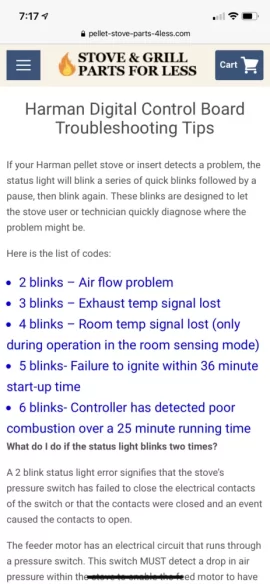
Error Meaning
The Harman pellet stove status light blinking two times signals an error related to the pressure switch. This error means the stove detects a problem with air pressure or airflow. The pressure switch plays a vital role in the stove’s safety and operation. Understanding this error helps with quick troubleshooting and proper maintenance.
This two-blink error usually means the pressure switch either failed to close its electrical contacts or opened unexpectedly after closing. This interrupts the stove’s normal function and prevents it from running safely. Knowing the pressure switch role and common causes can guide you in fixing the problem.
Pressure Switch Role
The pressure switch monitors airflow inside the stove’s vent system. It detects if the exhaust fan creates enough suction to remove smoke and gases. When the stove runs correctly, the pressure switch closes its contacts to allow power to critical parts like the feeder motor.
If the airflow is weak or blocked, the pressure switch stays open. This stops the feeder motor and other components to prevent unsafe conditions. The stove then signals the error by blinking the status light twice. The pressure switch keeps the stove safe by ensuring proper venting.
Common Causes
A blocked or dirty vent pipe can cause poor airflow and trigger the error. Ash buildup inside the stove or vent can clog the system. The vacuum hose connected to the pressure switch may be cracked or clogged with debris. Loose or damaged electrical connections also affect the pressure switch.
Incorrect installation or a failed pressure switch itself may cause the error. Check the stove’s doors and hopper lids to make sure they are fully closed. These small issues often lead to the two-blink status light error. Regular cleaning and inspection prevent these problems.
Initial Checks
Start troubleshooting the Harman pellet stove blinking two times by performing initial checks. These basic inspections often reveal simple problems causing the error. Focus on key areas that affect the stove’s pressure switch operation. Check seals and doors to ensure proper closure and airtightness.
Door Seals
Inspect the main door seals for any damage or gaps. Worn or loose seals let air leak into the stove. This disrupts the pressure switch and causes blinking lights. Clean the seals and press them firmly to close tightly. Replace seals if they look cracked or brittle.
Ash Pan Door
Look at the ash pan door to confirm it shuts completely. A partially open ash pan door affects the vacuum inside the stove. This can trigger the two-blink error. Remove any ash or debris blocking the door. Make sure the latch works and the door fits snugly.
Hopper Lid
Check the hopper lid for a proper seal and closure. A loose hopper lid often causes feeding and pressure problems. Secure the lid by pressing it firmly until it clicks. Clean around the lid edges to remove dust and fines. Replace the gasket if it is torn or missing.
Cleaning Steps
Cleaning your Harman pellet stove is essential to fix the two-times blinking status light. Dirt and ash buildup can block sensors and vents. This stops the stove from working properly. Follow these cleaning steps carefully to keep your stove running smoothly and safely.
Exhaust And Vent
Remove the exhaust pipe from the stove. Use a brush to clean out all ash and debris inside. Check the vent outside for any blockages or nests. Clear any dirt or leaves to ensure good airflow. A clean vent helps the stove burn pellets efficiently.
Esp Probe
Locate the ESP probe inside the stove. This sensor measures pressure and airflow. Gently wipe the probe with a soft cloth to remove ash or dust. Avoid bending or damaging the probe. A clean ESP probe ensures the stove reads pressure correctly.
Burn Pot And Fines Box
Remove the burn pot and empty the fines box below it. Use a small brush or vacuum to clear all ash and pellet dust. Check for any pellet chunks stuck in the burn pot holes. Clean parts improve pellet feeding and combustion. Always clean these areas after every few uses.
Inspecting Components
Inspecting the key components of your Harman pellet stove helps identify the cause of the 2-time blinking status light. This error often points to issues with the pressure switch or related parts. Careful examination of these parts ensures proper stove operation and safety. Below are important areas to check during your inspection.
Vacuum Line Condition
Start by examining the vacuum line. This small rubber hose connects to the pressure switch. Look for cracks, holes, or blockages. Ash buildup can clog the line, preventing it from working correctly. Replace the vacuum line if it shows any damage. A clean, intact line is vital for correct pressure readings.
Oxygen Holes
Check the oxygen holes in the burn pot. These holes allow air to mix with pellets for combustion. Ash and debris can block them over time. Use a small brush or tool to clear the holes gently. Clear oxygen holes improve airflow and help maintain a stable flame inside the stove.
Igniter Resistance
Measure the igniter’s resistance using a multimeter. The igniter must heat properly to start the pellets burning. A faulty igniter shows incorrect resistance or no continuity. Replace the igniter if readings fall outside the recommended range. Proper igniter function is crucial for stove ignition and safety.
Resetting The Stove
Resetting your Harman pellet stove is a simple step to clear minor errors. This process helps restore normal operation. It often fixes the two-times blinking status light issue. Proper resetting can save time and prevent unnecessary repairs.
Two common methods reset the stove effectively. The EasyTouch control reset is quick and user-friendly. The power cycle method is a straightforward way to reboot the system.
Easytouch Control Reset
Locate the EasyTouch control panel on your stove. Press the reset button marked with a checkmark symbol. Hold it for a few seconds until the stove responds. This action clears error codes and restarts the system. You may hear the auger motor start briefly. Wait until the stove completes the reset process. This method is safe and does not require unplugging the stove.
Power Cycle Method
Turn off the stove using the main power switch. Unplug the stove from the electrical outlet. Wait for at least 30 seconds to allow the control board to reset. Plug the stove back in and turn it on. The stove will run through its startup sequence. This can clear electrical glitches causing the blinking status light. Use this method if the EasyTouch reset does not work.

Advanced Troubleshooting
Advanced troubleshooting helps fix the Harman pellet stove blinking 2 times issue. It requires careful checks and part replacements. Understanding these steps saves time and avoids costly repairs.
Start by identifying the root cause. The two-blink error often points to pressure switch or control board problems. Follow each step for a clear diagnosis.
Pressure Switch Replacement
The pressure switch controls airflow inside the stove. A faulty switch causes the error light to blink twice. First, locate the pressure switch near the exhaust fan. Disconnect the vacuum hose and inspect it for cracks or blockages.
If the hose is fine, test the switch with a multimeter. A defective switch shows no continuity during operation. Remove the old switch by unscrewing its mount and disconnecting wires carefully. Install the new switch in the same position. Reconnect the vacuum hose and wiring securely. Power on the stove and check if the status light stops blinking.
Control Board Check
The control board manages all stove functions. A damaged board can cause false error signals. Start by unplugging the stove from power. Open the control panel and inspect the board for burn marks or loose connections.
Use a multimeter to test voltage output according to the manual. If the board fails the test or shows visible damage, replace it with a new one. Reassemble the stove and restore power. Observe the status light for normal operation. Testing the control board ensures the stove runs smoothly without errors.
Preventive Maintenance
Preventive maintenance keeps your Harman pellet stove running smoothly. It lowers the chance of errors like the status light blinking twice. Regular care improves stove efficiency and safety. Small tasks done often prevent big problems later. Follow these steps to maintain your stove.
Regular Cleaning Routine
Clean the stove weekly to avoid ash build-up. Empty the ash pan and fines box after each use. Remove ash from the burn pot and firebox carefully. Clean the exhaust pipe and vent screen to stop blockages. A clean stove burns pellets better and reduces errors. Use a soft brush and vacuum for best results.
Seals And Doors Inspection
Check stove doors and seals every month. Make sure doors close tightly without gaps. Inspect door seals for cracks or wear and replace if needed. A loose door or bad seal can cause pressure switch errors. Secure the hopper lid to prevent pellet feed issues. Good seals keep air pressure steady and the stove safe.
When To Call A Technician
The Harman pellet stove’s status light blinking twice signals an issue with the pressure switch. This switch controls airflow and safe operation. Some problems can be fixed by simple steps like cleaning or resetting. Other issues need expert help. Knowing when to call a technician saves time and prevents damage. This guide explains key signs that require professional service.
Persistent Errors
Errors that repeat after basic checks mean deeper problems. If the two-blink light stays on despite cleaning and resetting, call a technician. Persistent errors may involve faulty wiring or sensor failure. These issues need special tools and knowledge to diagnose. Avoid running the stove with ongoing errors. Continuous faults can harm the control board or motor.
Component Replacement Needs
The pressure switch or feeder motor may wear out over time. A blinking status light can indicate a failing part. Technicians can test and replace damaged components safely. Trying DIY replacement risks voiding warranties or causing injury. Professionals ensure the stove runs efficiently after repairs. Replace parts only when a technician confirms the issue.
Frequently Asked Questions
Why Is The Status Light Blinking Twice On My Harman Pellet Stove?
The Harman pellet stove’s status light blinking twice signals a pressure switch issue. It means the switch contacts failed to close or opened unexpectedly, disrupting the feeder motor circuit. Check the vacuum line, door seals, and clean ash buildup to resolve airflow or electrical contact problems.
How To Reset A Harman Pellet Stove?
Press the reset checkmark on the Harman EasyTouch control panel to reset the pellet stove. Ensure all doors and lids are securely closed before resetting.
What Is Error 2 On A Pellet Stove?
Error 2 on a pellet stove means the pressure switch failed to close, causing airflow or vacuum issues. Check door seals, vacuum line, and venting for blockages. Clean the firebox and ash pan. Replace the pressure switch if problems persist.
Why Is The Status Flashing On My Pellet Stove?
A flashing status on your pellet stove signals a feed or airflow issue. Check the hopper door, pressure switch, and pellet blockage. Clean the firebox and inspect venting and vacuum lines. Persistent flashing may require pressure switch replacement.
What Does 2 Blinking Lights On Harman Pellet Stove Mean?
Two blinking lights mean the pressure switch did not close properly. This can stop the stove from running safely. It often signals an electrical or vacuum issue.
Conclusion
A Harman pellet stove blinking twice signals an airflow or pressure switch issue. Check doors, vacuum lines, and vents carefully. Clean the stove to remove ash or blockages. Tighten any loose parts that affect airflow. Reset the stove after maintenance to see if the light stops blinking.
Persistent problems may need a pressure switch replacement. Regular care keeps your stove running smoothly and safely. This simple troubleshooting helps you enjoy warmth without worry.









