
Have you noticed a blinking arrow on your Vicks thermometer and wondered what it means? That little symbol can be more important than you think.
It’s your device’s way of telling you something needs your attention—often about the battery or a reset. If you rely on your thermometer to monitor your family’s health, you want to make sure it’s working perfectly every time. You’ll learn exactly what the blinking arrow means, how to fix it quickly, and tips to keep your thermometer running smoothly.
Keep reading so you never miss a beat when it comes to accurate temperature readings.
Blinking Arrow Meaning
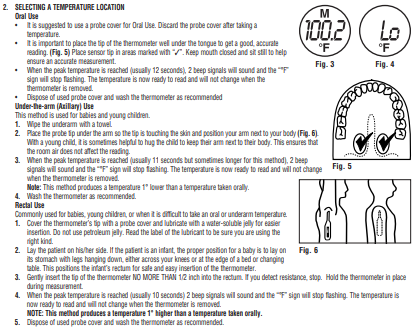
The blinking arrow on a Vicks thermometer is a key sign. It tells you something important about the device’s status. Understanding this symbol helps you use the thermometer correctly. It also helps avoid errors or wrong readings. The arrow usually points down and blinks on the screen. It signals two main things: low battery and error messages.
Low Battery Indicator
The blinking down arrow often means the battery is low. The thermometer needs new batteries to work right. When you see this arrow, replace the battery soon. A weak battery can cause wrong temperature readings. To replace it, open the battery cover. Remove the old battery carefully. Insert a new one, matching the plus and minus signs. Close the cover tightly to keep moisture out. If the arrow keeps blinking, try removing the battery for a minute. Then put it back to reset the thermometer.
Error Signals
Sometimes the blinking arrow shows an error message. This happens if the thermometer cannot read properly. Common errors include taking temperature too fast or outside normal range. The arrow may blink with an error code on the screen. Check the thermometer instructions to understand the code. Wait a few seconds and try taking the temperature again. Make sure the sensor is clean and the device is used as directed. Errors stop once the problem is fixed.

Battery Replacement Steps
Replacing the battery in your Vicks thermometer is simple and quick. A blinking arrow on the display usually means the battery is low. Follow these steps to change the battery and keep your thermometer working well.
Removing The Battery Cover
First, find the battery cover on the back of the thermometer. Use your thumb or a small tool to slide or gently lift the cover off. Be careful not to force it, as this might break the cover.
Inserting New Batteries
Take the new batteries and check the plus (+) and minus (-) signs. Place them in the compartment following the correct directions. Wrong placement can stop the thermometer from working.
Securing The Battery Compartment
After inserting the batteries, put the battery cover back on. Slide or press it until it clicks or fits tight. A secure cover helps keep moisture out and protects the batteries.
Resetting The Thermometer
Resetting your Vicks thermometer is a simple step to fix common issues like a blinking arrow. This often happens when the device needs a fresh start after a battery change or if it glitches during use. Resetting helps clear errors and ensures the thermometer works accurately for your next reading. Follow these easy methods below to reset your device quickly and safely.
Battery Removal Reset
First, open the battery compartment carefully. Remove the battery from the thermometer. Wait at least one minute to allow the device to fully reset. Reinsert the battery, making sure it fits correctly and matches the polarity signs. Close the battery cover tightly to prevent moisture from entering. Turn on the thermometer and check if the blinking arrow has stopped.
Another way to reset the thermometer is by using the memo button. Press and hold the memo button for a few seconds. Watch the display for the letters “CLR” to appear, which means the memory is cleared. This clears all stored temperature readings and resets the device. Release the button and turn the thermometer off. Switch it back on to confirm the reset worked.
Common Error Codes
Understanding the common error codes on your Vicks thermometer helps you troubleshoot quickly. These codes appear as blinking arrows or “Err” messages. They signal issues that prevent accurate readings. Recognizing these errors saves time and reduces frustration.
Below are the typical causes of these error codes and easy steps to fix them. Follow these tips to keep your thermometer working well.
Err Code Causes
The “Err” code usually means the thermometer detected a problem during measurement. It can happen if the sensor is dirty or the temperature is outside the safe range.
A blinking arrow often points to low battery power. The thermometer cannot function properly with weak batteries. Sometimes, the device may have a temporary glitch that triggers an error.
Other causes include improper placement of the thermometer or sudden movement during reading. Environmental factors like extreme cold or heat also cause errors.
How To Fix Errors
Start by replacing old batteries with fresh ones. Ensure you insert them correctly as shown in the compartment. Secure the battery cover tightly to prevent moisture damage.
Clean the sensor tip gently with a soft cloth to remove dirt or debris. Avoid using harsh chemicals that might harm the sensor.
Reset the thermometer by removing the batteries for two minutes, then reinsert them. This action clears temporary glitches.
Hold the thermometer steady during measurement. Place it as instructed in the user manual to get accurate results.
Keep the thermometer away from extreme temperatures. Store it in a cool, dry place for best performance.
Tips For Accurate Readings
Knowing when to replace your Vicks thermometer is important for reliable health checks. A thermometer that stops working well can give wrong readings. This can lead to wrong health decisions. Regular checks help ensure the device works properly. Here are key points to watch for.
Signs Of Faulty Device
Watch for unusual behavior in your thermometer. If the blinking arrow stays on without reason, it may signal a problem. The device may not turn on or show error codes like “Err.”
Cracked screens, loose parts, or damaged battery covers also show faults. If the thermometer gives erratic or very different readings each time, it may be failing.
These signs mean the thermometer needs repair or replacement to keep your health data accurate.
Testing Accuracy
Test your thermometer’s accuracy regularly. Take your temperature with another reliable device. Compare the results. If the Vicks thermometer shows a big difference, it may be inaccurate.
Test in the same conditions for fair results. Use a glass thermometer or a digital one known to be correct. If the Vicks thermometer fails these tests, consider replacing it.
Regular accuracy checks prevent false readings and keep health monitoring safe and effective.

Frequently Asked Questions
How Do You Reset A Vicks Thermometer?
To reset a Vicks thermometer, remove the battery and wait one to two minutes. Reinsert the battery securely. Press and hold the “MEMO” button until “CLR” shows to clear stored data. This resets the device and clears previous temperature readings.
What Is The Err Code On A Vicks Thermometer?
The “Err” code on a Vicks thermometer indicates a measurement error. Check battery, reset device, or retake temperature.
What Is The Red Arrow On A Thermometer?
The red arrow on a thermometer indicates a low battery. Replace the battery to ensure accurate readings.
How To Tell If A Thermometer Is Faulty?
Check for inconsistent readings or error codes like “Err” on the display. Replace low batteries if a blinking arrow appears. Reset by removing and reinserting the battery. Faulty thermometers may fail to turn on or show delayed responses.
What Does The Blinking Arrow On Vicks Thermometer Mean?
The blinking arrow usually signals a low battery in the thermometer. It indicates you need to replace the battery soon. This helps keep accurate temperature readings.
Conclusion
The blinking arrow on your Vicks thermometer usually means the battery is low. Replace the battery carefully and check if the arrow stops blinking. If the problem continues, try removing and reinserting the battery after a short wait. Make sure the battery cover is closed tightly to keep moisture out.
This simple care helps your thermometer work correctly. Understanding these signs keeps your device reliable for accurate temperature readings. Trust your Vicks thermometer to guide you in monitoring health safely and easily.









