
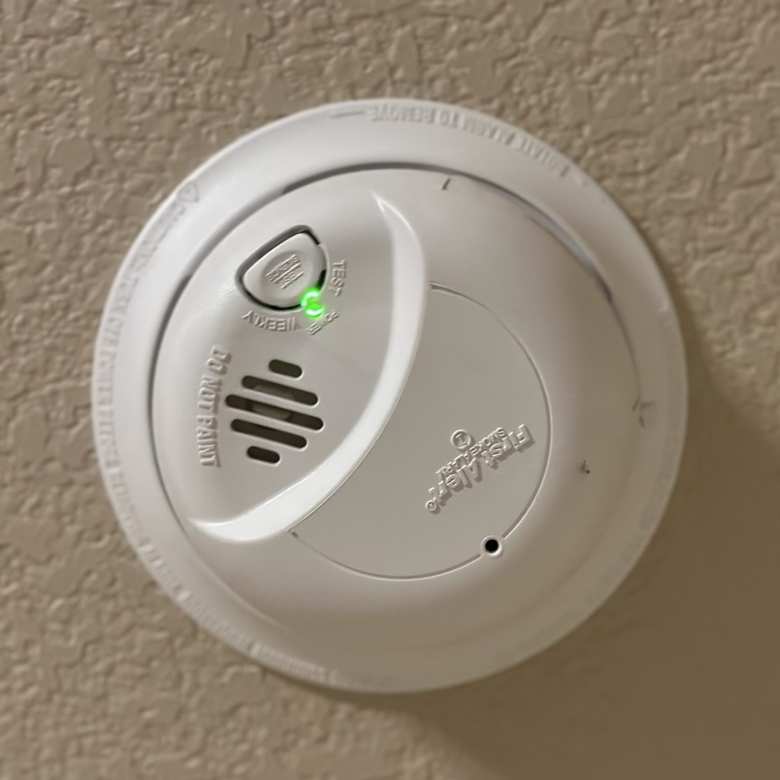
If you’ve noticed your First Alert smoke alarm blinking a green light, you’re probably wondering what it means and whether you need to take action. That blinking green light isn’t just a random signal—it holds important information about your alarm’s status and safety.
Understanding why your smoke alarm is flashing green can help you quickly fix any issues and keep your home protected. You’ll learn exactly what the blinking green light means, how to troubleshoot it step-by-step, and simple tips to ensure your smoke alarm is always working when you need it most.
Keep reading to take control of your home safety and stop that blinking light once and for all.

Green Light Signals
The green light on a First Alert smoke alarm provides important signals about its status. Understanding these signals helps you ensure your home safety. The green light can either stay steady or blink in patterns. Each type of signal tells you something different about the alarm’s condition.
Knowing what the green light means keeps your alarm working properly. It also alerts you to any power issues or battery needs. Pay attention to these signals for timely maintenance and peace of mind.
Steady Green Meaning
A steady green light usually means the alarm has normal power. For hardwired alarms, it shows the unit is connected to the house electricity. This steady light confirms your alarm is ready and working.
For some battery-only models, a solid green light means the battery is good. It signals the alarm is powered and active. When you see a steady green light, no immediate action is needed.
Blinking Green Patterns
Blinking green lights warn of specific issues or statuses. A slow blink often means the alarm is running on battery backup. This happens if the main power is lost.
Rapid or repeated green flashes can indicate a low battery. The alarm may need a battery change or reset. Some models flash green to show they recently detected smoke or danger.
Pressing the test button can reset the blinking light. It clears any memory of past alarms or alerts. Always check your alarm manual for exact blink codes and fixes.

Power Source Effects
The power source plays a key role in how your First Alert smoke alarm behaves. The blinking green light often signals something about the power supply. Understanding the effects of power sources helps you know what to check first. Power issues can cause the light to blink and affect alarm performance.
Smoke alarms get power in two main ways: hardwired into the house or using batteries. Each type shows different signs when power is low or lost. Recognizing these signs helps keep your home safe. Let’s explore how power sources impact the blinking green light on your First Alert smoke alarm.
Hardwired Vs Battery
Hardwired alarms connect directly to your home’s electrical system. They usually have a battery backup in case of power outages. A steady green light means the alarm has normal AC power. A blinking green light often means the alarm is running on battery backup. This happens when the main power is lost.
Battery-powered alarms rely only on batteries. The green light patterns differ by model. Some show a steady green when the battery is good. Others blink green to indicate normal operation. A blinking green light on battery alarms can also mean low battery or a need to reset.
Power Loss Indicators
A blinking green light often warns of power loss in hardwired alarms. It usually flashes once per minute to show the alarm is on battery backup. This helps you know if the house power is out. Battery alarms may blink green if the battery is weak. Replace the battery to stop the blinking.
Some First Alert models store a memory of recent alarms. This can cause the green light to blink until you reset the unit. Pressing the test button usually clears this memory. Always check your alarm’s manual for exact blinking patterns and reset instructions.
Battery Status
The battery status of your First Alert smoke alarm is crucial for its proper function. A blinking green light often relates to the battery condition. This signal helps you know if the battery is strong or needs attention.
Understanding these signals ensures your alarm works when you need it most. It also helps avoid false alarms or missed warnings. Checking the battery regularly keeps your home safe and secure.
Low Battery Alerts
A blinking green light can mean the battery is low. The alarm may also beep or chirp at intervals. These alerts warn you to replace the battery soon. Ignoring them can cause the alarm to stop working.
Some models blink the green light once every minute. Others combine blinking with a sound. These signs help you act quickly to maintain safety. Always take low battery alerts seriously.
Battery Replacement Tips
Use the correct battery type for your smoke alarm. Check the user manual to find the right one. Remove the old battery carefully to avoid damage. Insert the new battery with the correct polarity.
After replacing the battery, press the test button. This resets the alarm and stops the blinking green light. Regular battery changes extend the life of your smoke alarm. Replace batteries at least once a year for best results.
Memory And Reset
The memory and reset features of a First Alert smoke alarm help keep you informed about its status. These functions ensure you know if the alarm has detected smoke or if the battery needs attention. Understanding these features allows you to maintain the alarm properly and keep your home safe.
Latching Memory Function
The latching memory function records if the alarm has sensed smoke or fire. After an alarm event, the green light blinks to show it was triggered. This alert remains until you manually reset the alarm. The memory helps you know about past alarms even if you missed the initial sound. It provides peace of mind and ensures you check your home’s safety carefully.
Resetting The Alarm
Resetting the alarm clears the latching memory and stops the blinking green light. To reset, press and hold the test button for about 15 seconds. The alarm will beep and the light will stop flashing. Resetting is important after replacing the battery or after an alarm event. It ensures the smoke alarm is ready to protect you again. Regular resets keep the system working smoothly and alert you to any issues.
Troubleshooting Steps
Troubleshooting a First Alert smoke alarm blinking green light requires careful steps. Understanding the cause helps solve the issue quickly. The blinking green light can signal different states, such as power loss or battery issues. Follow these steps to identify and fix the problem safely.
Testing The Alarm
Start by pressing the test button on the alarm. This checks if the alarm sounds properly. A working alarm means the device is powered and functional. If the alarm does not sound, check the battery or power source. Replace the battery and test again. Testing helps ensure your alarm keeps you safe.
Consulting The Manual
Each First Alert model has specific light codes. The manual explains what the blinking green light means. Look for instructions about power loss, battery replacement, or memory reset. Follow the manual’s guidance exactly. It provides the best advice for your model’s blinking green light.
Common Errors
Understanding common errors helps keep your First Alert smoke alarm working well. Many users face issues due to simple mistakes. These errors can cause confusion about the blinking green light. Knowing these mistakes helps you fix the problem faster.
Misinterpreting Light Codes
The blinking green light has many meanings. Some think it always means a low battery. Others confuse it with power loss or a reset need. Each First Alert model shows different patterns. Check your manual to know the correct code. Misreading codes may delay proper action. This can risk your safety and cause alarm failure.
Ignoring Reset Procedures
After changing the battery, the alarm may still flash green. This happens if the unit’s memory is not reset. Press and hold the test button to clear the alert memory. Skipping this step keeps the light blinking. Ignoring reset steps leads to ongoing confusion. Follow reset instructions carefully to stop the blinking green light.
Frequently Asked Questions
What Does A Blinking Green Light On A First Alert Smoke Detector Mean?
A blinking green light on a First Alert smoke detector means it’s running on battery backup or needs a battery reset. Press the test button to clear the alert.
What Is The Difference Between A Steady Green And A Blinking Green Smoke Alarm?
A steady green light means the smoke alarm has normal AC power. A blinking green light signals battery backup mode, power loss, or a low battery needing reset.
Why Is My Smoke Alarm Blinking Green And Chirping?
A blinking green light with chirping means your smoke alarm runs on battery backup or has low battery. Press the test button to reset it. Replace the battery if chirping continues. Check your model’s manual for exact light codes and follow reset instructions.
How Do I Reset My First Alert Smoke Detector?
To reset your First Alert smoke detector, press and hold the test button for 15-20 seconds. Replace the battery if needed. This clears memory and stops flashing green light. Ensure power is restored for hardwired units. Consult your manual for model-specific instructions.
What Does A Blinking Green Light On First Alert Mean?
A blinking green light means the alarm is on battery backup. It may also signal lost AC power or need a battery reset.
Conclusion
A blinking green light on your First Alert smoke alarm signals a power or battery issue. Check if the unit is hardwired or running on battery backup. Replace the battery if needed and press the test button to reset the alarm’s memory.
Always consult your alarm’s manual for specific light patterns. Regular testing keeps your home safe and your alarm functioning well. Don’t ignore blinking lights—they help protect you and your family every day. Stay alert and act quickly to ensure your smoke alarm works properly.









