Is your DirecTV remote blinking blue and leaving you confused? You’re not alone.
This little light can be more than just a flicker—it’s trying to tell you something important. If your remote isn’t working right or you’re unsure why that blue light keeps flashing, you’re in the right place. Keep reading, and you’ll quickly understand what’s going on and how to fix it.
Don’t let a blinking blue light ruin your TV time—let’s get your remote back on track now.

Why The Remote Blinks Blue
The blinking blue light on your DirecTV remote can catch you off guard. This light signals that the remote wants your attention. It usually means the remote is trying to tell you something about its current status. Understanding why it blinks blue helps you fix the issue quickly. Below are the common reasons behind this blinking light.
Signal And Connectivity Issues
The blue blinking light often shows a problem with signal connection. Your remote sends commands through infrared or Bluetooth. If something blocks the signal, the remote blinks blue. This can happen if the path to the receiver is not clear. Sometimes, electronic devices nearby cause interference. Checking the line of sight and moving other devices may stop the blinking.
Battery And Power Concerns
Low or weak batteries make the remote blink blue. The remote uses this light to warn you about power issues. It needs fresh batteries to work properly. Old batteries can cause slow response or no response. Replacing the batteries with new ones often solves the problem. Always use the right battery type for your remote.
Remote Pairing Status
The blinking blue light can show the remote is pairing with the receiver. This is normal during setup or after resetting. The remote tries to connect to the receiver to work properly. If pairing fails, the light keeps blinking. You may need to repeat the pairing process. Following the pairing steps carefully helps the remote connect quickly.
Check And Replace Batteries
The blinking blue light on your DirecTV remote often points to weak or dead batteries. Checking and replacing the batteries can fix this issue quickly. Fresh batteries keep your remote working smoothly. This simple step saves time and avoids frustration.
Battery Type And Compatibility
Most DirecTV remotes use AAA batteries. Some models may need AA batteries. Always check your remote’s battery compartment for the correct type. Using the right batteries ensures proper function. Avoid mixing old and new batteries together. Use fresh, compatible batteries for best results.
How To Replace Batteries Properly
Open the battery cover on the back of the remote. Remove the old batteries carefully. Insert new batteries with the correct polarity (+ and -). Close the battery cover securely. Test the remote to see if the blinking stops. Proper replacement improves remote performance and response.
Resetting The Remote
Resetting the DirecTV remote can fix many common issues. A blinking blue light often means the remote is not working properly. Resetting helps clear small errors and reconnects the remote to your receiver. Follow these simple steps to reset your remote and get it working again quickly.
Soft Reset Steps
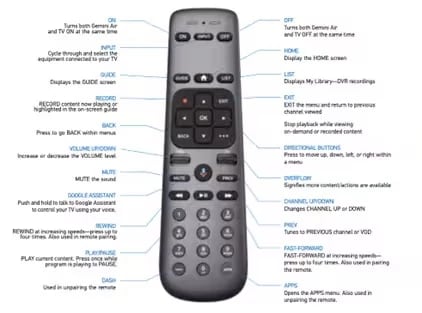
Start with a soft reset. This method does not erase your settings. Press and hold the MUTE and SELECT buttons together. Keep holding them for about 5 seconds. The remote’s light will flash green twice. Release the buttons. The remote will restart and may stop blinking blue.
Factory Reset Procedure
A factory reset erases all settings and pairs your remote from scratch. Press and hold the MUTE and ENTER buttons together. Hold them for 6 seconds. The remote light will flash green twice. Release the buttons. Enter your 4-digit receiver code. The remote will reset and pair with your device. This clears deeper problems causing the blinking blue light.
Re-pairing The Remote With The Receiver
When your DirecTV remote blinks blue, it means the remote has lost connection. The best way to fix this is to re-pair the remote with the receiver. Re-pairing helps the remote and receiver communicate again. This process is simple and usually takes only a few minutes.
Follow these steps carefully to restore your remote’s function. Make sure the receiver is on and ready to pair. Keep the remote close to the receiver during the pairing process for a better signal.
Manual Pairing Instructions
First, press the “Mute” button on your remote. Hold it down for a few seconds. Next, press and hold the “Select” button while still holding “Mute.” Hold both buttons until the light on the remote blinks green twice.
Release both buttons. The remote will start trying to connect. If the light blinks blue, the remote is pairing with the receiver. Wait for the blinking to stop and the light to turn solid. This means the pairing was successful.
Troubleshooting Pairing Failures
Pairing may fail if the remote is too far from the receiver. Move closer and try again. Check the batteries and replace them if they are low. Low batteries can cause poor connection.
Turn off the receiver for a few minutes and then turn it back on. This can reset the receiver and help with pairing. If the remote still blinks blue, try restarting the pairing process from the beginning.
In rare cases, the remote or receiver might have a hardware problem. Contact support if problems continue after several attempts.
Signal Interference Solutions
Signal interference can cause your DirecTV remote to blink blue. This means the remote is having trouble communicating with the receiver. Fixing signal interference helps the remote work smoothly. Small changes in your setup can clear up the problem fast.
Removing Obstacles
Objects between the remote and receiver block signals. Clear furniture, decorations, or electronic devices from the path. Keep the area in front of the receiver clean and open. This helps the remote’s signals reach the receiver without trouble.
Even glass and mirrors can reflect the signal. Move the receiver to a spot with fewer barriers. Avoid placing it inside cabinets or behind TVs. This ensures the remote’s light reaches the receiver directly.
Avoiding Wireless Interference
Other wireless devices can disturb the remote’s signal. Wi-Fi routers, cordless phones, and microwaves cause interference. Place these devices away from the receiver and remote area. Turn off unused wireless gadgets during remote use.
Change your Wi-Fi channel to reduce overlap with the remote’s signal. This lowers interference and improves remote response. Keep the remote’s batteries fresh for a strong signal. Weak batteries can worsen interference problems.
Credit: www.directv.com
When To Contact Support
The blinking blue light on your DirecTV remote can be confusing. It often signals a problem that needs attention. Knowing when to contact support saves time and avoids frustration. Not all issues require professional help. Some problems can be fixed with simple steps. But certain signs mean it’s best to call for expert assistance.
Identifying Hardware Issues
Hardware problems cause the remote to blink blue repeatedly. This may indicate a dead battery or a faulty infrared sensor. Another sign is the remote not responding to button presses. Damage from drops or spills can also affect the remote’s function. If basic troubleshooting fails, hardware might be the cause. Persistent blinking after battery replacement suggests a deeper issue. Identifying hardware problems early prevents further damage.
Getting Professional Help
Contact support when the remote’s blinking blue light continues. Technicians can diagnose the exact problem quickly. They offer repairs or replacements if needed. Professional help ensures your remote works correctly. Avoid trying to fix internal parts alone. Incorrect handling can worsen the problem. Support teams also provide useful tips for future use. Reach out if the remote remains unresponsive or behaves oddly. Prompt assistance restores your DirecTV experience fast.
Frequently Asked Questions
Why Is My Directv Remote Blinking Blue?
A blinking blue light means the remote is trying to connect to the receiver. It may need to be reset or reprogrammed.
How Do I Stop The Directv Remote From Blinking Blue?
Try removing the batteries and reinserting them after 10 seconds. Re-pair the remote with the receiver if blinking continues.
Can A Blinking Blue Light Mean A Battery Issue?
Yes, weak or low batteries can cause the remote to blink blue. Replace the batteries with fresh ones to fix this.
What Does Blinking Blue Mean During Remote Setup?
Blinking blue shows the remote is in pairing mode. Wait until it connects or follow the setup steps again.
Will Resetting The Remote Fix The Blinking Blue Light?
Resetting often stops the blinking blue light by clearing errors. Hold the mute and select buttons for 5 seconds to reset.
Conclusion
A blinking blue light on your DirecTV remote shows a connection issue. Try changing the batteries or resetting the remote first. Make sure the remote is pointed at the receiver without obstacles. Check if the receiver is powered on and working well.
If problems continue, contact DirecTV support for help. Small fixes often solve this blinking light problem. Staying calm and following these steps brings your remote back to work. Simple actions save time and frustration. Keep your remote ready for easy TV control.