
Is your Firestick remote blinking green and leaving you frustrated? You’re not alone.
When your remote starts flashing that green light, it’s a clear sign something isn’t working right. But don’t worry—this issue is common and usually easy to fix. You’ll discover simple steps to stop the blinking and get your remote back to normal.
Keep reading, and you’ll be controlling your Firestick smoothly again in no time.

Why Firestick Remote Blinks Green
The Firestick remote blinking green can puzzle many users. This light indicates the remote is trying to communicate with your Firestick device. Understanding why the remote blinks green helps fix the issue fast. Several common reasons cause this blinking light to appear.
Battery Issues
The most common cause is low or dead batteries. Weak batteries can make the remote blink green as it struggles to send signals. Changing the batteries often stops the blinking. Always use fresh, good-quality batteries for best results.
Connectivity Problems
The green blinking can mean the remote lost connection to the Firestick. Distance or obstacles like walls can block the signal. Re-pairing the remote with the Firestick usually solves this. Make sure you are close to the device during pairing.
Software Glitches
Sometimes, software bugs cause the remote to blink green. Restarting the Firestick can clear these glitches. Check for system updates that fix known problems. Keeping the software up to date improves remote performance.
Basic Troubleshooting Steps
When your Firestick remote blinks green, it signals a connection or power issue. Basic troubleshooting can often fix this problem quickly. Follow these simple steps to get your remote working again. Each step helps check common issues that cause the blinking light.
Restart The Firestick
Turn off your Firestick by unplugging it from the power source. Wait for about 30 seconds before plugging it back in. This restarts the device and refreshes the remote connection. After the Firestick powers on, test the remote to see if the blinking stops.
Replace Or Recharge Batteries
Check the batteries inside your remote. Remove and inspect them for any damage or leakage. Insert fresh batteries or recharge the existing ones if they are rechargeable. Weak batteries often cause the remote to blink green. Always use good quality batteries for longer performance.
Check Remote Range And Obstructions
Make sure you are within the remote’s effective range, usually about 20 feet. Remove any objects between the remote and Firestick. Walls, furniture, or other electronics can block the signal. Clear the path to improve the connection and stop the blinking light.
Re-pairing The Remote
The Firestick remote blinking green often means it has lost connection. Re-pairing the remote can fix this issue quickly. This process helps your remote connect back to your Firestick device. Follow these steps to re-pair your remote easily.
Manual Pairing Process
First, turn on your Firestick device. Hold the remote close to the Firestick. Press and hold the Home button for about 10 seconds. The green light will start blinking faster. This means the remote is in pairing mode. Wait a few seconds until the light stops blinking. Your remote should now be connected.
Using Fire Tv Settings
Turn on your TV and Firestick. Use another remote or the Fire TV app on your phone. Go to Settings on your Fire TV screen. Select Controllers and Bluetooth Devices. Choose Amazon Fire TV Remotes. Select Add New Remote. Press and hold the Home button on your remote. Wait for the remote to appear on the screen. Select it to pair.
Resetting The Remote
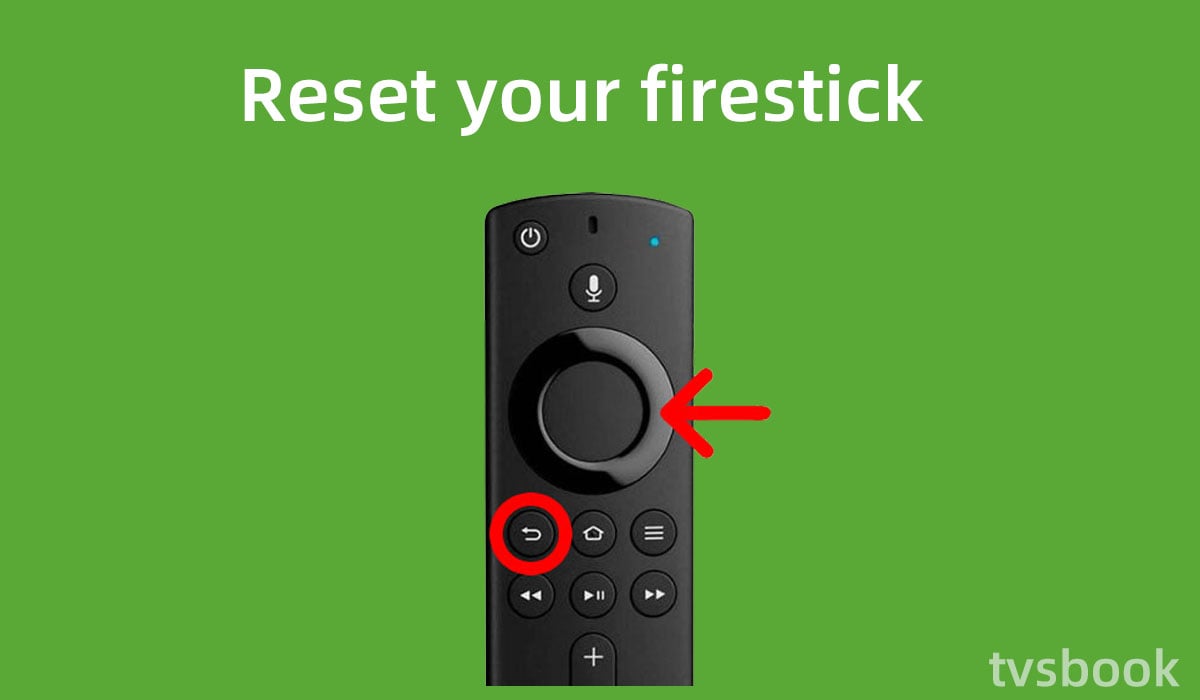
Unpairing the remote can sometimes help. Remove the batteries from the remote. Press and hold the Home button for 20 seconds. Release the button and wait 10 seconds. Insert the batteries back into the remote. Try pairing the remote again using the steps above. This reset may solve connection problems.
Advanced Fixes
Advanced fixes can solve persistent Firestick remote blinking green issues. These steps dig deeper than basic troubleshooting. They target software and system glitches causing the problem. Follow each method carefully for best results.
Update Firestick Software
Updating your Firestick software can fix bugs and improve performance. Go to Settings, then select My Fire TV. Click on About, then choose Check for Updates. If an update is available, download and install it. This process ensures your device runs the latest software version.
Clear Cache And Data
Cache and data can cause remote connection problems. Clearing them refreshes the system and removes corrupted files. Open Settings, then Applications, and select Manage Installed Applications. Choose the app causing issues, then click Clear Cache and Clear Data. Restart your Firestick to apply changes.
Factory Reset Firestick
A factory reset restores Firestick to original settings. It removes all apps, settings, and personal data. Use this only if other fixes fail. Go to Settings, then My Fire TV, and select Reset to Factory Defaults. Confirm the reset and wait for the device to restart.
When To Replace The Remote
The Firestick remote blinking green can signal a problem with the device. Sometimes, the remote needs replacement. Knowing when to replace the remote saves time and frustration. It helps to keep your streaming experience smooth and enjoyable.
Signs Of Hardware Failure
One sign is the remote not responding at all. Pressing buttons without any reaction is common. Another sign is irregular blinking that does not stop. The remote might also fail to connect to the Firestick. Physical damage, like broken buttons, is a clear sign. Battery issues are common but check if new batteries help first. Hardware failure means the remote is no longer working properly.
Buying Compatible Remotes
Not all remotes work with every Firestick model. Check your Firestick version before buying a new remote. Choose remotes designed for your device to avoid connection issues. Official Amazon remotes are always a safe choice. Some third-party remotes can work but read reviews first. Compatibility ensures the new remote functions well with your Firestick.
Preventive Tips
The Firestick remote blinking green can be frustrating. Preventing this issue saves time and effort. Small habits help keep the remote working well. Follow these simple tips to avoid blinking problems.
Proper Battery Maintenance
Check the remote batteries often. Replace old or weak batteries quickly. Use good-quality batteries for longer life. Remove batteries if you will not use the remote for a long time. This stops corrosion and damage inside the remote.
Keeping Remote Firmware Updated
Update the Firestick remote firmware regularly. Updates fix bugs and improve remote functions. Go to Firestick settings to check for updates. Connect your Firestick to the internet to download updates. This keeps the remote working smoothly and avoids blinking issues.
Avoiding Physical Damage
Handle the remote gently. Do not drop or throw it. Keep the remote away from water and heat. Use a cover or case to protect it. Avoid pressing buttons too hard. Physical damage often causes blinking and other problems.

Frequently Asked Questions
Why Is My Firestick Remote Blinking Green?
A blinking green light means the remote is trying to pair with the Firestick. It usually happens when the remote is new or reset. Wait a few moments for the connection to complete.
How Do I Fix Firestick Remote Blinking Green?
Try replacing the batteries with fresh ones first. Restart your Firestick device and press the Home button for 10 seconds to pair again. This often solves the blinking green issue.
Does Blinking Green Mean Low Battery On Firestick Remote?
No, blinking green light does not indicate low battery. Low battery usually causes a red or no light. Blinking green signals a pairing or connection problem.
Can Firestick Remote Blinking Green Stop On Its Own?
Yes, the blinking green light may stop after the remote pairs with the Firestick. If it keeps blinking, the connection failed. Try pairing again or check the batteries.
What If Firestick Remote Keeps Blinking Green After Reset?
If blinking continues, the remote may not pair properly. Check battery placement and try pairing again. You can also restart your Firestick device to fix the issue.
Conclusion
A blinking green Firestick remote can be frustrating. It often means the remote is trying to connect. Checking the batteries is a quick fix. Restarting the Firestick can also help. Make sure the remote is within range. Pair the remote again if needed.
These steps usually solve the problem fast. Staying patient and following simple tips works best. Enjoy your streaming without long interruptions. Keep this guide handy for future issues.









