Is your Samsung refrigerator’s light blinking and you’re not sure why? That blinking light can be more than just a minor annoyance—it might be trying to tell you something important about your fridge’s health.
But don’t worry, you don’t need to call a technician right away. You can take simple steps to stop that blinking light and get your fridge back to normal quickly. You’ll learn easy, clear ways to fix the blinking light on your Samsung refrigerator.
Keep reading, and you’ll have your fridge running smoothly in no time.
Blinking Light Causes
The blinking light on a Samsung refrigerator can signal different issues. Understanding the causes helps to fix the problem quickly. Each blinking pattern points to a specific concern inside the fridge. Below are common reasons why the blinking light appears.
Power Outage Effects
A power outage can reset the refrigerator’s system. When power returns, the light may blink. This blinking shows the fridge is rebooting or needs a reset. Sometimes, the fridge takes a few minutes to stabilize. During this time, blinking lights are normal.
Filter Replacement Alerts
The blinking light often signals a filter change is due. Samsung fridges track water and air filter use. After a set time, the light blinks to remind you. Replacing the filter stops the blinking alert. This helps keep water and air fresh inside.
Temperature Fluctuations
Temperature changes inside the fridge can trigger blinking lights. If the fridge is too warm or too cold, it warns you. This can happen after opening the door many times. Or if the fridge needs cleaning or defrosting. The blinking light tells you to check the temperature.
Door Ajar Warnings
A door that is not fully closed causes the light to blink. The fridge senses when the door is open too long. This prevents cold air from escaping and keeps food fresh. Closing the door firmly usually stops the blinking. Check door seals if the problem continues.
Control Panel Errors
Sometimes, blinking lights mean an error in the control panel. This could be a glitch or a sensor issue. Resetting the panel often clears the error. If blinking stays, the panel may need repair. Watch for error codes on the display for guidance.
Basic Troubleshooting Steps
When a Samsung refrigerator shows a blinking light, basic troubleshooting can solve many issues. These simple steps help identify and fix common problems quickly. Follow each carefully to stop the blinking light and restore normal function.
Resetting The Control Panel
Resetting the control panel often clears errors causing blinking lights. Locate the control panel on your fridge. Press and hold the power or reset button for about 10 seconds. The panel will turn off and then back on. This resets the system and may stop the blinking light.
Checking Door Seals
Door seals that do not close properly can trigger blinking lights. Inspect all door seals for dirt, damage, or gaps. Clean seals with warm, soapy water and a soft cloth. Press the doors firmly shut to ensure a tight seal. Replace seals if you find cracks or tears.
Inspecting Power Supply
A poor power supply can cause blinking lights on your refrigerator. Check the power cord and plug for damage. Make sure the fridge is plugged into a working outlet. Reset the circuit breaker if needed. Avoid using extension cords or adapters.
Cleaning The Filter
A dirty water or air filter can cause system alerts and blinking lights. Locate the filter according to your model’s manual. Remove and rinse the filter under running water. Replace the filter every six months or as recommended. Proper filter care helps the fridge run smoothly.
Resetting Filter Light
The blinking filter light on your Samsung refrigerator signals the need for maintenance. Resetting this light after changing the water filter keeps your fridge running smoothly. It also ensures the filter status is accurate. Follow simple steps based on your refrigerator model to reset this light.
Locate the control panel on your refrigerator door. Press and hold the “Filter Reset” button. Keep holding it for about 3 seconds. The blinking light should turn off. If your model does not have this button, press and hold “Ice Type” or “Alarm” button instead. This method works for most standard Samsung refrigerators.
Family Hub Model Reset
Open the upper right door of the Family Hub refrigerator. Find the small power switch inside the panel. Flip the power switch off and wait for 30 seconds. Flip the switch back on to restart the system. This resets the filter light and the control panel. The Family Hub model may require this manual power cycle to clear alerts.
When To Replace The Filter
Replace the water filter every six months or after 300 gallons. A clogged filter reduces water flow and ice quality. Your refrigerator’s filter light helps track this timing. If water tastes odd or ice looks cloudy, change the filter sooner. Regular filter replacement keeps your fridge clean and efficient.

Fixing Temperature Display Blinking
The blinking temperature display on your Samsung refrigerator signals a possible issue. Fixing this blinking can prevent food spoilage and maintain appliance efficiency. The problem often relates to temperature settings or internal sensors. Follow these steps to address the blinking display and restore normal function.
Adjusting Temperature Settings
First, check the temperature settings on the control panel. Make sure the fridge and freezer temperatures are within the recommended range. The ideal fridge temperature is between 37°F and 40°F (3°C to 4°C). The freezer should be set at 0°F (-18°C). Adjust settings using the control buttons. Wait a few minutes to see if the blinking stops. Incorrect settings can cause the display to blink continuously.
Checking Internal Sensors
Internal sensors monitor the refrigerator’s temperature and operation. A faulty sensor can cause the display to blink. Locate the sensors inside the fridge, usually near the cooling vents. Check for any visible damage or loose connections. Clean the sensors gently if dusty or dirty. If the sensors appear damaged, they may need replacement. Sensor issues often require careful inspection to avoid further damage.
When To Call A Technician
If adjusting settings and checking sensors does not stop the blinking, professional help is necessary. A technician can diagnose complex issues like control board failures or sensor malfunctions. Calling a technician ensures safe and proper repair. Avoid trying advanced fixes without experience, as this can worsen the problem. Schedule service promptly to protect your refrigerator and its contents.
Handling Power Interruptions
Power interruptions can cause your Samsung refrigerator’s light to blink. Handling these interruptions correctly helps stop the blinking light and ensures your fridge works properly. This section guides you through the steps to fix blinking lights after power outages.
Steps After A Blackout
After a blackout, check if the fridge is plugged in securely. Power outages may cause the refrigerator to reset or blink. Wait a few minutes to see if the blinking stops on its own. Avoid opening the fridge door often to keep the temperature stable. If the blinking continues, move to the next step.
Performing A Hard Reset
Unplug the refrigerator from the power outlet. Leave it unplugged for about five minutes. This pause lets the fridge’s system fully reset. Plug the fridge back in and turn it on. The hard reset clears minor errors that cause blinking. This simple step often stops the blinking light.
Verifying System Restart
After the reset, check if the control panel lights are steady. Open and close the fridge door to test the light. The blinking light should stop if the system restarts correctly. If blinking persists, check the user manual for further troubleshooting. This verification confirms the fridge is back to normal.
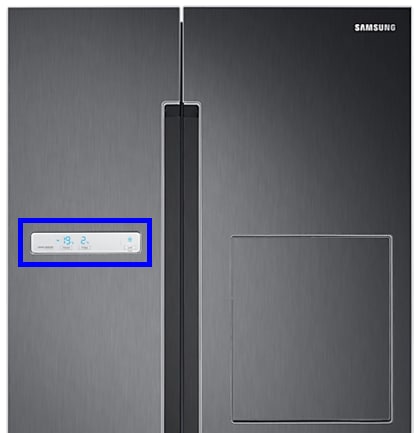
Control Panel Issues
The control panel is the heart of your Samsung refrigerator. It manages temperature settings, modes, and alerts. Sometimes, the panel may show blinking lights due to errors or malfunctions. These issues can cause frustration but often have simple solutions. Understanding how to address control panel problems helps stop the blinking light fast. This section covers common control panel issues and their fixes.
Unlocking The Panel
Sometimes the control panel locks accidentally. This prevents any changes and causes blinking lights. To unlock, press and hold the “Lock” button for about 3 seconds. The blinking light should stop, and you will regain control. If your model lacks a lock button, check the user manual for the correct unlocking process. Unlocking the panel restores normal function quickly.
Responding To Unresponsive Screen
The control panel may stop responding to touch or button presses. This problem often causes blinking or flashing lights. Try resetting the refrigerator by unplugging it for 5 minutes. Plug it back in and check if the panel responds. If not, press the “Power Freeze” and “Power Cool” buttons together for 10 seconds. This soft reset may fix the unresponsive screen without service.
Replacing Control Board
A damaged control board can cause continuous blinking lights. The board controls all panel functions and sensors. If resets do not work, the board may need replacing. Turn off and unplug the refrigerator before starting. Remove the rear panel inside the fridge to access the control board. Swap it with a new, compatible board. This fix requires care or professional help to avoid damage.
Advanced Fixes
Advanced fixes help solve blinking light issues on Samsung refrigerators. These methods go beyond basic troubleshooting. They require some technical knowledge but can stop the blinking light effectively.
Try these advanced steps carefully to avoid damage. Always unplug the refrigerator before working on electrical parts.
Replacing Electrical Components
Faulty electrical parts often cause blinking lights. The main components include the control board and temperature sensor. Identify the defective part by checking for visible damage or wear. Remove the old component and install a new one carefully. Use exact replacements to ensure compatibility. This fix restores proper function and stops blinking.
Diagnosing Error Codes
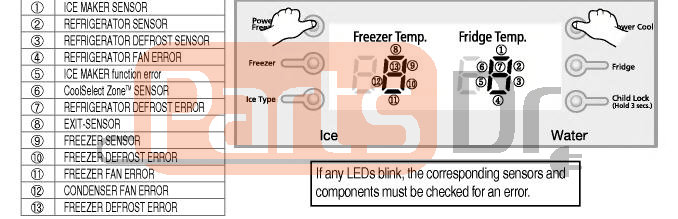
Samsung refrigerators display error codes for specific problems. Find the error code on the control panel or in the user manual. Each code points to a particular issue like temperature or sensor faults. Use the code to guide your repair steps. Clearing the error code after fixing the issue can stop the blinking light. Error codes make diagnosing easier and faster.
Using Samsung Support Resources
Samsung offers online tools and manuals for troubleshooting. Visit Samsung’s official website for guides and FAQs. Use the Samsung SmartThings app to monitor and control the fridge. Contact Samsung support for expert advice and service options. These resources provide reliable help and clear instructions. They save time and ensure proper repair steps.
Frequently Asked Questions
How Do I Get My Samsung Refrigerator To Stop Blinking?
To stop your Samsung refrigerator from blinking, reset the control panel by unplugging it for 5 minutes. Plug it back in and check. If blinking continues, press and hold the Power Cool and Power Freeze buttons simultaneously for 10 seconds.
Contact Samsung support if the issue persists.
How To Fix A Blinking Refrigerator Light?
Unplug the refrigerator for five minutes, then plug it back in to reset the control board. Check and replace faulty bulbs or switches. Ensure the door switches work properly. If blinking persists, consult a technician for electrical issues or control board replacement.
How To Get Samsung Fridge To Stop Blinking After Power Outage?
Press and hold the Power Cool and Power Freeze buttons simultaneously for 10 seconds to reset the Samsung fridge. Wait a few minutes for the blinking to stop. Unplugging the fridge for 5 minutes can also help reset the system after a power outage.
How Do I Reset The Control Panel On My Samsung Refrigerator?
To reset your Samsung refrigerator control panel, press and hold the Power Freeze and Power Cool buttons together for 10 seconds. Wait a few minutes for the panel to reboot. For Family Hub models, flip the power switch inside the upper right door to reset the screen.
Why Is My Samsung Refrigerator Light Blinking?
A blinking light usually signals a temperature or filter issue. It can also mean the door is not fully closed. Check these first to identify the cause.
Conclusion
Stopping the blinking light on your Samsung refrigerator is simple. First, identify the cause by checking the filter or temperature settings. Next, try resetting the control panel or unplugging the fridge for a few minutes. These steps often fix the issue quickly.
Keep the fridge clean and maintain it regularly to avoid blinking lights. If the problem continues, note any error codes and contact Samsung support. A calm approach saves time and stress. Your fridge will run smoothly again soon.