
Is your Samsung refrigerator light blinking and leaving you puzzled? You’re not alone.
That small flickering light might seem like a minor annoyance, but it often signals that your fridge needs attention. Ignoring it could lead to bigger problems or spoil your food. You’ll discover what that blinking light really means, why it happens, and simple steps you can take to fix it quickly.
Keep reading to save time, avoid costly repairs, and keep your fridge running smoothly.
Causes Of Blinking Light
The blinking light on a Samsung refrigerator signals an issue needing attention. Understanding the causes helps diagnose the problem quickly. Several factors can trigger the blinking, from simple sensor errors to complex software glitches.
Identifying the exact reason behind the blinking light can save time and prevent further damage. Below are the common causes that explain why the light flashes.
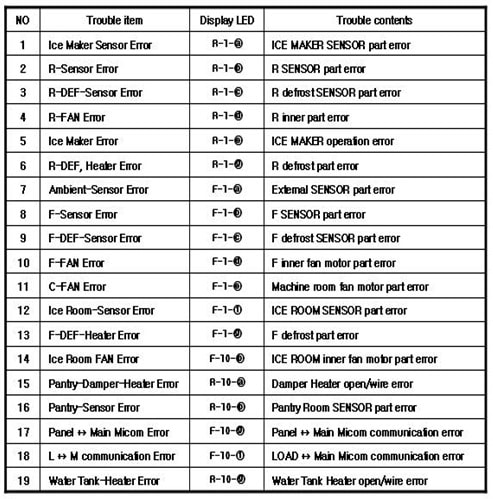
Error Codes And What They Mean
The blinking light often represents an error code. Samsung refrigerators use these codes to show specific problems. Each pattern or number of blinks points to a different issue.
For example, a certain blink sequence may mean a temperature sensor fault. Another may indicate a cooling system problem. Checking the user manual or Samsung’s website can clarify these codes.
Faulty Door Sensor Issues
The door sensor controls the interior light and cooling cycle. If the sensor fails, the light may blink to alert you. Sometimes the door does not close properly, causing the sensor to send false signals.
A dirty or damaged sensor can also cause blinking. Cleaning or replacing the sensor often stops the blinking light. This fix ensures the door status is correctly detected.
Software Glitches And Bugs
Modern Samsung refrigerators run on software to manage functions. Occasionally, bugs in the system cause the light to blink. These glitches may happen after updates or power surges.
Resetting the refrigerator’s control board can clear the software errors. This step often stops the blinking without the need for repair. Keeping the software updated helps prevent such glitches.
Power Interruptions And Resets
Power outages or sudden resets can trigger the blinking light. When electricity returns, the refrigerator may enter a warning mode. This blinking warns you the system is restarting or needs a reset.
Unplugging the fridge for a few minutes and plugging it back in can fix this. The reset allows the refrigerator to reboot and stop blinking. Consistent power supply prevents these interruptions.
Quick Fixes To Try
When the light on your Samsung refrigerator starts blinking, it can feel confusing. Simple steps often fix this issue quickly. Trying these quick fixes can save time and avoid calls to a technician.
Power Cycling The Refrigerator
Power cycling means turning off the fridge and unplugging it. Wait for about five minutes to let it reset. Plug it back in and switch it on. This simple step can clear minor glitches causing the light to blink.
Checking And Resetting Door Sensors
Door sensors tell the fridge if the door is open or closed. Check if the sensors are dirty or blocked. Clean them gently with a soft cloth. Open and close the door several times to reset the sensor. This can stop the blinking light if the sensor was the problem.
Updating Firmware And Software
Samsung refrigerators sometimes need software updates. Check your fridge model on the Samsung website for updates. Follow the instructions to update the firmware. Updated software can fix bugs that cause the light to blink.
Inspecting And Replacing Light Bulbs
The blinking light might be a sign of a faulty bulb. Turn off and unplug the fridge before checking. Remove the light cover and inspect the bulb for damage. Replace the bulb with a new one if needed. A new bulb often stops the blinking immediately.
Ice Maker Light Blinking
The ice maker light blinking on your Samsung refrigerator signals a potential issue. It usually means the ice maker needs attention. This blinking light can indicate a need to reset or clear blockages. Understanding how to fix it helps keep ice production smooth and steady.
Open the freezer door to find the ice maker unit. Look for a small blue or white button on the side or bottom. This is the reset or test button. Its position varies by model but is usually easy to spot.
Performing The Ice Maker Reset
Press and hold the reset button for about 10 seconds. Release the button and wait for the ice maker to start its cycle. This process can take several minutes. The blinking light should stop once the reset works.
Clearing Ice Blockages
Remove the ice tray carefully from the freezer. Check for any ice buildup blocking the mechanism. Clear out any ice or frost that blocks movement. Blockages often cause the blinking light to stay on.
When To Call For Repair
The blinking light may persist after reset and clearing blockages. Strange noises or no ice production are warning signs. Call a professional technician if problems continue. Avoid DIY fixes beyond simple resets to prevent damage.
Temperature Display Blinking
The temperature display blinking on your Samsung refrigerator signals a possible issue with the cooling system or temperature settings. This blinking alert helps you identify problems early, preventing food spoilage. Understanding why the temperature display blinks is crucial for quick troubleshooting and efficient fridge operation.
Causes Behind Temperature Alerts
The blinking temperature display often means the fridge is too warm or too cold. It may signal a power outage or a recent door opening for a long time. Sometimes, the sensor detecting temperature might be faulty. This alert helps avoid spoiled food and keeps your fridge running smoothly.
Ensuring Proper Door Closure
Check if the fridge door closes tightly. A door left slightly open causes temperature changes and blinking alerts. Clean the door seals to ensure a firm seal. Replace worn or damaged gaskets to prevent cold air loss. A properly closed door keeps the fridge cool and stops the temperature light from blinking.
Adjusting Temperature Settings
Verify the current temperature settings inside the fridge and freezer. The ideal temperature for the fridge is 37°F (3°C), and the freezer should be at 0°F (-18°C). If the settings are too high or low, adjust them using the control panel. Correct temperature settings reduce blinking and maintain food freshness.
Checking Cooling System
Inspect the cooling system for blockages or dust on the condenser coils. Dirty coils reduce cooling efficiency and cause temperature fluctuations. Clear any obstructions inside the fridge vents for proper air circulation. If the compressor or fan is faulty, contact a professional technician. A healthy cooling system keeps the temperature stable and the display steady.
When To Seek Professional Help
Knowing when to seek professional help for a blinking Samsung refrigerator light saves time and prevents damage. Some issues need expert diagnosis and repair to keep your fridge running smoothly. Watch for signs that simple fixes do not solve the problem.
Persistent Blinking After Fixes
Sometimes the light keeps blinking even after you try basic fixes. Resetting the fridge or replacing the bulb might not stop the blinking. This persistence often points to deeper electrical or sensor problems inside the fridge. Professional technicians can test and fix these hidden issues safely.
Signs Of Component Failure
Flickering light can signal failing parts like the control board or sensor. Strange noises, temperature changes, or error codes on the display often appear with component failure. These signs mean the fridge needs a thorough inspection. Avoid trying to fix electrical parts yourself to prevent accidents.
Samsung offers authorized service centers with trained technicians. They use original parts and follow official repair guidelines. Searching for an authorized center near you ensures quality service and keeps your warranty intact. Check Samsung’s website or customer support for the nearest location.
Warranty And Repair Costs
Check your refrigerator’s warranty before calling for repairs. Many repairs may be covered if the fridge is still under warranty. Out-of-warranty repairs can be costly, depending on the part and labor. Getting an estimate from an authorized service provider helps plan your budget.
Frequently Asked Questions
How Do You Reset A Samsung Refrigerator After A Power Outage?
Restore power to your Samsung refrigerator. Press and hold the power or reset button for 10 seconds. Wait for the display to restart. If needed, unplug the fridge for 5 minutes, then plug it back in to complete the reset after a power outage.
How To Fix A Blinking Refrigerator Light?
Unplug the refrigerator to reset its electronics. Check and replace any faulty door switches or sensors. Clean the light bulb socket and replace a flickering bulb. If blinking persists, consult a professional technician to inspect internal components or control boards.
How Long Does It Take For A Samsung Ice Maker To Reset?
Press and hold the ice maker’s reset button for 10 seconds. The ice maker resets and starts producing ice within 6 hours.
Why Is My Samsung Blinking?
Your Samsung blinks due to software glitches, error codes, or faulty sensors. Update software and check door sensors to fix it.
Why Is My Samsung Refrigerator Light Blinking?
A blinking light often signals a problem with temperature or door sensors. It can also mean the fridge is in demo mode or has a power issue.
Conclusion
A blinking light on your Samsung refrigerator often signals a minor issue. Checking the door seal and resetting the fridge can solve many problems. Keep the vents clear for proper airflow and avoid overloading shelves. Regular cleaning helps maintain the fridge’s performance.
If blinking continues, consult the user manual or contact a technician. Small fixes often prevent bigger repairs later. Stay attentive to these signals to keep your fridge running smoothly. Simple steps can save time and money in the long run.









