
Is your Samsung refrigerator’s temperature display blinking, leaving you worried about your food’s safety? You’re not alone.
This blinking light can be more than just a minor annoyance—it’s your fridge’s way of signaling that something needs your attention. Whether it’s a simple temperature setting issue or a sign of a deeper mechanical problem, understanding why your Samsung fridge temp is blinking is the first step to fixing it quickly.
Keep reading, and you’ll discover easy troubleshooting tips and clear solutions to get your refrigerator back to perfect cooling, so you can protect your groceries and enjoy peace of mind.
Causes Of Temp Light Blinking
The blinking temperature light on a Samsung refrigerator signals an issue inside the appliance. This blinking warns users that something is not working correctly. Understanding the causes helps in quick troubleshooting and prevents food spoilage.
Several common problems trigger the temp light to blink. These issues range from simple door problems to complex mechanical faults. Each cause affects the fridge’s ability to maintain the right temperature.
Door Seal Issues
Door seals keep cold air inside the fridge. If seals are damaged or dirty, cold air escapes. This forces the fridge to work harder to maintain temperature. The temp light blinks to show the fridge struggles to stay cool.
Temperature Sensor Faults
The temperature sensor monitors the fridge’s internal temperature. A faulty sensor sends wrong readings to the control board. This causes the fridge to overcool or stop cooling. The blinking temp light warns of sensor problems.
Compressor And Inverter Problems
The compressor and inverter work together to cool the fridge. If either part fails, the fridge cannot keep food cold. The compressor may stop running or run irregularly. The temp light blinks to signal these mechanical issues.
Evaporator Fan Malfunctions
The evaporator fan circulates cold air inside the fridge. A broken fan causes uneven cooling or warm spots. This triggers the temp light to blink as the fridge detects temperature problems. Fan issues need quick repair to avoid food spoilage.

Quick Reset Methods
Quick reset methods offer a fast and simple way to stop the Samsung refrigerator fridge temp blinking issue. These resets clear minor glitches in the fridge’s control system. By doing this, the temperature display often returns to normal. These methods do not require special tools or technical skills. Most users can perform them at home.
Soft Reset Steps
Locate the control panel inside the fridge or on the door. Press and hold the Power Cool button for about 5 seconds. The display will turn off and then turn back on. This action resets the temperature controls without unplugging the fridge. Wait a few minutes for the fridge to stabilize. Check if the temperature display stops blinking. Repeat if needed.
Hard Reset Via Power Cycle
Unplug the fridge from the power outlet. Leave it unplugged for 5 minutes to clear the memory. Plug the fridge back in and turn it on. This hard reset restarts the fridge’s entire control board. Wait for the temperature display to stabilize. Check if the blinking has stopped. This method works well for many Samsung models.
Adjusting Temperature Settings
Adjusting the temperature settings on your Samsung refrigerator helps keep your food fresh. The fridge temp blinking often signals a need to check or change these settings. Correct temperature ensures efficient cooling and energy use. Each model has specific ways to adjust the temperature. Understanding these can solve many common issues quickly.
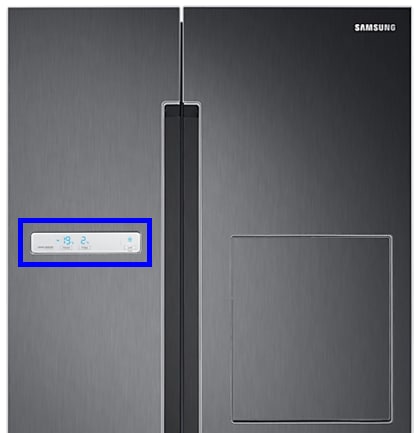
The control panel is the primary place to set your fridge’s temperature. Locate the buttons labeled “Fridge” or “Freezer” on the panel. Press these buttons repeatedly to change the temperature. The display will show the current setting as you adjust it. Stop pressing once you reach the desired temperature. This method works for most Samsung refrigerators.
Power Cool And Power Freeze Functions
Power Cool and Power Freeze speed up the cooling process. Hold the “Fridge” button for Power Cool to quickly chill items. Hold the “Freezer” button for Power Freeze to freeze food faster. These functions help when you add many groceries at once. They automatically return to normal mode after a few hours. Use them to keep your food fresh without manual temperature changes.
Setting Temp On Family Hub Models
Family Hub models have touchscreen controls for easy temperature adjustments. Tap the fridge or freezer icon on the screen to open settings. Use the slider or plus/minus buttons to set temperatures. The screen shows real-time temperature updates. You can also control the fridge remotely using the Samsung app. This makes managing temperature simple and convenient.

Troubleshooting When Blinking Persists
The blinking temperature on a Samsung refrigerator can signal ongoing issues. Troubleshooting helps find the root cause. Persistent blinking means the fridge needs a closer look. Simple checks often solve common problems. This section covers key steps to fix the blinking temp display.
Checking Door Seals And Gaskets
Start by inspecting the door seals and gaskets. Dirty or damaged seals let cold air escape. This makes the fridge work harder and causes temperature errors. Clean seals with warm, soapy water. Replace any cracked or torn gaskets. Proper sealing keeps the fridge cold and stable.
Testing Cooling Performance
Next, test the fridge’s cooling ability. Set the temperature and wait several hours. Check if the inside feels cold enough. Use a thermometer for accuracy. Poor cooling may cause the temperature display to blink. Make sure vents are clear and the fridge is not overloaded. Good airflow supports consistent cooling.
Identifying Compressor Failure
The compressor pumps refrigerant to keep the fridge cold. A failing compressor leads to blinking temperature alerts. Listen for unusual noises or constant running. If the fridge is warm inside, the compressor might be faulty. Professional repair or replacement may be needed. Early detection prevents further damage.
When To Call A Professional
Knowing when to call a professional for your Samsung refrigerator is key. Some blinking temperature issues signal simple fixes. Others hint at deeper mechanical or electrical problems. Acting at the right time can save money and prevent food spoilage.
Attempting complex repairs without experience can cause damage. Certified technicians have tools and knowledge for safe, effective service. If basic troubleshooting does not stop the blinking, professional help is the best choice.
Signs Of Electrical Component Failure
Frequent blinking of the temperature display may indicate electrical issues. Look for flickering lights or unusual noises. The fridge may fail to cool properly. If the appliance turns on and off randomly, electrical parts might be faulty. These symptoms require expert diagnosis and repair to ensure safety and proper function.
Repair Options For Compressor Issues
The compressor controls cooling inside the fridge. A damaged compressor can cause temperature blinking. Signs include loud humming or no cooling at all. Repairing or replacing the compressor is complex. Professionals can test the compressor and handle refrigerant safely. DIY attempts often lead to more harm and cost.
Service For Sensor And Fan Repairs
Sensors and fans regulate temperature and airflow inside the fridge. Faulty sensors can cause blinking temperature alerts. Fans that stop working lead to uneven cooling. Professional technicians can test sensor accuracy and fan operation. They also replace broken parts to restore proper cooling performance.
Frequently Asked Questions
Why Is My Samsung Fridge Blinking The Temperature?
Your Samsung fridge blinks temperature to alert you of door issues, temperature changes, or cooling problems. Check door seals and settings. Persistent blinking may indicate compressor or inverter failure, needing professional repair.
Why Is My Samsung Refrigerator Blinking 85c?
Your Samsung refrigerator blinking 85C indicates a temperature sensor error. Check door seals and reset the fridge. Persistent blinking may need professional repair.
How Do I Reset My Samsung Fridge Temperature?
To reset your Samsung fridge temperature, locate the control panel. Press the Fridge or Freezer button repeatedly until the desired temperature appears. For a full reset, unplug the fridge for 5 minutes, then plug it back in. This clears settings and resets the temperature controls.
How To Reset Samsung Fridge Temperature Display?
Press and hold the Fridge and Freezer buttons simultaneously for 10 seconds. The temperature display will reset. Unplug the fridge for 5 minutes to perform a hard reset if needed. Adjust temperature settings after the reset to desired levels.
Why Is My Samsung Fridge Temperature Blinking?
A blinking temperature usually signals a temperature error or sensor issue. It means the fridge is not at the correct temperature. Immediate attention helps avoid food spoilage.
Conclusion
A blinking temperature on your Samsung fridge signals an issue needing attention. Check for common causes like door gaps, power fluctuations, or sensor problems. Resetting the fridge often resolves blinking displays quickly. Keep the temperature settings within recommended ranges for best performance.
Regular maintenance helps prevent future blinking alerts. Follow simple steps to fix the problem yourself before calling a technician. This keeps your fridge running smoothly and your food fresh longer. Stay calm, act fast, and enjoy a well-working Samsung refrigerator every day.









