
Is your Geek Bar blinking but not dead? That flashing light can be confusing and frustrating, especially when you’re trying to enjoy your vape without interruptions.
You might wonder if your device is broken or if there’s a simple fix you’re missing. The good news is that a blinking Geek Bar doesn’t always mean it’s dead. In fact, many common reasons behind that blinking light are easy to troubleshoot—like taking shorter puffs or checking the battery status.
Keep reading, and you’ll learn exactly why your Geek Bar is blinking, how to fix it quickly, and when it’s time to say goodbye. Don’t let a blinking light stop your vaping experience—let’s get your device back to working smoothly!

Reasons For Blinking Lights
Seeing your Geek Bar blink can cause worry but it does not always mean the device is dead. Blinking lights serve as signals for various internal conditions. Understanding these signals helps in knowing the device’s status and what actions to take.
The blinking usually indicates a protective or alert mode. These modes prevent damage and ensure user safety. Below are common reasons why your Geek Bar might blink but still work.
Puff Limiter Activation
The Geek Bar has a built-in puff limiter to stop long puffs. Taking a puff that lasts too long triggers the blinking light. This is to protect the battery and device from overheating. Shorter puffs usually stop the blinking and allow normal use.
Low Battery Signals
A blinking light often warns of a low battery. When the power runs low, the light flashes to alert you. Rechargeable models need charging to continue working. For disposable types, it may mean the end of life soon.
Overheating Protection
The device blinks to signal overheating. This happens if you use it continuously without breaks. The blinking light activates a safety cut-off to cool down. Waiting a few minutes usually resets the device to normal.
Water Or Impact Damage
Water exposure or dropping the device can cause blinking lights. These signals warn of internal damage or short circuits. Such damage might make the device unsafe or stop it from working. In this case, replacement is often necessary.
Basic Troubleshooting Steps
When your Geek Bar blinks but does not die, simple troubleshooting helps. These steps fix most common issues fast. Follow these easy tips to bring your device back to life. No need to stress or discard it too soon.
Charging Rechargeable Models
Rechargeable Geek Bars need enough power to work properly. Connect your device to the charger using the original cable. Charge it fully before testing again. A low battery often causes blinking lights. Regular charging keeps your device healthy and ready.
Taking Shorter Puffs
Long puffs can trigger the device’s safety timer. This causes the light to flash and stops vapor. Try shorter, quicker puffs instead. This prevents overheating and keeps the device working smoothly. Short puffs extend battery life too.
Checking For Airflow Blockages
Blockages in the airflow path reduce vapor and cause blinking. Remove the mouthpiece and inspect for debris or dust. Blow gently into the device to clear any blockages. Clean airflow ensures good vapor and proper function.
Clearing Coil Clogs
Coil clogs stop vapor flow and cause flashing lights. Gently tap the device to loosen clogs inside. Inhale softly without activating the battery to help clear the coil. Regular cleaning prevents build-up and keeps your Geek Bar working well.
Fixes For Specific Issues
Fixing specific issues with your Geek Bar can bring it back to normal use quickly. Understanding common problems helps you apply the right solutions. Each issue needs a different approach for the best results.
Red Light Flashing Causes
A flashing red light often signals low battery. Recharge your device if it supports charging. Long puffs can also trigger the red light. This happens because the device tries to prevent overheating. Take shorter puffs to stop the flashing light. Sometimes, water damage or drops cause errors that flash red. In those cases, the device might be unusable.
Device Not Hitting Vapor
If your Geek Bar does not produce vapor, check the battery first. Rechargeable models need power to work properly. Next, look for blockages in the mouthpiece or airflow. Clear clogs by gently blowing through the device. Make sure you are inhaling with steady, moderate force. Loose or dirty connections can also stop vapor production.
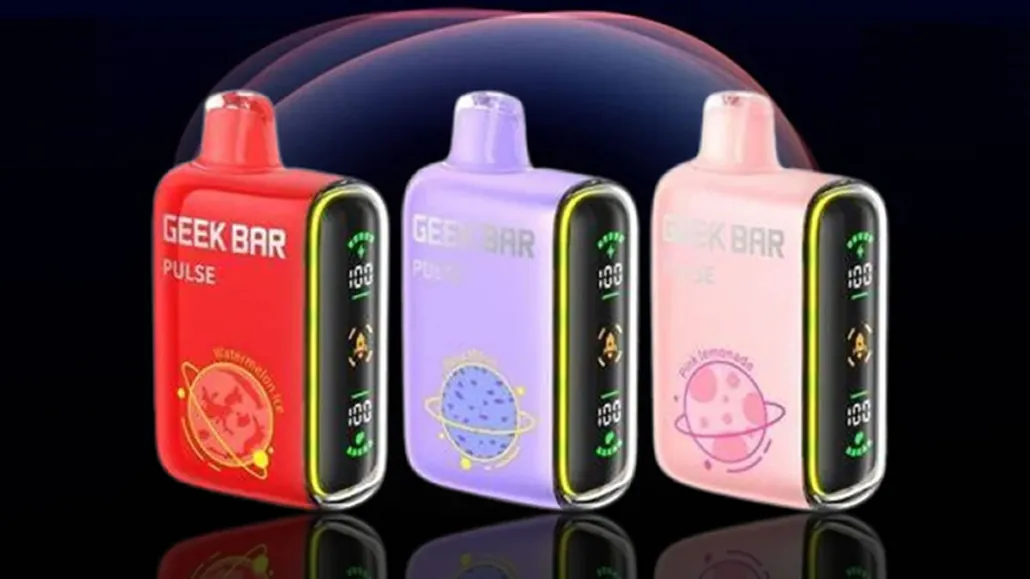
Resetting Geek Bar Pulse Models
Most disposable Geek Bars cannot be fully reset. Pulse models with rechargeable batteries can sometimes be refreshed by charging. Disconnect the device from power after a full charge. Taking short puffs may help clear minor errors. There is no factory reset button or special reset method for these devices.
Securing Mouthpiece Connections
Loose mouthpieces cause poor contact and no vapor. Remove the mouthpiece and reattach it firmly. Check for dirt or moisture on the connection points. Clean the area with a dry cloth if needed. A secure fit ensures the device works as intended. Avoid using excessive force when attaching the mouthpiece.
When To Replace Your Geek Bar
Knowing when to replace your Geek Bar is key to a smooth vaping experience. Some issues hint that your device needs replacement rather than repair. Early recognition of these signs saves time and frustration. Below are common situations that signal replacement is necessary.
Persistent Red Light After Troubleshooting
A red light usually warns of a problem. If it stays red after trying simple fixes, the device may be dead. Charging rechargeable models can help but disposable ones cannot be revived. Continuous red blinking means internal damage or battery failure. Using the device further risks safety and performance.
Damage From Water Or Drops
Water exposure often causes permanent damage to electronic parts. Dropping the Geek Bar can also break internal components. Cracks, loose parts, or moisture inside the device reduce function. Such damage cannot be fixed at home. Replacing the device is the safest choice.
End Of Disposable Device Life
Disposable Geek Bars have a limited puff count. Once the flavor fades or vapor weakens, the device is near its end. No amount of troubleshooting can restore full performance. Using the device beyond this point leads to a poor experience. It is time to replace the disposable unit.
Tips For Preventing Future Problems
Preventing future problems with your Geek Bar helps ensure smooth vaping. Simple habits keep your device working well longer. Small changes make a big difference in avoiding blinking or cutoff issues. Follow these tips to maintain your Geek Bar’s performance and extend its life.
Proper Puffing Techniques
Take short puffs instead of long inhales. Long puffs can trigger the built-in timer and cause blinking. Avoid holding the button or inhaling for more than a few seconds. Puff slowly and gently to let the device keep up with your inhalation. This reduces stress on the battery and heating element.
Avoiding Overuse And Overheating
Give your Geek Bar breaks between puffs. Continuous use heats the device, risking damage. Overheating can cause the light to blink and shut off temporarily. Use the device in moderation to prevent heat buildup. Allow time for the device to cool down after several puffs.
Regular Cleaning And Maintenance
Keep the mouthpiece clean and clear of debris. Blockages can cause poor airflow and blinking issues. Use a soft cloth or cotton swab to remove residue regularly. Avoid moisture inside the device to prevent short circuits. Proper cleaning helps your Geek Bar work efficiently without errors.
Disposal And Recycling Guidelines
Proper disposal and recycling of your Geek Bar device protect the environment and community health. These guidelines help you handle blinking but not dead devices safely. Understanding the right steps reduces waste and prevents pollution.
Safe Disposal Methods
Do not throw your Geek Bar in regular trash bins. The battery and chemicals inside can leak and harm the environment. Instead, place the device in a sealed plastic bag to avoid spills. Take it to a designated electronic waste drop-off point. Avoid breaking or puncturing the device to prevent fire risks. Follow local laws about disposing of electronic cigarettes.
Recycling Options In Austin, Texas
Austin offers several recycling centers for electronic waste. Many vape shops accept used Geek Bars for recycling. Check with local vape stores for collection programs. The Austin Resource Recovery Center also handles electronic waste safely. Use their website or call to find drop-off locations near you. Recycling keeps harmful materials out of landfills and recovers valuable resources.
Environmental Considerations
Improper disposal of vape devices can pollute soil and water. Chemicals in batteries can harm plants and animals. Recycling helps reduce mining for new materials and lowers carbon emissions. Choosing to recycle supports a cleaner community. Small actions like this add up to big environmental benefits. Think about the impact before discarding your Geek Bar.
Frequently Asked Questions
Why Is My Geek Bar Blinking But Not Dead?
Your Geek Bar blinks due to long puffs triggering the built-in timer or low battery. Take shorter puffs and charge if rechargeable. Persistent blinking may indicate device error or damage, requiring replacement.
How To Factory Reset Geek Bar?
You cannot factory reset a disposable Geek Bar. For rechargeable models like Pulse, try charging it or toggling the on/off switch. If issues persist, replace or recycle the device.
How To Fix A Geek Bar Vape That Won’t Hit?
Check for airway blockages and remove stickers or debris. Recharge the battery if low. Clear coil clogs gently with a paperclip or by blowing air. For Geek Bar Pulse, flip the on/off switch to reset. Replace the device if issues persist.
Why Is My Vape Flashing When It’s Not Dead?
Your vape flashes to warn about long puffs triggering the built-in timer or low battery. Try shorter puffs or recharge if possible.
Why Is My Geek Bar Blinking But Not Dead?
A blinking Geek Bar usually signals a built-in safety limit triggered by long puffs. Taking shorter puffs helps avoid this blinking and prevents device cutoffs. This blinking does not always mean the device is dead.
Conclusion
A blinking Geek Bar does not always mean it is dead. Shorter puffs often stop the blinking red light. Charging rechargeable models can fix low battery issues. Check for clogs or loose parts to improve performance. Persistent blinking after these steps may mean it’s time to recycle the device.
Proper care helps your Geek Bar last longer and work better. Stay aware of how you use it to avoid common problems. Simple fixes can keep your vaping experience smooth and safe.









