
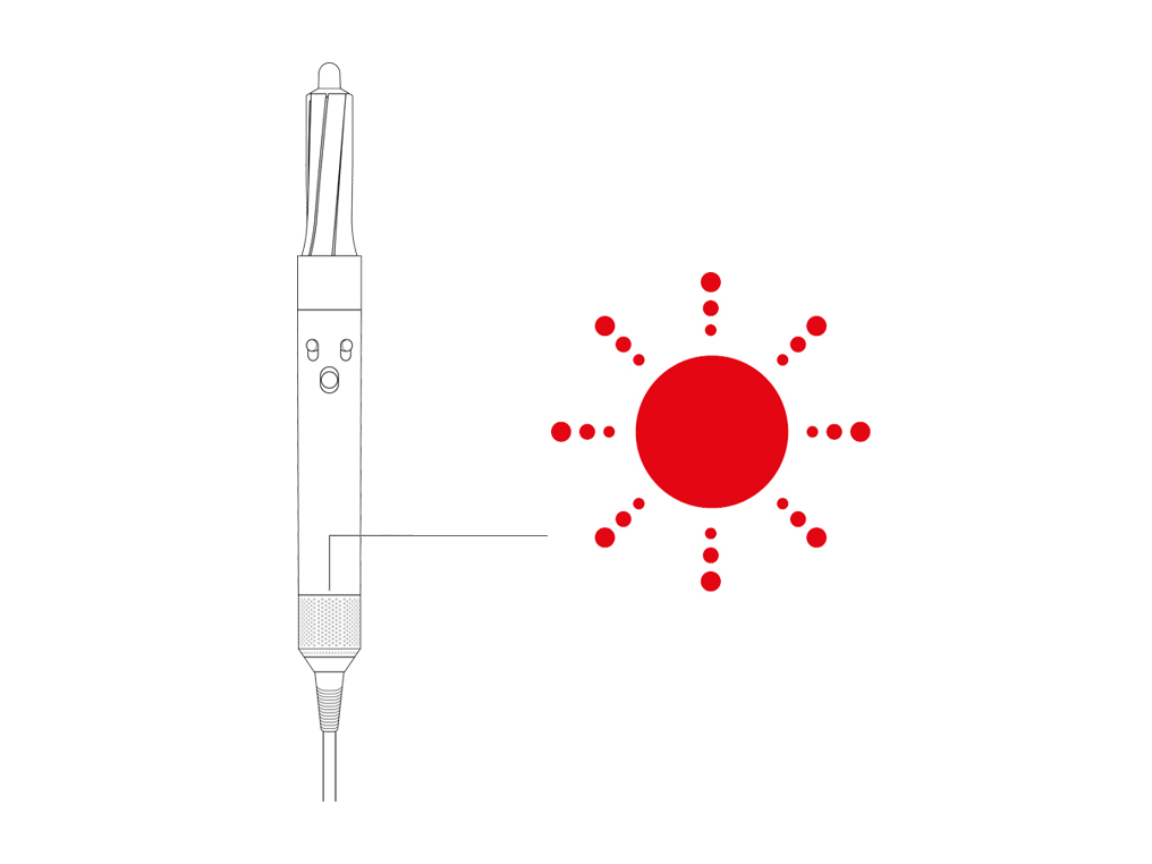
Is your Dyson Airwrap blinking a red light and leaving you puzzled? You’re not alone, and the good news is—it’s usually a simple fix.
That blinking red light is your Airwrap’s way of telling you it needs a little attention, often related to a dirty filter or overheating. You’ll discover easy steps to get your Airwrap back to perfect working order, so you can stop worrying and start styling again.
Keep reading—your Dyson will thank you!

Red Light Causes
The Dyson Airwrap blinking red light warns of a problem. This alert helps prevent damage and keeps your device working well. Understanding the red light causes can save time and avoid frustration. Here are the main reasons the red light appears.
Filter Blockage
The most common cause is a blocked filter. Dust and hair can clog it over time. A clogged filter blocks airflow and causes the device to work harder. This triggers the red light to blink. Cleaning the filter regularly avoids this problem. Remove the filter and rinse it under cold water. Let it dry completely before reinstalling.
Overheating Issues
Overheating is another reason for the red light. The Airwrap has safety sensors to stop damage from heat. Overheating happens if the airflow is blocked or the device runs too long. The red light blinks to warn you. Turn off the Airwrap and let it cool down fully. Avoid using it continuously for long periods.
Internal Faults
Sometimes, internal faults cause the red light to blink. These faults can be electrical or mechanical. They need professional attention from Dyson service. If cleaning and cooling do not fix the light, contact support. Do not try to open the device yourself. Proper repair keeps your Airwrap safe and working well.
Cleaning The Filter
Cleaning the filter of your Dyson Airwrap is essential to stop the blinking red light. A clogged filter blocks airflow and causes the device to overheat. Regular cleaning keeps your Airwrap working smoothly and extends its lifespan. Follow these simple steps for proper filter care.
Removing The Magnetic Filter Cage
First, turn off your Dyson Airwrap and unplug it. Locate the magnetic filter cage at the base of the device. Gently twist the cage counterclockwise to unlock it. Carefully pull the cage away from the machine. This exposes the filter for cleaning. Handle the parts with care to avoid damage.
Washing And Drying Tips
Rinse the filter cage under warm running water. Avoid using soap or detergent as it may damage the filter. Use your fingers to remove dust and debris. Shake off excess water gently. Let the filter cage air dry completely before reassembling. Drying can take up to 24 hours. Never use a hairdryer or heat source to speed drying.
Avoiding Moisture Damage
Keep the filter cage away from moisture during cleaning and storage. Do not operate the Airwrap with a wet filter. Moisture inside the device can cause electrical faults. Always ensure the filter is fully dry before use. Store the filter cage separately if needed to protect it from humidity. Proper care prevents damage and keeps your Airwrap safe.
Checking For Blockages
Checking for blockages is the first step to fix the Dyson Airwrap blinking red light. Blockages can cause the device to overheat or stop working properly. Clearing these blockages helps your Airwrap run smoothly and last longer.
Follow these simple checks to find and remove any debris or hair stuck inside the tool.
Inspecting The Barrel
Start by removing the barrel from the main unit. Look inside the barrel carefully. Check for any hair strands or dust that may block airflow. Use a soft brush or cloth to clean the inside gently. Make sure the barrel is dry before reattaching.
Clearing Hair And Lint
Hair and lint often gather around the motor and vents. Turn off and unplug the Airwrap first. Use a small brush or tweezers to pull out tangled hair and lint. Avoid pushing debris deeper inside the device. Clean these areas regularly to keep your Airwrap working well.
Attachment Points Review
Check the connection points between attachments and the main body. Dirt or hair can block these spots and cause errors. Wipe the attachment points with a dry cloth. Ensure attachments click securely in place. Proper fit prevents blockages and blinking red lights.
Cooling Down The Device
The Dyson Airwrap may blink a red light to signal overheating. Cooling down the device is crucial to protect its motor and extend its life. Understanding the correct cool down process helps avoid damage and keeps your Airwrap working well.
Proper Cool Down Time
After use, switch off the Dyson Airwrap immediately. Let it sit untouched for at least 10 minutes. This pause allows the motor and internal parts to cool naturally. Avoid storing or covering the device during this time. Cooling prevents overheating and stops the red light from blinking again.
Safe Restart Practices
Only turn the Airwrap back on after it has fully cooled. Press the power button gently to restart. If the red light blinks again, switch off and wait longer. Repeated overheating can harm the device. Use the Airwrap in short sessions to avoid frequent overheating.
Resetting The Airwrap
Resetting your Dyson Airwrap is a useful step to fix issues like the blinking red light. This process can clear errors and restore normal function. It is simple and can be done at home without special tools.
Knowing how to reset helps keep your Airwrap working well. Below are clear steps to perform a factory reset and to recognize reset signals during the process.
Performing A Factory Reset
Start by turning on the Airwrap. Press and hold the power button for about 10 seconds. You will hear a double motor pulse sound. Release the power button immediately after the sound.
Next, quickly slide the power button up and release it. The blue LED lights will turn off. This means the reset process has started. Wait until the LEDs pulse again. The pulsing shows the reset is complete.
After this, switch off your Airwrap and then turn it back on. Your device should work without the red blinking light.
Recognizing Reset Signals
During the reset, the Airwrap uses light and sound signals. The double motor pulse sound confirms the start. When the blue LEDs turn off, the reset is in progress.
Once the LEDs start pulsing slowly, the reset is finished. If the red light stops blinking, the reset worked.
Understanding these signals helps you know the reset status. It avoids confusion and unnecessary troubleshooting steps.

When To Contact Support
The Dyson Airwrap blinking red light often signals a problem requiring expert help. Knowing when to contact support saves time and prevents further damage. Some issues you can fix yourself, but others need professional attention.
Watch for signs that the Airwrap has internal faults. These indicate a deeper problem beyond simple cleaning or resetting. Contacting support early can protect your device and ensure safe use.
Signs Of Internal Faults
Continuous red blinking even after cleaning the filter is a warning. The device may shut off suddenly during use without overheating. Strange noises or burning smells also indicate internal faults. These symptoms mean the Airwrap needs professional diagnosis. Avoid using it to prevent damage or hazards.
Warranty And Repair Options
Dyson offers warranty coverage for Airwrap devices. Check if your product is still under warranty before contacting support. If so, repairs or replacements are often free. Dyson’s repair service uses original parts to keep your device safe and effective. Contact Dyson support through their official website or phone number for help. Keep your purchase receipt handy to speed up the process.
Preventive Maintenance
Preventive maintenance keeps your Dyson Airwrap working smoothly. It stops the blinking red light problem by avoiding common issues. Simple care routines extend the life of your device. Follow these steps to protect your investment and enjoy consistent styling results.
Regular Filter Cleaning
Cleaning the filter regularly prevents blockages that cause overheating. Turn off and unplug the Airwrap before cleaning. Remove the filter cover carefully. Rinse the filter under cold water until clear. Let it dry completely before reinstalling. Clean the filter every few weeks for best performance.
Proper Usage Tips
Use the Airwrap as directed in the manual. Avoid using it on wet hair to reduce strain. Do not cover the air intakes during use. Keep hair and debris away from the vents. Turn off the device immediately if it feels hot. Following these tips prevents motor stress and blinking red lights.
Storage Best Practices
Store the Dyson Airwrap in a dry, cool place. Avoid leaving it in direct sunlight or humid areas. Keep all attachments together in a storage case. Coil the cord loosely to prevent damage. Proper storage protects the internal parts and prevents malfunctions. Safe storage helps maintain the device’s long-term health.
Frequently Asked Questions
Why Does My Dyson Airwrap Keep Blinking Red?
Your Dyson Airwrap blinks red due to a clogged filter or overheating. Clean and dry the filter thoroughly. Remove any hair or debris from attachments. Let the device cool before restarting. Contact Dyson support if the red light persists after troubleshooting.
Why Does My Dyson Keep Turning Off And Flashing A Red Light?
Your Dyson turns off and flashes red due to overheating or a clogged filter. Clean and dry the filter thoroughly. Check for blockages in attachments. Let the device cool before restarting. Contact Dyson support if the issue persists.
Will Dyson Replace My Airwrap For Free?
Dyson replaces Airwraps free within the warranty if used correctly and they break down. Contact Dyson support for repairs or replacement.
How To Hard Reset Dyson Airwrap?
To hard reset Dyson Airwrap, press and release the power button after hearing the double motor pulse. Then, slide up and immediately release the power button. The blue LEDs will turn off and pulse again, indicating the factory reset is complete.
What Does A Blinking Red Light On Dyson Airwrap Mean?
A blinking red light usually signals overheating or a dirty filter. Check and clean the filter to fix this issue. Let the device cool down before using it again.
Conclusion
A blinking red light on your Dyson Airwrap usually means a filter or overheating issue. Clean the filter regularly to keep your device working well. Let the Airwrap cool down if it gets too hot. These simple steps can prevent interruptions during styling.
Keep an eye on your tool’s signals to avoid damage. Taking care of your Airwrap helps it last longer. Stay calm and follow these quick fixes to enjoy smooth styling again.









