
Is your Whirlpool washer’s lid lock blinking and leaving you stuck mid-cycle? You’re not alone.
When that little light starts flashing, it’s your washer’s way of telling you something’s off—often with the lid lock mechanism. This can stop your laundry routine in its tracks and cause real frustration. But don’t worry—understanding why the lid lock is blinking and how to fix it can save you time, money, and hassle.
You’ll discover simple, effective steps to troubleshoot and reset your Whirlpool washer’s lid lock, plus expert tips on when it’s time to call in a pro. Keep reading to get your washer back to working smoothly—because your laundry shouldn’t have to wait.
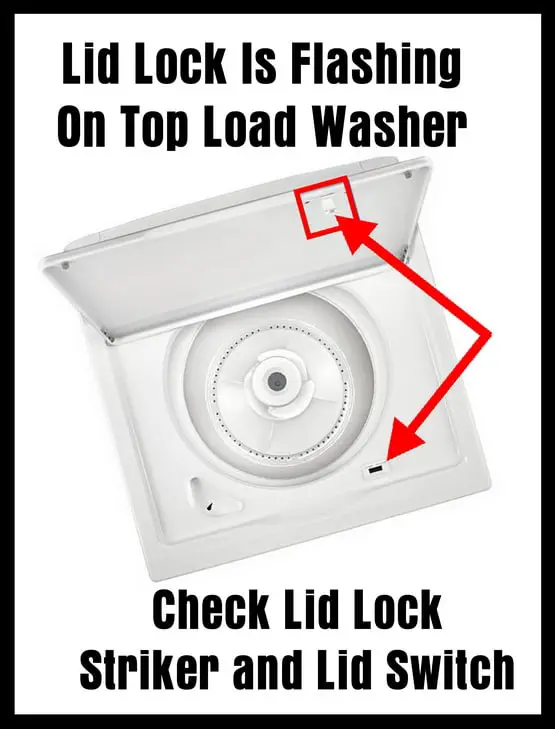
Causes Of Lid Lock Blinking
The blinking of the Whirlpool washer lid lock light signals an issue. Understanding the causes helps in quick troubleshooting. Several factors can trigger this blinking light. Identifying the exact cause saves time and effort.
Below are the main reasons your Whirlpool washer lid lock might be blinking.
Power Interruptions
Sudden power outages or fluctuations can confuse the washer’s control system. When power cuts off during a cycle, the lid lock light may blink. This blinking indicates the washer is trying to reset itself. A simple power cycle often clears this problem.
Faulty Lid Lock Assembly
The lid lock assembly physically locks the lid during operation. If this part is damaged or worn out, the light will blink. A broken lock assembly cannot secure the lid properly. Replacing the lid lock assembly usually fixes this issue.
Control Panel Glitches
The control panel manages the washer’s functions, including the lid lock. Sometimes, software glitches cause the blinking light. These glitches might happen after a power surge or long use. Resetting the control panel can help stop the blinking.
Door Switch Issues
The door switch detects if the lid is closed. A faulty switch may send wrong signals to the washer. This triggers the lid lock light to blink. Cleaning or replacing the door switch often resolves this problem.

Simple Power Reset
The Whirlpool washer lid lock blinking often signals an error in the locking mechanism. A simple power reset can clear minor glitches and restore normal function quickly. This method is easy and requires no special tools. Follow these steps to perform a power reset safely and effectively.
Unplugging The Washer
First, disconnect the washer from the power outlet. This cuts off all electrical power to the machine. Unplugging is safer than turning off the breaker and ensures a full reset.
Waiting Period
Wait for at least one minute before reconnecting the power. This pause allows the washer’s internal memory to clear any errors. It also lets the system cool down if overheated.
Plugging Back In
After the waiting time, plug the washer back into the power outlet. Make sure the connection is secure. Avoid using extension cords to prevent power issues.
Listening For Reset Click
Listen closely for a faint click sound. This click means the lid lock has reset. If you hear it, try starting a wash cycle to check if the blinking stops.
Control Panel Reset
Resetting the control panel can help fix the Whirlpool washer lid lock blinking issue. This process clears any electronic glitches causing the problem. A control panel reset is simple and safe to try before calling a technician. Follow these steps carefully to reset your washer’s control panel.
Not all Whirlpool washers have a dedicated reset button. Check the control panel for a small button labeled “Reset” or “Cancel.” It might be inside the detergent drawer or near the display. If your model lacks a reset button, use button combinations to reset the panel instead.
Press and hold specific buttons together to reset the control panel. Common combinations include “Start/Pause” and “Cancel” or “Power” and “Spin.” Hold them for 5 to 10 seconds until the lights flash or the panel resets. Refer to your model’s manual for exact buttons.
Confirming Reset
After resetting, the control panel lights should stop blinking. The washer may beep or show a normal display. Try starting a wash cycle to check if the lid lock works properly. If blinking continues, repeat the reset or consider other troubleshooting steps.
Advanced Recalibration
Advanced recalibration is a key process to fix the Whirlpool washer lid lock blinking issue. This process helps the washer recognize the lid lock status correctly. It resets internal sensors to avoid false error signals. Recalibration ensures smooth washer operation and stops the blinking light.
When To Recalibrate
Recalibrate the washer if the lid lock light keeps blinking. It is necessary after power outages or sudden stops. Also, recalibrate when the washer does not start properly. This step helps when the lid lock does not engage or release as expected.
Step-by-step Recalibration
First, unplug the washer from the power source. Wait for one minute to clear any residual power. Next, plug the washer back in and close the lid firmly. Press and hold the start button for about five seconds. Release the button and wait for the washer to beep. The blinking should stop, signaling a successful recalibration.
After Part Replacement
Recalibration is crucial after replacing lid lock parts. New parts may need syncing with the control board. Follow the same step-by-step recalibration method after installing the part. This ensures the new lock works perfectly with the washer system.
Cleaning And Inspecting Lid Lock
Cleaning and inspecting the lid lock is essential if your Whirlpool washer lid lock is blinking. Dirt or damage can cause the lock to malfunction. Keeping the lid lock clean and in good condition helps the washer operate properly and safely.
Follow simple steps to access the lid lock switch, clean its contacts, and check for damage. These checks often fix blinking lid lock issues without expensive repairs.
Accessing Lid Lock Switch
First, unplug the washer from the power source for safety. Turn off the water supply to avoid leaks. Open the washer lid and locate the lid lock switch near the top edge. In some models, you may need to remove a few screws or the control panel to reach the switch. Carefully pull the switch out without damaging wires.
Cleaning Contacts
Use a soft cloth or a cotton swab dipped in rubbing alcohol to clean the metal contacts of the lid lock switch. Remove any dust, dirt, or grime that may block electrical connection. Avoid using water or harsh chemicals. Let the contacts dry completely before reassembling the switch into the washer.
Checking For Damage
Inspect the lid lock switch for cracks, burns, or loose wires. Check the plastic parts to see if they are broken or warped. Damaged switches usually cause blinking or failure to lock. If you find any damage, the lid lock switch might need replacing to restore proper function.
Bypassing The Lid Lock
Bypassing the lid lock on a Whirlpool washer can help in certain situations. This method allows you to temporarily open the lid if the lock is stuck or blinking. It is useful for troubleshooting or removing clothes quickly. Use caution and follow steps carefully to avoid damage.
Using A Magnet
A strong magnet can sometimes trick the lid lock sensor. Hold the magnet near the lid lock area. Move it slowly along the edge where the lock is located. This may cause the washer to think the lid is closed and unlock. Not all models respond to this method, but it is a simple first step.
Temporary Bypass Steps
Unplug the washer from power before starting any work. Open the control panel to access the lid lock switch. Carefully disconnect the lid lock wiring harness. Use a jumper wire to connect the terminals on the switch. This will simulate a closed lid. Reconnect power and check if the washer starts. Only use this bypass for a short time. Do not leave the machine unattended while bypassed.
Safety Precautions
Always unplug the washer before working on electrical parts. Avoid forcing the lid open or closed as it can break the lock. Do not bypass the lid lock during a wash cycle. This lock prevents injury from moving parts. Keep children and pets away while working on the washer. If unsure, contact a professional for help.
When To Replace Lid Lock Assembly
Knowing when to replace the Whirlpool washer lid lock assembly is key to keeping your machine working well. The lid lock keeps the washer door secure during cycles. A blinking lid lock light often signals a problem. Ignoring it can stop your washer from running or cause safety issues.
Replacing the lid lock assembly at the right time prevents further damage. It also saves you from costly repairs. The following sections explain how to spot failure signs, what parts you need, and a simple DIY guide for replacement.
Signs Of Failure
- The lid lock light blinks repeatedly during cycles.
- The washer won’t start or stops mid-cycle.
- You hear clicking sounds near the lid lock area.
- The lid doesn’t lock or unlock properly.
- Error codes related to the lid lock show on the display.
Any of these signs means the lid lock assembly may be faulty. Acting fast avoids bigger problems.
Parts Required
- Replacement lid lock assembly specific to your Whirlpool model.
- Screwdriver set (usually Phillips and flat-head).
- Needle-nose pliers (optional for wiring).
- Work gloves for safety.
- Multimeter for testing electrical connections (optional).
Always get the exact part number for your washer model. Using the wrong part can cause more issues.
Diy Replacement Guide
- Unplug the washer from the power source to avoid shock.
- Open the washer lid and locate the lid lock assembly.
- Remove screws holding the top panel or control console, depending on your model.
- Disconnect the wiring harness from the old lid lock carefully.
- Unscrew and remove the faulty lid lock assembly.
- Install the new lid lock assembly and reconnect the wiring.
- Secure the panel back with screws.
- Plug the washer back in and test the lid lock function.
Follow the user manual for model-specific instructions. Testing after replacement ensures the problem is solved.
Deactivating Control Lock
Deactivating the control lock on your Whirlpool washer stops the lid lock blinking issue quickly. This feature prevents accidental changes during a wash cycle. Turning it off lets you open the lid or adjust settings safely. Understanding how to deactivate the control lock saves time and hassle.
The control lock button usually has a small lock icon. It is often found on the control panel near the start or pause button. Some models combine it with other buttons, such as “End of Cycle Signal.” Check your washer’s user manual for exact location. Knowing where this button is helps to deactivate the lock fast.
Unlocking Procedure
To deactivate the control lock, press and hold the control lock button for 3 to 5 seconds. Watch for the lock icon to disappear or the blinking to stop. This action disables the lock and allows you to open the lid. If nothing happens, try pressing two buttons together as indicated in your manual.
Alternative Unlock Methods
Some Whirlpool washers let you deactivate the lock by unplugging the machine. Leave it unplugged for about one minute. Plug it back in and check if the control lock is off. Another way is pressing a combination of buttons, like “Prewash” and “Spin,” at the same time. Refer to your model’s guide for exact steps.
When To Call A Professional
Knowing when to call a professional for your Whirlpool washer lid lock blinking issue can save time and prevent further damage. Some problems need expert tools and skills. These situations go beyond simple fixes and require trained technicians to ensure your washer works safely and efficiently again.
Persistent Error Codes
If error codes keep showing after resets, call a professional. Continuous blinking usually means a deeper issue. Technicians can read the codes and diagnose the exact problem quickly. Ignoring persistent errors may cause bigger damage to the washer.
Control Panel Faults
Control panel problems often cause the lid lock to blink repeatedly. If buttons stop responding or the display malfunctions, professional help is needed. Experts have the right tools to test and repair the control board safely. DIY attempts can worsen control panel faults.
Complex Repairs
Some repairs involve delicate or hard-to-reach parts, such as the door lock motor or latch assembly. These require special knowledge and parts. Professionals know how to replace or fix these components without harming other washer functions. Complex repairs should never be delayed or handled without experience.

Frequently Asked Questions
How To Reset Whirlpool Washer Lid Lock?
Unplug the Whirlpool washer for one minute, then plug it back in to reset the lid lock. Listen for a faint click signaling success.
Is There A Way To Bypass The Lid Lock On A Whirlpool Washer?
Bypassing the Whirlpool washer lid lock isn’t recommended for safety reasons. Instead, try unplugging the washer, then plugging it back to reset. If that fails, replace the lid lock assembly or contact a professional for repair.
How Do I Get My Whirlpool Washer Out Of Lock Mode?
Press and hold the “Control Lock” button or padlock icon for 3 seconds. Wait for the lock symbol to disappear. If that fails, unplug the washer for 1 minute, then plug it back in to reset the lock.
Why Is The Lock Light Flashing On My Washing Machine?
The lock light flashes when the washing machine’s lid lock activates during a cycle. It ensures safety by preventing lid opening. Flashing may indicate a door lock issue or a need for resetting the washer. Unplugging and plugging back in often resolves this.
Why Is My Whirlpool Washer Lid Lock Blinking?
A blinking lid lock usually signals a problem with the locking mechanism. It may mean the lid isn’t closing properly or the lock is faulty. This prevents the washer from starting the cycle.
Conclusion
A blinking Whirlpool washer lid lock signals a problem needing attention. Try unplugging the washer for a quick power reset. If blinking continues, check the lid lock switch and latch for dirt or damage. Cleaning might help, but faulty parts often need replacement.
Follow your washer’s manual for reset steps or watch repair videos online. When unsure, ask a professional technician to avoid further issues. Taking timely action keeps your washer working smoothly and your laundry routine stress-free.









