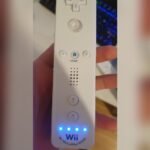
Is your Wii controller blinking blue lights and refusing to connect? It’s frustrating when you’re ready to play, but your remote won’t sync with the console.
Those blinking blue lights aren’t just random—they’re a signal that your Wii remote is searching for a connection but can’t find it. The good news? You don’t need to toss your remote or buy a new one just yet. You’ll discover simple, effective steps to fix the blinking blue light issue and get back to gaming quickly.
Keep reading, and you’ll learn easy tricks that even beginners can follow to solve this common problem. Your next Wii adventure is just a few fixes away!
Causes Of Blinking Blue Lights
The blinking blue lights on a Wii controller signal that it is trying to connect to the console. This blinking can be caused by different issues. Understanding these causes helps fix the problem quickly. Below are some common reasons why the Wii controller blinks blue lights.
Failed Sync Attempts
The most common cause is a failed sync between the controller and the Wii console. The controller tries to link but cannot complete the connection. This may happen if the sync buttons are not pressed at the right time. Sometimes, the console or remote needs a reset to start fresh.
Battery Issues
Low or dead batteries cause the controller to blink blue lights. Weak power makes it hard for the remote to maintain connection. Old batteries also reduce performance. Replacing batteries with fresh, high-quality ones can solve the blinking problem.
Interference From Devices
Other wireless devices nearby can interfere with the Wii remote’s signal. Devices like cordless phones, routers, or Bluetooth gadgets create noise. This interference disrupts syncing and causes blinking lights. Moving away from such devices often stops the blinking.
Sensor Bar Problems
The sensor bar helps the Wii remote track movement. If the sensor bar is off, unplugged, or broken, syncing may fail. Dirt or obstacles blocking the sensor bar also cause issues. Checking the sensor bar’s position and cleanliness can fix the blinking blue lights.
Checking Batteries And Contacts
When your Wii controller blinks blue lights, checking the batteries and contacts is a simple first step. Poor battery power or dirty contacts often cause connection issues. Ensuring fresh batteries and clean contacts can restore proper syncing. This check is easy and improves controller performance.
Replacing Batteries
Start by opening the battery compartment on the back of the Wii remote. Remove the old batteries carefully. Use new, high-quality AA batteries for the best results. Insert the batteries following the correct polarity markings. Close the compartment securely. Test the remote by pressing any button to see if the blue lights stop blinking.
Cleaning Battery Contacts
Remove the batteries again before cleaning. Use a dry cloth or cotton swab to clean the metal contacts inside the battery compartment. Dirt or corrosion can block the electrical connection. Gently rub the contacts until they look shiny and free of debris. Place the batteries back in and close the cover. Try syncing the remote to check if the blinking stops.
Resetting The Wii Remote
Resetting the Wii Remote can solve blinking blue light issues. This process refreshes the connection between your controller and the console. It often fixes syncing problems and restores normal function.
Follow simple steps to reset your Wii Remote. These methods require no special tools or skills. Just a bit of care and patience.
Removing And Reinstalling Batteries
First, remove the batteries from your Wii Remote. This helps clear any temporary errors inside the device. Wait for about 30 seconds before putting the batteries back in. Make sure the batteries are fresh and placed correctly. Clean the battery contacts gently using a dry cloth. Dirty contacts can stop the remote from working properly. After reinstalling, press any button to check if the blue lights stop blinking.
Physical Reset Technique
Hold the Wii Remote firmly in your hand. Turn it face down and slap the back against your palm once. This action resets the internal components. It can fix small glitches causing the blinking lights. After the slap, try syncing the remote again with the console. Press the red sync buttons on both devices quickly. If successful, one blue light stays solid while others turn off.
Syncing The Remote With Console
Syncing the Wii remote with the console is essential for gameplay. The blinking blue lights indicate the remote is searching for the console. Pairing the devices correctly stops the blinking and ensures control responsiveness. Follow simple steps to connect your remote and console quickly.
Using The Sync Buttons
First, turn on your Wii console. Find the red sync button inside the SD card slot on the console. Open the battery cover on the Wii remote. Press the red sync button on the remote. Then, press the console’s sync button again. The blue lights on the remote will flash rapidly. Wait until one light stays solid. This means the remote synced successfully.
Timing The Sync Process
Timing is key during syncing. Press the remote’s sync button right after pressing the console’s button. Delays can cause the remote to fail syncing. Keep the remote close to the console during this process. If the lights keep blinking, repeat the steps. Make sure the batteries are fresh and inserted correctly. Try syncing in a room with fewer wireless signals to avoid interference.
Syncing Through Console Menu
You can also sync using the Wii’s menu. Turn on the console and go to the Wii Menu. Select “Controllers” and then “Change/Play.” Follow the on-screen instructions to press the sync buttons. This method guides you step-by-step. It confirms the remote is connected once syncing finishes. Use this option if the button method does not work well.
Reducing Wireless Interference
Wireless interference can cause your Wii controller’s blue lights to blink endlessly. This happens when the remote struggles to maintain a clear connection with the console. Reducing interference helps create a stable link. You can play without interruptions or delays. Simple steps in your setup can lower wireless noise and improve syncing.
Moving Away From Routers And Phones
Wi-Fi routers and mobile phones emit signals that disrupt your Wii remote. Keep the remote and console at least a few feet away from these devices. This distance reduces signal clashes. Avoid placing the Wii near routers or cordless phones during play. Turn off or move other wireless gadgets if syncing problems persist. A clear wireless space boosts your controller’s connection.
Clearing Sensor Bar Obstructions
The sensor bar must have a clear line of sight to the Wii remote. Objects like furniture, decorations, or cables can block signals. Remove anything between the sensor bar and your remote. Clean the sensor bar with a soft cloth to remove dust. Position it on a stable surface, usually above or below the TV. A clear path helps the remote sync faster and keeps the blue lights steady.
Advanced Troubleshooting
Advanced troubleshooting helps solve persistent Wii controller blinking blue light issues. These steps go beyond basic fixes. They target deeper causes of connection problems. Follow each carefully to improve your chances of success.
Trying Another Remote
Test a different Wii remote if available. This helps check if the problem is with your controller. If the new remote connects without blinking blue lights, your original remote might be faulty. This eliminates console issues from the troubleshooting process. If both remotes blink, the issue likely lies with the Wii console or settings.
Checking Console Power And Settings
Verify your Wii console is fully powered on. Unplug the console for 10 seconds, then plug it back in. This resets internal hardware. Check the console’s sync settings in the system menu. Ensure no restrictions block new device connections. Disable any wireless interference by moving other electronic devices away. This can improve the remote’s signal and stop blinking blue lights.
Firmware And Software Updates
Keep your Wii console updated with the latest firmware. Updates fix bugs that cause syncing problems. Connect your Wii to the internet via Wi-Fi. Go to the system settings and select the update option. Wait for the update to complete before trying to sync again. Also, update any game software requiring the remote. Updated software ensures compatibility and smooth remote operation.
Preventive Maintenance Tips
Proper maintenance keeps your Wii controller working well. Small habits prevent blinking blue light issues. Protect your remote with these simple tips. They save time and avoid frustration during play.
Storing Remotes Properly
Keep your Wii remote in a safe, dry place. Avoid leaving it in direct sunlight or near heat. Store it away from dust and moisture. Use a soft pouch or case to protect it. This prevents damage and helps maintain battery life.
Regular Cleaning
Clean your remote regularly to avoid dirt buildup. Use a dry cloth or soft brush for the outside. Wipe the battery contacts gently with a cotton swab. Avoid using water or harsh chemicals. Clean remotes connect better and last longer.
Avoiding Physical Damage
Handle your Wii remote with care during use and storage. Do not drop or throw it. Avoid pressing buttons too hard. Keep it away from pets and small children who might damage it. Physical damage can cause blinking lights and connection problems.
Frequently Asked Questions
Why Are The Blue Lights Blinking On My Wii Remote?
Blue lights blinking on your Wii Remote mean it’s trying and failing to sync with the console. Replace batteries, clean contacts, then press the red sync buttons on both the remote and console quickly. Move away from wireless interference. Repeat syncing until one light stays solid, confirming connection.
Why Is My Wii Controller Blinking But Not Connecting?
A blinking Wii controller means it tries to sync but fails. Replace batteries, clean contacts, and resync using red buttons. Move away from wireless interference. If issues persist, test another remote or sync via the console’s connection menu.
How Do I Reset A Wii Remote?
Remove the batteries from your Wii Remote. Wait one minute, reinsert them, then press the red sync button under the battery cover and the console’s sync button quickly. This resets and resyncs the remote to your Wii console.
What Do Flashing Lights Mean On A Wii Remote?
Flashing lights on a Wii Remote mean it’s trying to sync with the console but hasn’t connected yet. Replace batteries, press sync buttons on both remote and console, and ensure no interference. Once synced, one light stays solid, indicating a successful connection.
Why Is My Wii Controller Blinking Blue Lights?
Blinking blue lights mean the controller is trying to connect to the console. It is searching for a signal but hasn’t paired yet. This usually happens when the controller is off or out of sync.
Conclusion
Wii controllers blink blue when trying to sync with the console. This usually means they need a fresh connection or battery check. Clean the contacts and press the sync buttons on both remote and console quickly. Move away from other wireless devices to avoid interference.
If blinking continues, try another controller to see if the issue is with the remote. These simple steps often solve the blinking light problem fast. Enjoy your gaming time without interruptions!