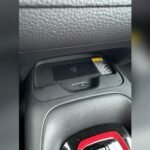
Is your Toyota wireless charger blinking orange and leaving you confused? You’re not alone.
This blinking light is your car’s way of telling you something isn’t quite right with the charging process. But don’t worry—you don’t have to guess what’s wrong or waste time and money. You’ll discover exactly why your Toyota wireless charger blinks orange and how you can fix it quickly.
Whether it’s a simple case of misalignment, an object blocking the charger, or something else, we’ll guide you step-by-step. Keep reading to get your wireless charging working smoothly again and enjoy the convenience you expected from your Toyota.

Why The Charger Blinks Orange
The Toyota wireless charger blinking orange indicates a problem with the charging process. This light alerts you to issues that need attention. It helps prevent damage to your phone or charger. Understanding why it blinks orange can save time and frustration.
Metal Objects On The Pad
Metal objects like coins or keys can trigger the orange light. The charger detects these metals and stops charging. This prevents overheating or damage. Always clear the pad before placing your phone.
Phone Misalignment
Placing the phone off-center causes the charger to blink orange. Wireless charging needs the phone to be correctly aligned. A small shift can break the connection. Center your phone carefully on the pad for proper charging.
Overheating Issues
The charger blinks orange if it becomes too hot. Overheating can harm the charger and your phone. It pauses charging until the temperature drops. Avoid charging in hot places or direct sunlight.
Case Or Accessory Interference
Thick or metal phone cases block wireless charging. Some accessories contain magnets or metal plates. These interfere with the charger’s signals and cause blinking. Removing the case or accessory often fixes the issue.
Common Wireless Charging Problems
Wireless charging offers a simple way to power your devices without cables. Yet, it comes with some common issues. These problems can cause the Toyota wireless charger to blink orange, signaling a fault. Understanding these issues helps maintain smooth charging and avoid frustration.
Intermittent Charging Stops
Charging may stop suddenly and restart repeatedly. This happens if the phone moves slightly out of place. Dirt or dust on the charging pad also disrupts power transfer. Even a thin phone case can block the connection. Reposition the device and clean the surface to fix this.
Device Compatibility
Not all phones work well with every charger. The Toyota wireless charger supports Qi-compatible devices. Phones without this feature may not charge or cause errors. Some phone cases with metal parts or magnets block charging signals. Using a compatible device and case ensures steady charging.
Charger Malfunctions
The charger itself can have faults. Internal damage or manufacturing defects lead to blinking lights. Overheating also triggers safety shutdowns. Using the charger in a hot environment or covering it can cause malfunctions. Regular checks and proper use help prevent these problems.
Easy Fixes To Try Now
When your Toyota wireless charger blinks orange, it signals a charging issue. Trying simple fixes can save time and frustration. These quick checks help most users get their charger working again.
Follow these easy steps to troubleshoot your Toyota wireless charger blinking orange.
Remove Metal Items
Metal objects block wireless charging signals. Coins, keys, or credit cards near the charger cause blinking orange light. Clear the charging pad of any metal before placing your phone. This removes interference and helps the charger work properly.
Center Your Phone Properly
Incorrect phone placement stops charging. Place your phone in the center of the charging pad. A slight misalignment causes the orange blink. Adjust your phone until the light turns solid, showing a good connection.
Take Off Thick Or Magnetic Cases
Bulky or magnetic phone cases stop wireless charging. Remove any thick, metal, or magnetic cases before charging. These materials block signals and cause the orange blinking. Using a thin, non-metal case improves charging performance.
Allow Device To Cool Down
Overheating can trigger the orange blinking light. If your phone or charger feels hot, remove the phone and let both cool down. Charging resumes normally once the temperature drops. Avoid charging in hot environments for best results.
Preventive Tips For Smooth Charging
Preventive tips help keep your Toyota wireless charger working well. They stop problems like the orange blinking light. Following simple steps makes charging smooth and fast. These tips protect your charger and phone from damage.
Keep The Pad Clean
Dirt and dust can block charging signals. Wipe the charging pad with a soft cloth often. Avoid wet or harsh cleaners. Clean surfaces help your device connect properly. This stops the charger from blinking orange.
Avoid Using While Charging
Using your phone while charging may cause interruptions. Moving the phone can break the connection. It also makes the charger get hot. Keep your phone still until fully charged. This keeps the light steady and charging smooth.
Use Compatible Devices
Only charge phones that support Toyota’s wireless system. Some devices may not match the charger’s power needs. This mismatch can cause blinking or stop charging. Check your phone’s compatibility before use. Using the right device avoids errors.
Regular System Updates
Toyota often releases software updates for wireless chargers. These updates fix bugs and improve performance. Connect your car to Wi-Fi or a mobile hotspot. Install updates as soon as they are available. Updated systems charge faster and stay reliable.
When To Seek Professional Help
Knowing when to seek professional help for your Toyota wireless charger blinking orange can save you time and frustration. Some issues require expert diagnosis and repair to avoid further damage. Recognizing these situations helps maintain your charger’s performance and safety.
Persistent Blinking Issues
If the orange light keeps blinking despite trying basic fixes, it signals a deeper problem. Continuous blinking means the charger cannot complete the charging cycle. Avoid ignoring this sign. Persistent issues need professional attention to diagnose the cause accurately.
Hardware Faults
Hardware faults like damaged coils or faulty circuits cause blinking problems. These faults are not visible or fixable by simple troubleshooting. A technician can open the charger safely and check internal components. Repair or replacement of parts may be necessary to restore function.
Warranty And Replacement Options
Check your Toyota charger’s warranty before seeking repairs. Many chargers come with a warranty covering hardware failures. If your charger is under warranty, contact the dealer or manufacturer for replacement options. This helps avoid extra repair costs and ensures you get a genuine product.
Frequently Asked Questions
Why Does My Wireless Charger Blink Orange?
Your wireless charger blinks orange to warn of an obstruction like metal objects or misalignment. Remove any items and center your phone on the pad. Thick or magnetic cases may also cause this blinking. Ensure the charger and phone are cool for proper charging.
How Do I Get My Toyota Wireless Charger To Work?
Place your phone flat and centered on the Toyota wireless charging pad. Remove thick or metal cases. Clear any objects from the pad. Ensure the phone and charger are cool. The charging indicator light confirms proper connection.
Why Does My Toyota Wireless Charger Keep Disconnecting?
Your Toyota wireless charger disconnects due to misaligned phones, thick or metal cases, or objects on the pad. Remove cases and center your phone. Ensure no metal items or heat cause interruptions.
Why Is Magsafe Not Working?
MagSafe may not work due to dirt or obstruction on the magnetic surface, device misalignment, incompatible cases, or a depleted battery. Clean the surface, remove thick or metal cases, center your device properly, and ensure the battery has charge to fix common issues.
Why Is My Toyota Wireless Charger Blinking Orange?
The blinking orange light means there is an object blocking charging. It could be metal, keys, or even a thick phone case. Remove anything on the charger pad to fix this.
Conclusion
The blinking orange light on your Toyota wireless charger signals a common issue. Check for metal objects or thick phone cases blocking the connection. Make sure your phone sits properly in the center of the charging pad. Allow the charger and phone to cool down if they feel hot.
These simple steps often fix the problem quickly. Staying patient and following these tips helps keep your wireless charger working smoothly every day.