Is your Stiiizy pod blinking but not hitting? It’s frustrating when you’re ready to enjoy your vape, and your device won’t cooperate.
The blinking light is your Stiiizy’s way of sending a message—often about connection issues, battery problems, or pod defects. But don’t worry, you’re not stuck with a useless pen. Understanding what those blinking lights mean and knowing simple fixes can get you back to smooth hits in no time.
Keep reading to discover easy troubleshooting tips that will help you decode your Stiiizy’s signals and enjoy a hassle-free vaping experience again.

Common Stiiizy Pod Issues
Stiiizy pods are popular for their ease and smooth vaping experience. Still, users often face issues that interrupt use. Common problems include blinking lights and pods not hitting properly. Understanding these issues helps to troubleshoot quickly. This section covers the most frequent Stiiizy pod concerns.
Knowing what each blinking light means and recognizing pod problems can save time and prevent damage. Battery status is also a key factor to monitor. Here are details on these common Stiiizy pod issues.
Blinking Lights Explained
Blinking lights on your Stiiizy pod signal different issues. A white blinking light often means a poor connection or low battery. Red blinking twice usually points to a connection error between the pod and battery. Solid red indicates the device is charging. Pay attention to these signals to identify problems early.
Signs Of Pod Problems
Pods may fail to hit due to clogs or poor contact with the battery. Dark or cloudy oil inside the pod suggests oxidation or damage. If the pod wobbles or feels loose, it may not connect properly. These signs help detect pod issues before they worsen.
Battery Indicators
The battery’s blinking lights indicate its health and charge. A blinking white light often shows low power. If the battery continues to blink after full charging and cleaning, it might need replacement. Proper battery care extends device life and improves performance.
Cleaning And Maintenance
Proper cleaning and maintenance keep your Stiiizy pod working well. Dirt and residue can cause the pod to blink but not hit. Regular care improves connection and vape experience. Follow these simple steps to clean and maintain your device effectively.
Cleaning Contact Points
Remove the pod carefully from the battery. Use a cotton swab dipped in isopropyl alcohol. Gently clean the gold contact points on both the pod and battery. Avoid soaking the contacts to prevent damage. Let the contacts dry completely before reattaching the pod. Clean contacts ensure a strong connection and stop blinking issues.
Removing Pod Residue
Residue buildup inside the pod can block airflow and cause problems. Use a dry cotton swab or a soft cloth to wipe around the pod base. Avoid using water or harsh cleaners on the pod itself. Clear residue helps the device hit smoothly without blinking lights. Check for sticky oil or debris after each use and clean as needed.
Drying And Reassembly Tips
After cleaning, allow all parts to dry fully. Moisture can cause short circuits or blinking errors. Do not rush to reassemble the device. Place the pod and battery on a clean, dry surface for 10-15 minutes. Once dry, carefully insert the pod back into the battery chamber. Ensure it fits snugly without wobbling to avoid connection issues.
Battery Troubleshooting
Troubles with your Stiiizy pod blinking but not hitting often relate to battery issues. The battery powers the device, so it needs proper care to work well. Identifying battery problems helps fix the blinking light and restore vaping.
Charging Properly
Ensure the battery charges fully each time. Use the original charger or a compatible one. Connect the charger firmly to the battery and power source. A loose connection may stop charging and cause blinking. Avoid overcharging by unplugging once the light turns solid white. Regular full charges keep the battery healthy and ready.
Replacing The Battery
Batteries wear out after many uses and lose power. If charging does not fix blinking, consider replacing the battery. Buy a genuine Stiiizy battery for safety and performance. Follow the instructions to swap the battery carefully. A fresh battery solves most power and connection problems.
Battery Life And Storage
Battery life depends on usage and care. Store the device in a cool, dry place to protect the battery. Avoid extreme heat or cold which damages battery cells. Keep the battery charged above 20% if not using for days. Proper storage extends battery life and prevents blinking issues.
Fixing Connection Problems
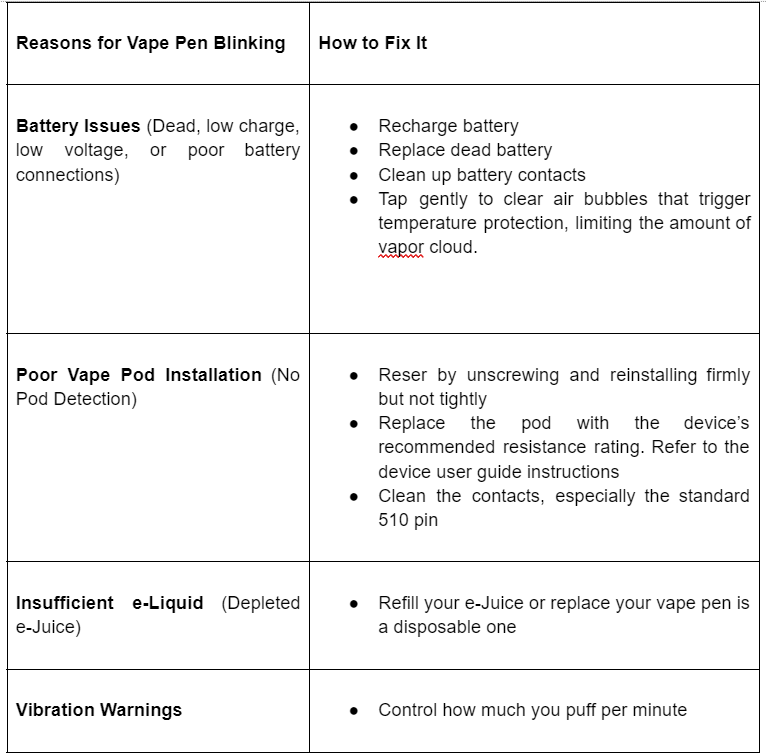
Fixing connection problems is the key to resolving the Stiiizy pod blinking but not hitting issue. Connection troubles often cause the device to blink and fail to deliver vapor. Checking the pod and battery connection can restore normal function quickly. Small adjustments can make a big difference in performance and user experience.
Reinserting The Pod
Remove the pod gently from the battery. Inspect the metal contacts on both the pod and battery for dirt or residue. Clean them with a dry cotton swab if needed. Once clean, reinsert the pod firmly. Make sure it clicks into place to ensure a solid connection. This simple step often fixes blinking problems.
Ensuring Proper Pod Fit
The pod must fit snugly into the battery chamber. Check for any wobbling or loose fit. A loose pod causes poor contact and blinking lights. Align the pod carefully with the battery. Push it in until it feels secure. Proper fit keeps the connection stable and allows smooth vaping.
Adjusting Pod Position
Sometimes the pod position affects the connection. Slightly adjust the pod by pushing or pulling it gently. Try tilting the pod at a small angle to find the best contact point. Avoid forcing the pod, as this may damage the device. Small position changes can stop blinking and restore vaping power.
Dealing With Clogs
Clogs often cause Stiiizy pods to blink but not hit properly. Oil or debris can block airflow or connection points. Dealing with clogs quickly keeps your device working well. Below are simple steps to clear and prevent these blockages.
Clearing Pod Blockages
Remove the pod from the battery carefully. Check the mouthpiece and airflow holes for any debris. Use a small, dry brush or a toothpick to clear out visible clogs gently. Avoid using water as it can damage the pod.
Clean the metal contact points with a dry cotton swab. Dirt or oil on contacts can stop the pod from working. Let everything dry completely before reinserting the pod back into the battery.
Preventing Future Clogs
Store your Stiiizy device upright to prevent oil from leaking into airflow paths. Keep the mouthpiece clean by wiping it regularly with a dry cloth. Avoid overfilling or shaking the pod roughly, as this can cause spills inside.
Regular maintenance keeps oil flowing smoothly. Check your pod’s condition often and replace it if the oil looks dark or thick. This reduces the chance of clogs and blinking issues.
Using The Pod Correctly
Insert the pod firmly but gently to ensure a good connection. Avoid forcing it in, which may damage the contacts. Take slow, steady draws to help the oil vaporize evenly.
Avoid chain vaping. Give the device time to cool between hits. This practice keeps airflow clear and prevents overheating, which can cause blinking and no-hit problems.

When To Replace Your Pod Or Battery
Knowing when to replace your Stiiizy pod or battery is important for a smooth vaping experience. Pods and batteries wear out over time. Using them too long can cause blinking lights and prevent proper hits. Pay attention to signs that indicate it is time for a replacement. This helps you avoid frustration and enjoy your device fully.
Signs Of Pod Degradation
Pods show clear signs when they start to degrade. The oil may look darker or cloudy. Taste changes and may become burnt or bitter. Vapor production drops and feels weak. Leaks around the pod base can appear. If your pod blinks but does not hit, degradation is likely the cause. Replace the pod to restore proper function.
Battery Replacement Indicators
Batteries also show signs before failing. The device may blink white or red lights often. Charging takes longer than usual or the battery won’t hold charge. The battery may get hot during use or charging. If blinking continues after cleaning and charging, the battery is probably faulty. Swap the battery to fix hitting problems.
Disposal And Recycling
Dispose of used pods and batteries safely. Pods contain oil and metal parts that need special handling. Batteries contain chemicals harmful to the environment. Use designated recycling centers for electronic waste. Many vape shops offer recycling programs for pods and batteries. Proper disposal protects nature and follows local laws.
Tips To Avoid Future Issues
Preventing future issues with your Stiiizy pod keeps it working smoothly. Small habits help avoid blinking and not hitting problems. Follow simple steps to protect your device and enjoy every hit.
Proper Storage Practices
Store your Stiiizy pod upright to stop oil leaks. Keep it away from extreme heat or cold. Avoid leaving it in direct sunlight or hot cars. Use a protective case to prevent damage. Make sure the pod is secure but easy to remove.
Regular Cleaning Schedule
Clean the metal contact points often using a dry cotton swab. Use isopropyl alcohol lightly if needed. Let the contacts dry fully before use. Remove debris or residue from the pod and battery chamber. Regular cleaning ensures good connection and smooth hits.
Charging Best Practices
Charge your battery with the original or compatible charger only. Avoid overcharging by unplugging when full. Keep charging ports clean and dry. Charge in a cool, dry place to protect battery life. Proper charging helps your device work longer and better.
Frequently Asked Questions
How To Fix Stiiizy Pod That Won’t Hit?
Remove the pod and clean metal contacts with a dry or lightly alcohol-swabbed cotton swab. Let dry fully. Reinsert the pod firmly. Charge the battery completely. Clear any clogs by pulling the pod gently without the battery. Replace the battery if blinking persists.
Why Is My Cart Blinking And Not Hitting?
Your cart blinks and won’t hit due to poor connection, low battery, or clogged pod. Clean contacts, fully charge, and reinsert the pod firmly.
How To Know If A Stiiizy Pod Is Bad?
Check for unusually dark, cloudy, or inconsistent oil inside the pod. Also, poor taste or no vapor indicates a bad Stiiizy pod.
Why Is My Vape Flashing But Not Working?
Your vape flashes due to poor connection, low battery, or pod issues. Clean contacts, fully charge, and firmly reinsert the pod. Replace the battery if problems persist.
Why Is My Stiiizy Pod Blinking But Not Hitting?
A blinking pod often means a poor connection or low battery. Clean the contacts and fully charge the device. If blinking continues, the pod or battery may be faulty.
Conclusion
A blinking Stiiizy pod often signals connection or battery issues. Clean the contacts gently and ensure the pod fits well. Fully charge the battery before trying again. Check for clogs or damaged pods that may need replacement. Regular maintenance helps avoid blinking problems.
Keep your device upright and clean for better performance. Small steps can fix most common Stiiizy pod troubles quickly. Don’t let a blinking light stop your vaping experience. Stay patient and follow these simple tips for smooth use.