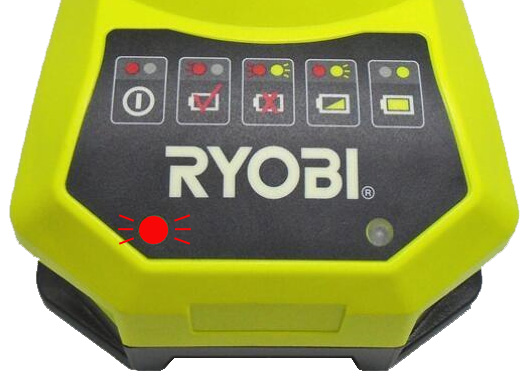
Is your Ryobi charger blinking red and leaving you wondering what’s wrong? You’re not alone.
That flashing red light is your charger’s way of telling you something isn’t quite right with your battery or the charging process. But don’t worry—before you toss out your battery or buy a new charger, there are simple steps you can take to fix this issue.
You’ll learn why your Ryobi charger is blinking red and how you can quickly troubleshoot the problem to get back to work without delay. Keep reading—you’ll find easy-to-follow solutions that save you time, money, and frustration.
Reasons For Red Blinking Light
A red blinking light on your Ryobi charger signals a problem that needs attention. The charger uses this light to warn users about issues affecting charging. Knowing the common reasons helps you fix the problem quickly. This section explains the main causes behind the red blinking light.
Temperature Problems
The battery or charger may be too hot or cold. Extreme temperatures stop charging to protect the battery. Move the battery to a room with normal temperature. Let it cool down or warm up before charging again.
Damaged Battery
A damaged battery cannot charge properly. Internal cells might be broken or worn out. If the light blinks fast, the battery may be faulty. Test with another battery to confirm. Replace damaged batteries to avoid hazards.
Poor Connections
Dirty or loose connections cause charging errors. Dust, dirt, or corrosion blocks the flow of electricity. Clean the battery and charger contacts with rubbing alcohol. Ensure all connections fit tightly before charging.
Low Voltage Issues
Deeply discharged batteries show low voltage. The charger may not start charging immediately. Let the battery sit in the charger for some time. It can slowly regain enough power to begin charging.
Wrong Battery Type
Using an incompatible battery causes errors. Ryobi chargers work with specific battery types only. Check the battery model matches the charger specifications. Using the wrong battery stops the charging process.
Charger Malfunctions
The charger itself might be faulty or overloaded. Internal parts can fail over time. Try plugging the charger into another outlet. Test it with a different battery. Replace the charger if problems persist.

Basic Troubleshooting Steps
Seeing a Ryobi charger blinking red can be frustrating. This signal often means the charger or battery has an issue. Basic troubleshooting helps identify simple problems and fix them quickly. Follow these steps to start.
Check Charger Manual
First, read the charger manual carefully. It explains what the red blinking light means for your model. The manual may show specific error codes. This guides you to the right fix. Manuals also offer safety tips to avoid damage.
Clean Battery Contacts
Dirty or corroded contacts cause bad connections. Use a clean cloth or rubbing alcohol to wipe battery terminals. Clean the charger contacts too. Let them dry fully before reinserting the battery. Good contact improves charging and stops blinking.
Adjust Battery Temperature
Extreme cold or heat stops charging. Move the battery to a room with normal temperature. Let it sit for 30 minutes to an hour. The charger will reset and may start charging again. Avoid charging in very cold or hot places.
Reinsert Battery Firmly
Loose battery placement can trigger errors. Remove the battery and insert it again firmly. Make sure it clicks into place. A solid connection ensures proper power flow. This step often fixes blinking lights.
Test Different Power Outlet
Sometimes the outlet causes problems. Plug the charger into another power source. Check if the blinking stops. Faulty or weak outlets affect charger performance. Testing multiple outlets rules out this issue.
Try Alternative Charger
Use a different Ryobi charger if available. This helps identify if the charger is faulty. If the battery charges fine on another charger, your charger may need repair or replacement. Testing with another charger saves time.
Advanced Fixes For Red Blinking
The Ryobi charger blinking red often means a serious issue with charging. Basic fixes sometimes fail to solve the problem. Advanced methods can help revive your charger and battery. These techniques require patience and careful handling. Follow these steps to improve your charging experience and extend battery life.
Deep Charge Attempt
Deep charging can bring a battery back from very low voltage. Place the battery in the charger and leave it for several hours. Avoid removing the battery during this time. This slow charging helps stabilize battery cells. It can reset safety limits inside the battery. Monitor the charger for any changes in the blinking pattern.
Battery Reset Techniques
Resetting the battery clears minor faults and errors. Remove the battery from the charger. Press and hold the battery’s power button for 10 seconds. Reinsert the battery into the charger after a short pause. This process resets the battery’s internal circuitry. It often stops the red light from blinking. Repeat if the issue persists but limit attempts to avoid damage.
Use Battery Jumper
A battery jumper can jumpstart a deeply discharged battery. Connect the jumper correctly to the battery terminals. Allow a few minutes for the battery to gain charge. Detach the jumper and place the battery back into the charger. This method revives batteries that are too low to charge normally. Use caution to prevent short circuits or sparks.
Monitor Charging Patterns
Observe the charger’s blinking patterns carefully. Different blink speeds and sequences mean different errors. Record these patterns to understand the battery’s condition. Use this information to decide on further action. Consistent blinking after fixes may indicate battery replacement is needed. Keep track of the battery’s performance over time.

Frequently Asked Questions
How Do You Reset A Ryobi Battery Charger?
To reset a Ryobi battery charger, unplug it, wait 5 minutes, then plug it back in. Reinsert the battery firmly. Clean battery and charger contacts if needed. Allow the battery to reach room temperature before charging again.
Why Does My Battery Charger Keep Blinking Red?
A blinking red light on your battery charger signals issues like overheating, bad connection, damaged battery, or incorrect battery type. Clean terminals, ensure proper temperature, check connections, and use the correct battery. If it persists, try a different outlet or replace the battery or charger.
What Do Lights Mean On A Ryobi Charger?
Ryobi charger lights indicate battery status. Solid green means fully charged. Blinking red signals errors like bad battery, poor connection, or temperature issues. Clean contacts, check battery type, or let it reach room temperature to fix. Persistent red blinking means battery or charger may need replacement.
How Do I Get My Lithium Battery Out Of Sleep Mode?
Remove the battery and clean the terminals with rubbing alcohol. Let it reach room temperature. Reinsert firmly and charge. If blinking persists, leave it charging overnight or try another charger. Replace the battery if it remains unresponsive.
Why Is My Ryobi Charger Blinking Red Light?
A blinking red light usually means the battery or charger has an error. It can be caused by a bad connection, damaged battery, or wrong battery type.
Conclusion
A blinking red light on your Ryobi charger signals an issue. Common causes include temperature extremes, poor connections, or battery problems. Clean the contacts and ensure the battery sits at room temperature. Try different outlets or chargers to isolate the problem.
Sometimes, a deeply discharged battery needs extra time on the charger. Following these simple steps can help your charger work properly again. Stay patient and check each solution carefully to avoid damage. Proper care keeps your tools ready for use when you need them most.