Is your Paslode battery charger blinking red and green, leaving you wondering what’s wrong? You’re not alone.
This flashing light pattern usually means there’s an issue—whether it’s a loose connection, a faulty battery, or a problem with the charger itself. But don’t worry, you don’t have to guess or waste time. You’ll discover simple, effective steps to identify the cause and get your charger back to working properly.
Keep reading to learn how to fix the blinking red and green lights and avoid costly replacements. Your tools depend on it!
Error Signals From Charger
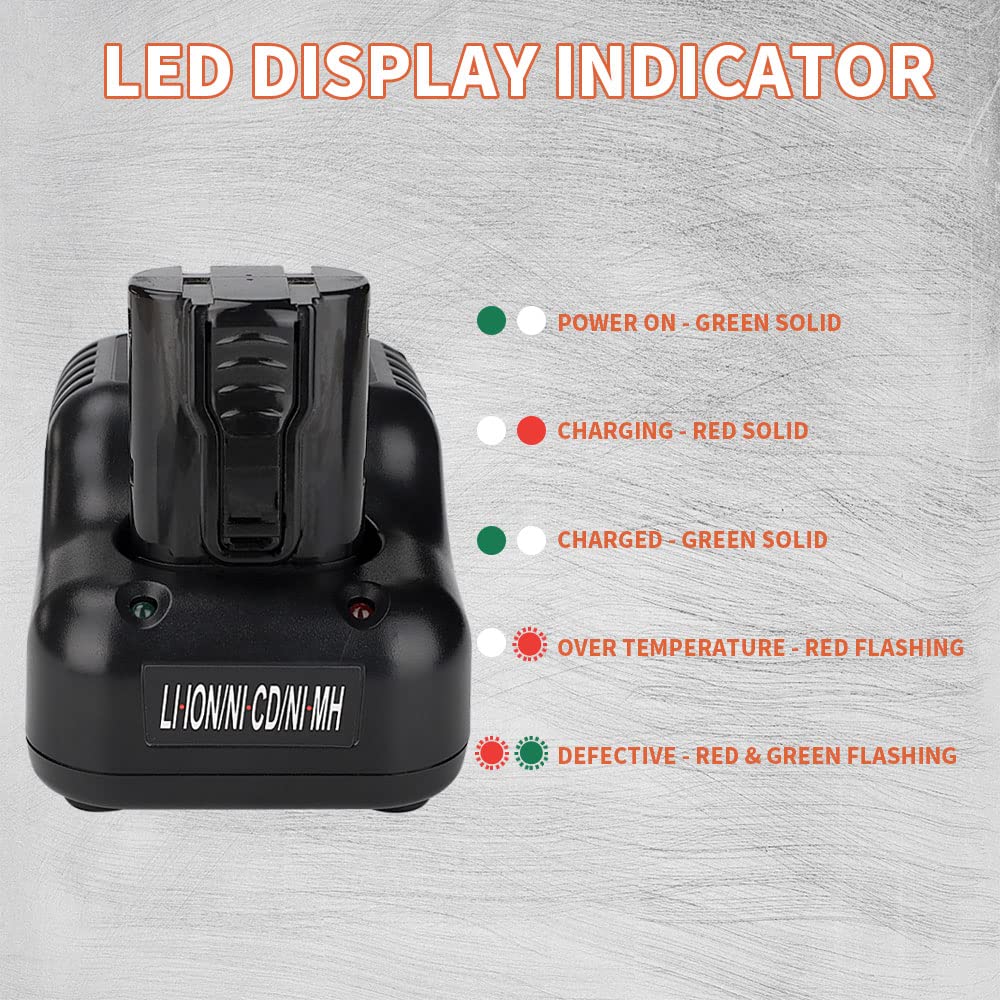
Paslode battery chargers use blinking lights to communicate their status. When the charger flashes red and green together, it signals an error. This alert helps users identify problems with the battery or charger quickly. Understanding these signals prevents further damage and saves time.
Recognizing error signals is important for safe and efficient charging. The blinking red and green lights usually mean the charger detects an issue. This section explains what these signals mean and common reasons behind them.
Meaning Of Red And Green Blinking
The charger flashing red and green means it found a problem. It could be a poor connection between the battery and charger. It may also indicate the battery is too hot or too cold. Another reason could be a deeply discharged or damaged battery. Sometimes, the charger itself may be faulty. This signal warns users to check the setup before continuing.
Common Causes Of Error Lights
One common cause is a loose battery connection. Dirt or debris on contacts can block charging. Temperature extremes also cause errors. Batteries too hot or cold won’t charge properly. A battery that is deeply discharged or old may trigger the error. Lastly, a malfunctioning charger can cause the red and green lights to blink. Cleaning contacts and reseating the battery often fixes the issue.
Connection Issues
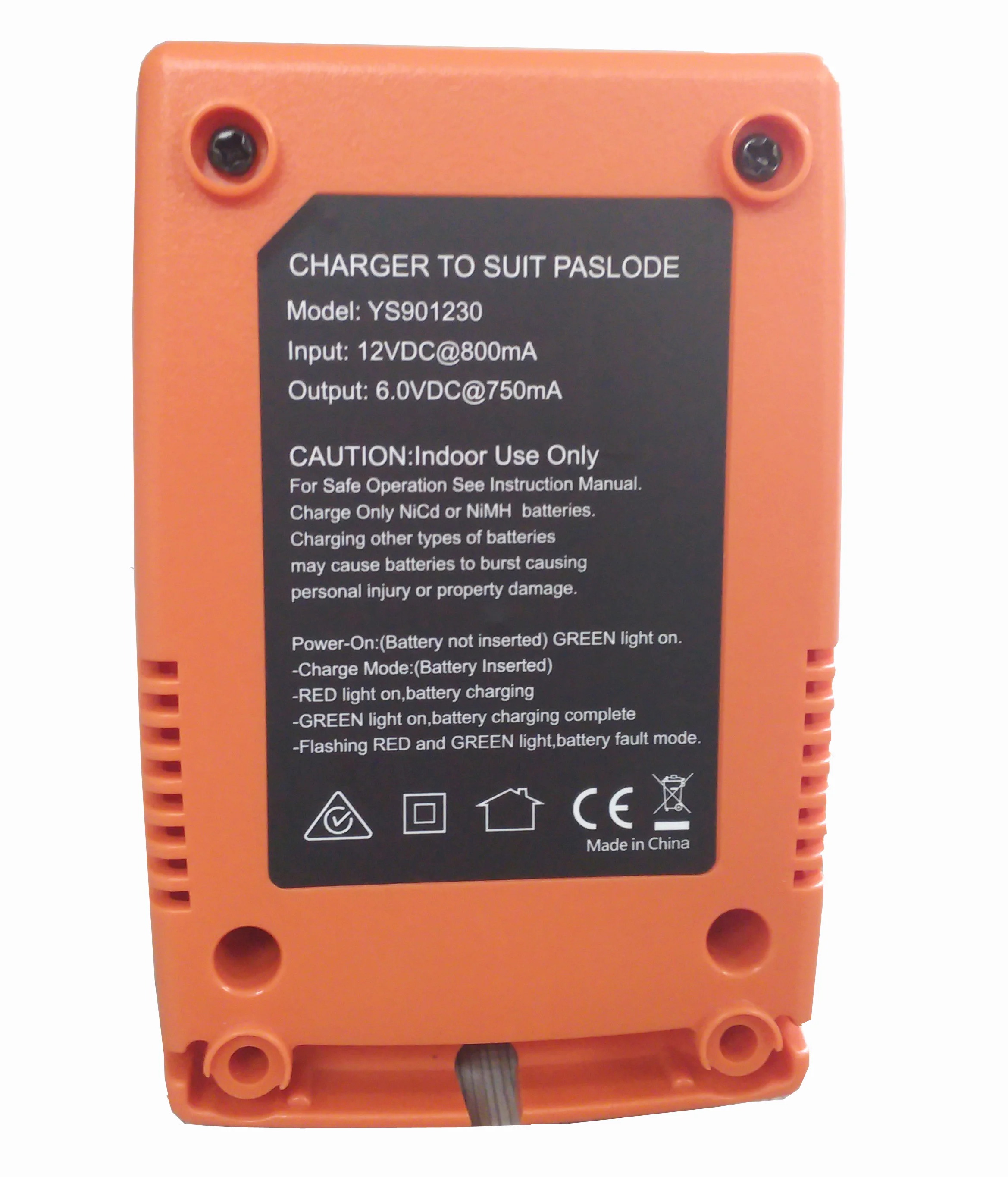
Connection issues often cause the Paslode battery charger to blink red and green. This blinking usually means the charger cannot communicate properly with the battery. It may happen because the battery is not seated correctly or the contacts are dirty. Poor contact stops the charger from delivering power efficiently. Fixing connection issues can often resolve the blinking light problem quickly.
Reseating The Battery
Remove the battery from the charger carefully. Check for any debris or dust on the battery edges. Align the battery properly with the charger slot. Press the battery firmly until you hear a click. This click shows the battery is seated correctly. A loose battery connection can cause the red and green blinking light. Try reseating the battery several times to ensure a good fit.
Cleaning Battery And Charger Contacts
Dirt and grime build up on contacts over time. This buildup blocks the flow of electricity. Use a dry cloth or a soft brush to clean the battery contacts. Also, clean the charger contacts gently. Avoid using water or liquid cleaners as they can damage the charger. Clean contacts improve the connection and help stop the blinking light. Regular cleaning keeps the charger working properly.
Temperature Effects
Temperature plays a key role in the performance of your Paslode battery charger. Extreme heat or cold can cause the charger to blink red and green. This blinking signals that the battery or charger is not working properly due to temperature issues. Understanding how temperature affects charging helps solve this problem quickly.
Impact Of Overheating
Overheating can stop your battery from charging correctly. High heat may cause the charger to blink red and green as a warning. The battery’s internal components can get damaged if it stays hot too long. This damage lowers battery life and charging efficiency. Avoid charging the battery immediately after heavy use or in hot environments.
Effects Of Cold Conditions
Cold temperatures slow down battery chemistry. When the battery is too cold, the charger may blink red and green to indicate a problem. Charging in freezing conditions can reduce battery capacity temporarily. The battery may not reach a full charge or may charge very slowly. Keep the battery warm before charging in cold weather.
Allowing Battery To Reach Room Temperature
Let the battery sit at room temperature before charging. This step helps the battery’s internal chemistry return to normal. A battery at room temperature charges more efficiently and safely. Remove the battery from cold or hot places and wait 30 to 60 minutes before charging. This simple action often stops the red and green blinking on the charger.
Resetting The Charger
Resetting the charger can clear many common errors causing the Paslode battery charger to blink red and green. This simple step helps the charger recalibrate and often fixes connection issues. Resetting involves disconnecting power and ensuring the battery is correctly seated. These actions help the charger restart its process and recognize the battery properly.
Unplugging And Reconnecting
First, unplug the charger from the power outlet. Leave it disconnected for at least 60 seconds. This pause allows the charger’s internal system to reset fully. After the wait, plug the charger back into the power source securely. Make sure the outlet is working by testing it with another device. Reconnecting power often resolves minor glitches causing the blinking lights.
Reinserting The Battery
Remove the battery from the charger carefully. Check the battery terminals and charger contacts for dirt or debris. Clean them gently with a dry cloth if needed. Insert the battery firmly back into the charger. Listen for a click or ensure it sits flush. A proper connection between battery and charger is essential for charging to start. Reinserting the battery can reset the charging cycle and stop the blinking lights.
Testing With Other Equipment
Testing with other equipment helps identify if the problem is with the battery or the charger. Using different tools narrows down the cause of the blinking red and green lights. This method saves time and avoids unnecessary purchases. It is a simple way to check the health of both parts.
Trying A Different Battery
Take another battery compatible with your Paslode charger. Insert it firmly and observe the charger lights. If the charger works fine, your original battery may be faulty. A different battery charging normally means the first one might be dead or damaged. This test is quick and shows if the problem lies with the battery itself.
Using Another Charger
Use a charger that fits your Paslode battery. Place the original battery into this charger and watch the indicator lights. If the battery charges without blinking red and green, your charger is likely defective. This step helps confirm whether the charger has an internal issue. Testing with another charger is essential to pinpoint the exact source of the problem.
Signs Of A Faulty Battery
A Paslode battery charger blinking red and green often means the battery has issues.
Faulty batteries show clear signs that help you identify problems early.
Recognizing these signs can save time and prevent further damage to your tools.
Deep Discharge Conditions
Deep discharge happens when a battery drains completely and stays empty too long.
This condition reduces battery capacity and causes failure to hold a charge.
Chargers may flash red and green to signal deep discharge problems.
Damaged Internal Cells
Battery cells inside may get damaged due to heat, impact, or age.
Damaged cells lower battery performance and cause irregular charging signals.
A blinking red and green charger light can indicate internal cell damage.
Battery Replacement Indicators
Frequent blinking of red and green lights often means it is time to replace the battery.
Slow charge, quick discharge, or no charge are strong replacement signs.
Replacing the battery ensures your Paslode tools work efficiently and safely.
Other Potential Causes
Besides common issues like battery faults or connection problems, other factors can cause the Paslode battery charger to blink red and green. These causes often go unnoticed but affect the charger’s performance. Checking these can save time and help fix the problem quickly.
Bad Power Outlet
A faulty power outlet can cause the charger to blink red and green. The charger may not get stable power from a damaged or loose outlet. Try plugging the charger into a different outlet to see if the blinking stops. Avoid outlets that feel warm or show signs of damage.
Charger Malfunction
The charger itself might be defective or damaged. Internal components can wear out over time or after a fall. This malfunction can cause unusual blinking patterns. If the charger blinks red and green even with a good battery and power source, it may need repair or replacement.
Charger Behavior Without Battery
Sometimes, the charger blinks red and green when no battery is connected. This is normal behavior for some models. The blinking signals the charger is powered but waiting for a battery. Always insert the battery properly to avoid confusion with actual errors.
Waking A Sleeping Lithium Battery
Waking a sleeping lithium battery is key for restoring power. Sometimes, lithium batteries enter a deep sleep state to protect themselves. This happens when voltage drops too low. The battery then stops accepting a charge.
To wake it, a special approach is needed. This process helps the battery regain its normal function. Many chargers cannot start this on their own. Knowing how to manage this helps avoid battery damage and extend battery life.
Battery Management System Role
The Battery Management System (BMS) protects the battery from harm. It monitors voltage, current, and temperature constantly. If the battery voltage drops too low, the BMS puts the battery to sleep. This prevents further damage.
The BMS controls how the battery charges and discharges. It blocks charging if the battery is too cold or hot. To wake a sleeping battery, the BMS must allow a small, controlled charge. This step is crucial for safe battery recovery.
Using A Charge Controller
A charge controller helps manage the tricky waking process. It supplies a very low current to the battery at first. This gentle charge raises the battery voltage slowly. It avoids stressing the battery or the BMS.
The controller monitors battery response during charging. If the battery voltage rises safely, the controller increases the charge rate. If not, it stops charging to protect the battery. This careful charging wakes the battery without damage.
Frequently Asked Questions
Why Is My Battery Charger Blinking Green And Red?
A blinking green and red battery charger signals an error. Check battery connection, clean contacts, and ensure proper temperature. Test with another battery or charger to identify if the battery or charger is faulty. Replace damaged batteries or chargers as needed.
How Do I Get My Lithium Battery Out Of Sleep Mode?
Remove the lithium battery and firmly reseat it on the charger. Clean contacts, ensure room temperature, and reset the charger. Try another battery or charger to identify the issue. Deeply discharged batteries may need a jump start. Replace if faulty or damaged.
What Are The Light Codes For The Paslode Charger?
Paslode charger lights: Green means fully charged; red means charging. Blinking red and green signals errors like bad connection, battery fault, or charger issue. Check battery seating, clean contacts, ensure proper temperature, or test with another battery or charger.
How To Tell If A Paslode Battery Is Charging?
A Paslode battery shows a solid green light when fully charged. A blinking red or green light indicates charging or an error. Ensure the battery is seated firmly and contacts are clean for proper charging.
Why Is My Paslode Charger Blinking Red And Green?
A red and green blink usually means a charging error. It could be a bad connection, a faulty battery, or charger issues.
Conclusion
A Paslode battery charger blinking red and green shows a problem. Check the battery connection first. Clean the battery and charger contacts gently. Let the battery cool or warm to room temperature. Try resetting the charger by unplugging it briefly.
Test with another battery or charger to find the faulty part. Deeply discharged or damaged batteries often cause this issue. Using a different wall outlet might help too. Following these simple steps can fix most blinking light errors quickly. Keep your tools ready for the next job.