Is your Oticon hearing aid blinking red while on the charger? This blinking red light can be confusing and worrying, especially when you rely on your hearing aids every day.
You might wonder if there’s something wrong with your device or if it’s just a simple charging issue. Don’t worry—this guide will help you understand what that red blinking means and show you easy ways to fix it. Keep reading to find out how to get your Oticon hearing aid charging properly again, so you never miss a moment of clear sound.
Red Light On Oticon Charger
The red light on an Oticon charger signals important information about your hearing aids. It helps users understand the charging status and any issues with the devices. Knowing what the red light means can save time and prevent damage to your aids. This guide explains the red blinking light and color indicators for both left and right hearing aids.
What The Red Blinking Means
A blinking red light on the Oticon charger often means a charging error. It may indicate poor contact between the hearing aid and charger. Dirt, earwax, or sweat can block the connection. Another reason is incorrect seating of the hearing aid in the charger slot.
The red blinking may also show low power in the charger itself. Make sure the charger is plugged into a reliable power source. If the red light continues, try cleaning the contacts and reseating the hearing aids. This usually fixes the problem quickly.
Color Indicators For Left And Right Aids
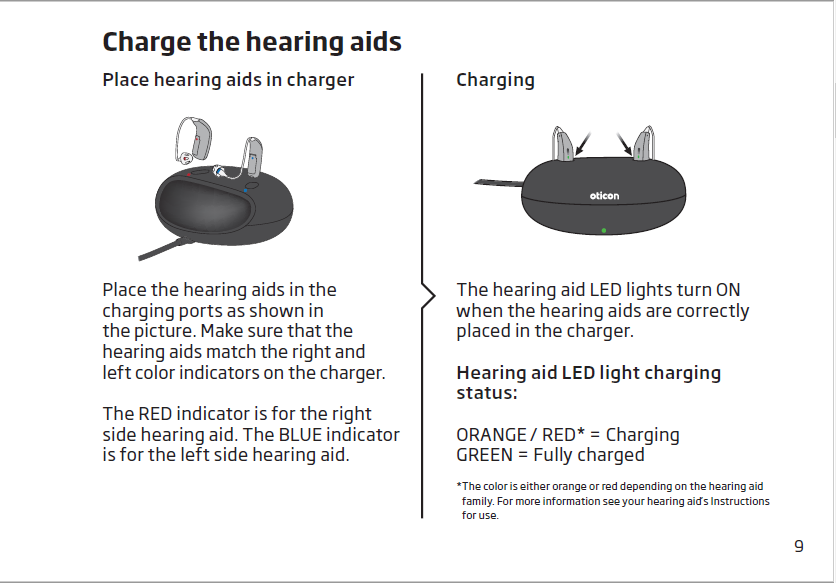
Oticon chargers use different colors to show the charging status of each hearing aid. A red light corresponds to the right hearing aid. A blue light indicates the left hearing aid. These colors help users identify which device is charging or has an issue.
While charging, hearing aids often show an orange light. This means the batteries are charging properly. If the lights do not turn orange, check if the hearing aids are seated correctly. Remove and place them back in to ensure a good connection.
Common Causes
The blinking red light on your Oticon hearing aid charger signals a charging issue. Understanding common causes helps fix the problem quickly. This section covers the main reasons why the red light blinks and how to spot them easily.
Poor Connection And Dirty Contacts
Dirt, earwax, or sweat can build up on the charging contacts. This stops the charger from connecting properly to the hearing aid. Dirty contacts cause the red light to blink as the device does not charge.
Clean the metal contacts gently with a dry cloth or cotton swab. Avoid using water, which can damage the charger or hearing aid.
Incorrect Hearing Aid Seating
Placing the hearing aid wrongly in the charger causes poor contact. The charger cannot detect the hearing aid properly. This triggers the blinking red light.
Remove the hearing aid and place it back carefully. Make sure it fits snugly in the charging slot. Proper seating usually stops the red blinking light.
Low Battery Voltage
The hearing aid battery may be too low to charge correctly. Low voltage can cause the charger to blink red while trying to charge. This can happen if the hearing aid was used for a long time before charging.
Leave the hearing aid on the charger for a longer time. This allows the battery to gain enough power. If the red light stays, the battery may need professional check or replacement.
Cleaning Charging Contacts
Cleaning the charging contacts is crucial when your Oticon hearing aid blinks red on the charger. Dirt, sweat, or earwax can block the connection. This stops the hearing aid from charging properly. Keeping the contacts clean helps maintain a steady power flow. It also extends the life of your hearing aid and charger.
Regular cleaning prevents charging errors. It improves the device’s performance. The process is simple and only takes a few minutes. Use the right tools to avoid damage. Follow the steps carefully for the best results.
Tools You’ll Need
- Soft, lint-free cloth
- Cotton swabs
- Isopropyl alcohol (70% or less)
- Small brush (optional)
- Compressed air can (optional)
Step-by-step Cleaning Guide
- Unplug the charger from the power source.
- Remove the hearing aids from the charger.
- Use a dry, soft cloth to wipe the charger contacts gently.
- Dampen a cotton swab with isopropyl alcohol. Avoid soaking it.
- Clean the metal contacts on the hearing aids carefully.
- Use a small brush or compressed air to remove stubborn debris.
- Let all parts dry completely before placing the hearing aids back.
- Place the hearing aids in the charger securely.
- Plug in the charger and check for the charging light.
Reseating Hearing Aids
Reseating hearing aids is a simple yet effective step to fix charging issues with Oticon devices. Sometimes the red blinking light on the charger means the hearing aids are not placed correctly. Taking out the aids and placing them back carefully can restore proper contact with the charger. This helps the device charge properly without errors.
Proper reseating ensures the metal contacts on the hearing aids align with the charger pins. A small misalignment can cause charging interruptions or prevent the aids from charging at all. Following a few clear steps can help you avoid this problem and keep your Oticon hearing aids powered up.
Proper Placement Tips
Place the hearing aids gently into the charger slots. Make sure the metal contacts face down and align with the charger pins. Avoid forcing the aids into the charger. The hearing aids should fit snugly but easily.
Check that the aids are fully inserted without any gaps. The charger lid, if present, should close smoothly. If you feel resistance, remove and reposition the hearing aids.
Verifying Charging Status
After placing the hearing aids, watch the charger lights carefully. The red blinking should stop, and a steady light or orange glow should appear. This confirms the aids are charging properly.
If the red light continues to blink, remove the aids and reseat them again. Ensure the charger is plugged into a power source. Clean the charging contacts if needed for better connection.
Power Source Checks
Power source issues often cause the Oticon hearing aid to blink red while on the charger. This blinking red light signals that the charger may not be receiving steady power. Checking the power source helps identify if the problem lies with the charger or the outlet. It is a simple step that can save time and avoid frustration. Start by confirming the charger is plugged firmly into the power socket. Loose connections can interrupt charging and trigger the red blinking light.
Ensuring Reliable Power
Use a power source that delivers consistent electricity. Avoid outlets that switch on and off frequently. A weak or fluctuating power supply can cause the charger to malfunction. Also, check the charger cable for any visible damage. Damaged cables may stop the charger from working properly. Plug the charger into a known working outlet to test its function. Confirm the charger’s indicator lights change as expected.
Using Different Outlets
Try plugging the charger into another outlet in your home. Outlets in different rooms may have different power conditions. This test helps rule out issues with the original outlet. Some power strips or extension cords may not provide enough power. Plug the charger directly into a wall socket for best results. If the red blinking stops, the first outlet or power strip likely causes the problem.

Battery Issues
Battery issues often cause the Oticon hearing aid to blink red while on the charger. The blinking red light usually signals a problem with the battery’s charging or its condition. Low battery power or battery failure can stop the hearing aid from charging properly. Understanding these battery problems helps maintain your device’s performance.
When To Replace Batteries
Replace the battery if the hearing aid stops holding a charge. Batteries generally last between three to seven days. If the red blinking continues even after charging, the battery may be weak. Another sign is the hearing aid turning off suddenly. Replace batteries regularly to avoid interruptions in use.
Signs Of Battery Failure
Battery failure shows in several ways. The hearing aid may not turn on after charging. Charging may take longer than usual. The red light blinking on the charger could keep happening. You might notice poor sound quality or sudden shutoffs. These signs suggest the battery is no longer reliable.
Resetting Oticon Hearing Aids
Resetting Oticon hearing aids can solve many common issues. This process helps clear minor errors that cause blinking red lights on the charger. A reset refreshes the hearing aid’s system for better performance. It is a simple step to try before seeking professional help.
Follow clear instructions to reset your Oticon hearing aids safely. Doing this can restore normal charging and usage quickly. Understanding when and how to reset is key to keeping your device working well.
Hard Reset Process
Start by removing the hearing aids from the charger. Turn the devices off completely by opening and closing the battery door if your model has one. Wait about 5 seconds before closing the battery door again or placing the aids back in the charger.
For rechargeable models, place the hearing aids in the charger and leave them for about 30 seconds. Then, remove and press the push button on each hearing aid for 5 seconds. This triggers a hard reset to clear the system.
Finally, place the hearing aids back into the charger and check if the red blinking stops. The lights should change to orange or green, indicating proper charging.
When To Perform A Reset
Reset your Oticon hearing aids if the red light keeps blinking on the charger. Also, try a reset if the devices are not responding or working oddly. A reset helps when the hearing aids do not turn on or connect correctly.
Perform a reset after cleaning the charging contacts and ensuring the aids sit properly in the charger. If problems continue, a reset might fix internal errors causing the issue.
Do not reset your hearing aids too often. Use it as a troubleshooting step only when needed. If problems persist after a reset, contact your hearing care professional for support.
When To Contact Professionals
Knowing when to contact professionals about your Oticon hearing aid blinking red on the charger is important. Some issues need expert help to avoid damage or further problems. Recognizing these signs early saves time and protects your device.
If the red light keeps blinking after basic troubleshooting, it signals a deeper issue. Persistent charging errors or unusual behavior require professional attention. Professionals have the tools and knowledge to diagnose and fix complex problems safely.
Service And Repair Options
Authorized service centers offer repair services for Oticon hearing aids. They can handle battery, charger, and internal component issues. Professionals use original parts to maintain device quality and warranty. Sending your hearing aid to a certified center ensures proper care and reliable repair results.
Some repairs are quick and done on-site, while others may take longer. Many centers provide cleaning and maintenance to improve device performance. Regular servicing helps avoid future charging problems and extends the life of your hearing aids.
Finding Local Hearing Care Providers
Local hearing care providers offer personalized support for Oticon users. They can check the device, charger, and fit for any issues. Visiting a nearby professional saves time and gives face-to-face guidance. Many providers also offer hearing tests and adjustment services.
Search for certified hearing specialists in your area with experience in Oticon products. Check reviews and credentials to find trusted care providers. Local experts can recommend the best solutions or replacements if needed. Getting help nearby ensures quick and effective service.
Frequently Asked Questions
How To Know If Oticon Hearing Aid Is Charging?
The Oticon hearing aid shows an orange light on the charger when charging. A red blinking light indicates a charging error or poor connection. Ensure the hearing aid sits correctly and clean the charging contacts for proper charging.
Why Is The Red Light Blinking On My Hearing Aid Charger?
A red blinking light on your hearing aid charger signals a charging error or poor connection. Clean contacts and reseat aids. Persistent blinking may indicate battery issues; contact your hearing care professional for support.
What Is The Red Light On The Oticon Battery Charger?
The red light on the Oticon battery charger indicates the right hearing aid is charging. Blinking red signals a charging error or poor connection. Clean contacts and reseat the aid. Persistent blinking may require battery replacement or professional service.
How Do I Reset An Oticon Hearing Aid?
To reset an Oticon hearing aid, turn it off, wait 5 seconds, then turn it back on. For a full reset, remove and reinsert the battery or use the Oticon app’s reset feature if available. Contact your hearing care professional if issues persist.
Why Is My Oticon Hearing Aid Blinking Red On The Charger?
A blinking red light usually means a charging error or poor contact. Check if the hearing aid is seated properly and the contacts are clean.
Conclusion
A blinking red light on your Oticon charger signals a charging issue. Check for dirt or debris on the contacts first. Make sure the hearing aid sits correctly in the charger slot. Clean the contacts gently with a dry cloth or cotton swab.
If the problem persists, the battery might need replacement. Contact a hearing care professional for help. Regular care prevents most charging problems. Stay patient and follow these simple steps to keep your hearing aids working well.