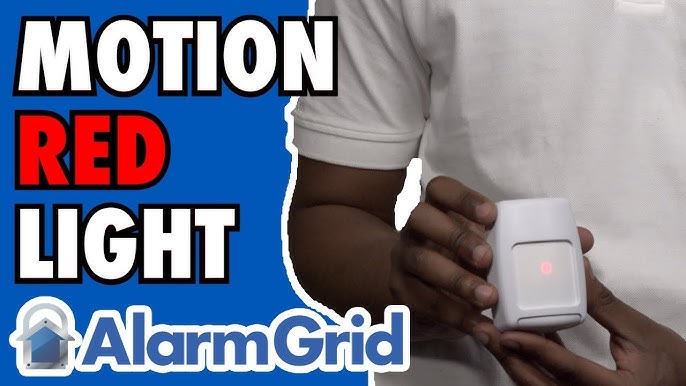
Have you ever noticed a motion sensor blinking red light and wondered what it means? That small, flashing red dot can tell you a lot about how your device is working—or if something might be wrong.
Understanding this simple signal can save you time, avoid frustration, and even improve your home’s security. Keep reading to discover what your motion sensor’s red light is trying to tell you and how you can make the most of it.

Common Causes Of Red Light Blinking
Motion sensor blinking red light can signal several issues. Knowing common causes helps with quick fixes. Red blinking often means the sensor needs attention. It might be a small problem or something needing repair.
Check the red light carefully. Each pattern can tell you what is wrong. Below are frequent reasons for a blinking red light on motion sensors.
Power Supply Issues
Power problems often cause the red light to blink. Loose plugs or unstable power can disrupt the sensor. Check if the sensor is plugged in well. Ensure the power source is working correctly. A steady power flow keeps the sensor active and reliable.
Sensor Obstruction
Objects blocking the sensor can trigger the red light. Dirt, dust, or debris may cover the lens. Even plants or furniture in front can cause issues. Clean the sensor lens gently to clear the view. Make sure nothing blocks the sensor’s path.
Low Battery Warning
Battery-powered sensors blink red to show low power. This warning helps avoid sensor failure. Replace batteries as soon as you see the warning. Use fresh batteries for better sensor performance. Regular battery checks extend the sensor’s life.
Faulty Wiring
Broken or loose wires cause blinking red lights. Wiring issues disrupt the sensor’s signals. Inspect wires for damage or loose connections. Tighten or replace faulty wires promptly. Proper wiring keeps the sensor working smoothly.
Environmental Interference
Strong lights or weather can affect sensor performance. Bright sunlight or reflections may confuse the sensor. Rain, fog, or cold can also cause blinking. Position the sensor away from direct light. Protect it from harsh weather for stable operation.
Diagnosing The Problem
Diagnosing a blinking red light on a motion sensor helps identify the root cause. This process ensures the sensor works properly and keeps your space safe. A step-by-step check can reveal simple problems or signal the need for repairs.
Checking Power Connections
Start by verifying the power source. Ensure the sensor is plugged in securely. Look for loose wires or damaged plugs. A weak power connection often causes blinking red lights. Confirm the outlet or battery pack supplies steady power.
Inspecting Sensor Lens
The sensor lens must be clean and clear. Dirt, dust, or spider webs can block the sensor. Gently wipe the lens with a soft cloth. Avoid harsh chemicals that might damage it. A clear lens helps the sensor detect motion accurately.
Testing Battery Health
Battery problems often cause blinking red lights. Test the battery with a multimeter or replace it with a new one. Weak or old batteries may not power the sensor correctly. Fresh batteries improve sensor response and reduce blinking alerts.
Examining Wiring And Mounting
Loose wiring or poor mounting can disrupt sensor function. Check all wires for breaks or corrosion. Secure any loose connections firmly. Make sure the sensor is mounted at the right angle. Proper installation ensures the sensor works without errors.
Identifying External Factors
External factors may trigger false alerts or blinking lights. Look for heat sources like heaters or direct sunlight near the sensor. Moving objects such as curtains or pets can also affect it. Removing these distractions helps the sensor operate smoothly.
Quick Fixes For Red Light Blinking
The red light blinking on a motion sensor can signal different issues. Quick fixes often solve these problems without expert help. Simple steps like cleaning or resetting can stop the blinking. These easy actions save time and restore normal function fast.
Resetting The Sensor
Turn off the sensor power first. Wait for 30 seconds, then turn it back on. This step resets the system and clears minor errors. Many blinking problems stop after a reset.
Cleaning The Sensor Lens
Dust or dirt on the lens can cause false signals. Use a soft cloth to wipe the lens gently. Clean lenses help the sensor detect motion correctly. Avoid harsh cleaners to prevent damage.
Replacing Batteries
Weak batteries make the red light blink repeatedly. Check battery power and replace old batteries. Use fresh, compatible batteries for better performance. This fix often restores steady sensor operation.
Securing Loose Wires
Loose or damaged wires disrupt sensor signals. Inspect wires and connections carefully. Tighten any loose wires to ensure good contact. Secure wiring helps stop blinking and keeps the sensor stable.
Adjusting Sensor Position
The sensor may blink if it faces bright light or moving objects. Change its angle or position slightly. Avoid pointing it at windows or busy areas. Proper positioning reduces false triggers and blinking.
Preventing Future Issues
Preventing future issues with a motion sensor blinking red light helps keep your system reliable. Small steps can stop problems before they start. Consistent care extends the life of your sensor and avoids frequent errors.
Regular Maintenance Tips
Clean the sensor lens regularly. Dust and dirt can block the sensor’s view. Check for any loose wires or connections. Test the sensor every few months. Replace worn parts early to avoid bigger problems.
Optimal Sensor Placement
Place the sensor where it has a clear view. Avoid areas with too much direct sunlight or strong lights. Keep it away from moving objects like trees or curtains. Position it at a height that covers the desired area well.
Using Quality Batteries
Choose batteries from trusted brands. Cheap batteries may leak or lose power fast. Change batteries before they run out completely. Keep spare batteries ready to avoid sensor downtime. Use the correct battery type recommended by the manufacturer.
Protecting From Weather Damage
Use covers or shields to protect the sensor from rain and snow. Avoid placing sensors in spots that collect water. Check seals and casing for cracks or damage. Move sensors away from extreme heat or cold areas if possible.
When To Seek Professional Help
Knowing when to seek professional help for a motion sensor blinking red light is important. Some problems can be fixed easily. Others need expert attention. Acting at the right time saves money and avoids bigger issues.
Persistent Blinking After Fixes
If the red light keeps blinking after you try common fixes, call a professional. Basic steps like cleaning the sensor or checking batteries might not solve the problem. Persistent blinking may mean there is a deeper issue.
Complex Wiring Problems
Wiring issues can cause a motion sensor to blink red. These problems need expert skills to diagnose and fix. Incorrect wiring can cause damage or safety risks. Let a qualified electrician handle complex wiring.
Sensor Malfunction Signs
Signs of sensor malfunction include erratic blinking or no response to motion. A faulty sensor may send false alarms or fail to detect movement. Professional inspection can confirm if the sensor needs repair or replacement.
Frequently Asked Questions
What Does A Blinking Red Light On A Motion Sensor Mean?
A blinking red light usually means the sensor detects movement. It can also show the sensor is working properly or in test mode.
How Do I Stop The Red Light From Blinking On My Motion Sensor?
Check the sensor’s settings to turn off the LED indicator. Some models allow you to disable the blinking light in the menu.
Can A Blinking Red Light Indicate A Motion Sensor Problem?
Yes, constant blinking may mean a low battery or a wiring issue. Try replacing batteries or checking connections to fix it.
Why Does My Motion Sensor Blink Red Even Without Movement?
It might catch small movements like pets or shadows. Environmental factors like sunlight can also cause the light to blink.
Is A Blinking Red Light Normal For All Motion Sensors?
Not all models blink red; it depends on the brand and type. Always read your sensor’s manual for specific light signals and meanings.
Conclusion
A blinking red light on a motion sensor shows it is working properly. It helps to detect movement and keeps your space safe. Sometimes, the light blinks because of low batteries or a need for cleaning. Regular checks can prevent issues and keep the sensor active.
Understanding what the blinking means saves time and worry. Stay aware of your device’s signals for better security. Simple steps can fix most blinking light problems quickly. Trust your motion sensor to protect your home or office every day.