Is your hardwired smoke detector blinking a green light and leaving you wondering what it means? You’re not alone.
That steady or flashing green glow isn’t just a random signal—it’s your smoke detector’s way of communicating with you. Understanding what that blinking green light indicates can help you ensure your home stays safe without unnecessary worry. You’ll discover the common reasons behind the blinking green light, how to troubleshoot it, and simple steps to fix the issue.
Keep reading to take control of your smoke detector’s signals and keep your home protected.
Green Light Signals
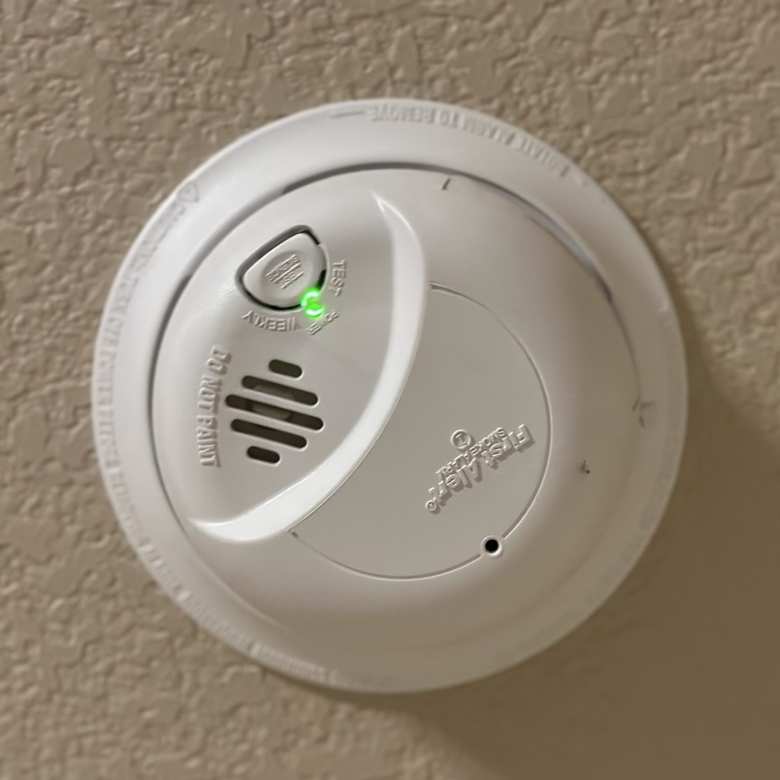
The green light on a hardwired smoke detector shows its power status and condition.
Understanding this signal helps keep your home safe and your detector working well.
Different patterns of the green light mean different things about the detector’s state.
Steady Green Meaning
A steady green light means the detector has normal power from your home wiring.
This steady glow confirms the unit is receiving continuous AC power.
It shows the detector is ready to detect smoke and protect your home.
Flashing Green Causes
A flashing green light often means the detector is running on battery backup.
This happens if the main power from the house is lost or interrupted.
Flashing can also signal a low battery that needs replacement and reset.
Sometimes, it flashes to show the unit recently detected smoke and needs a reset.
Press the test button to reset the detector and stop the flashing light.
Common Reasons For Blinking
The blinking green light on a hardwired smoke detector signals various operational statuses. Understanding why the light blinks helps maintain safety and ensures proper function. This section covers the common causes behind the blinking green light.
Power Loss And Backup Mode
A blinking green light often means the detector lost main power. The unit switches to battery backup to keep working. This happens during power outages or wiring issues. The light flashes slowly to show the backup mode is active. Check your home’s power supply to fix the issue. Restoring main power usually stops the blinking.
Low Battery Alerts
Some hardwired smoke detectors use batteries as backup. A blinking green light can warn of a low battery. The device needs a fresh battery to work well. Replace the battery promptly to avoid false alarms. After replacement, the green light should return to normal. This alert keeps your smoke detector reliable at all times.
Memory Reset Requirements
After an alarm, the detector may blink green to show it remembers the event. This is called latching memory. Pressing the test or reset button clears this memory. Without reset, the green light keeps blinking. Resetting confirms the detector is ready for any new danger. It is a simple step to keep your system clear and accurate.
Quick Fix Steps
The blinking green light on your hardwired smoke detector can be confusing. It usually means the unit needs attention. Follow these quick fix steps to solve the issue fast. These simple actions help restore proper function and keep your home safe.
Check Power Connection
First, ensure the smoke detector is firmly connected to the power source. Look for loose wires or a tripped circuit breaker. If power is lost, the detector runs on battery backup, causing the green light to blink. Restoring the power often stops the blinking.
Replace And Reset Battery
Next, replace the backup battery inside the smoke detector. Use the correct battery type recommended by the manufacturer. After replacing, press and hold the test button to reset the detector’s memory. This action clears any error signals and stops the blinking green light.
Press Test Button
Press the test button to check the smoke detector’s function. Hold it for a few seconds until the light changes or stops blinking. This step resets the device and confirms it works properly. Repeat if the green light continues blinking after battery replacement.
Model-specific Tips
Hardwired smoke detectors often use blinking green lights to communicate their status. Understanding these signals depends on the specific model. Each brand has unique light patterns and reset methods. Knowing model-specific tips helps you maintain your alarm properly and keep your home safe.
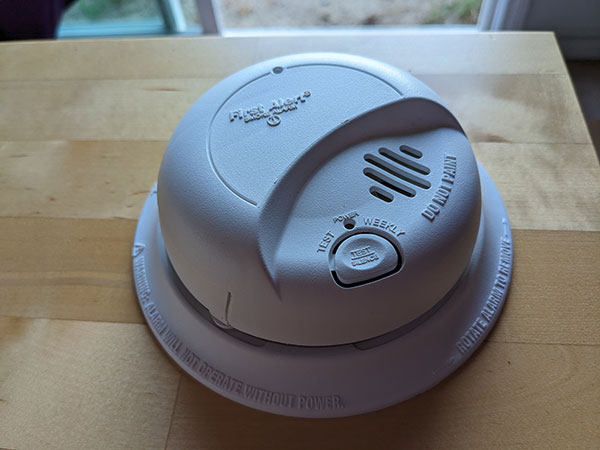
First Alert Alarms
First Alert smoke detectors use a blinking green light to show battery backup power. This means the alarm is running on battery, not house power. To fix this, check the AC power connection first. If power is fine, replace the backup battery. Press the test button after to reset the alarm’s memory. This stops the blinking green light.
Some First Alert models blink green after an alarm event. This latching memory feature reminds you to reset the unit. Hold the test button until the light stops blinking. Always consult your manual for exact instructions, as patterns can vary by model.
Kidde Smoke Detectors
Kidde smoke detectors show a blinking green light for power or reset issues. A single blink every minute often means the detector lost house power. Check your circuit breaker and wiring for problems. If the alarm runs on battery backup, the green light may flash to show this.
Low battery in Kidde units also triggers a blinking green light, sometimes with a chirp sound. Replace the battery and press the test button to clear the alert. Some models require a reset after battery replacement to stop the blinking. Always read the user guide for your specific Kidde alarm.
When To Call A Professional
Knowing when to call a professional for a hardwired smoke detector blinking green light is important. Some issues are simple to fix. Others need expert help to keep your home safe. Understanding the signs helps you make the right choice fast. This reduces risk and avoids damage.
Persistent Blinking Issues
A green light that keeps blinking without stopping signals a deeper problem. It may mean the detector lost power or has a battery fault. If you changed batteries and reset the alarm but the light stays on, call a technician. Persistent blinking may also show wiring issues inside the unit. These problems need a trained eye to fix safely. Do not ignore repeated blinking or try to fix complex electrical parts yourself.
Troubleshooting Complex Problems
Some blinking patterns are tricky to understand. Smoke detectors differ by brand and model. A green light flashing in a certain pattern can mean different things. Professionals have tools and knowledge to diagnose these issues correctly. They check wiring, power supply, and internal parts. They can replace or repair components without risk. Complex issues can affect your alarm’s reliability. Let an expert handle these problems to keep your home protected.
Maintenance Best Practices
Maintaining your hardwired smoke detector is essential for safety and proper function. A blinking green light often signals the device needs attention. Following best practices keeps your smoke detector reliable and responsive.
Regular upkeep prevents false alarms and ensures the alarm works during emergencies. Routine checks and timely battery changes are key steps in maintenance.
Regular Testing
Test your smoke detector once a month. Press the test button until you hear the alarm sound. This confirms the device is working correctly. If it does not sound, check the power source or replace the battery. Regular testing detects any faults early.
Battery Replacement Schedule
Replace the backup battery every six months. Even if the green light blinks, the battery may be weak. Use the recommended battery type for your model. After replacement, press the test button to reset the detector. Keeping batteries fresh avoids unexpected power loss.
Frequently Asked Questions
Why Is My Hardwired Smoke Detector Blinking Green?
A hardwired smoke detector blinking green usually means it’s running on battery backup due to power loss. It may also signal a low battery or a need to reset the unit. Press the test button to reset memory and replace batteries if needed.
Why Is My Smoke Alarm Blinking Green Or Solid Green?
A solid green light means your smoke alarm has normal AC power. A blinking green light indicates battery backup, power loss, or a needed battery reset. Press the test button to reset after battery replacement. Check your model’s manual for exact light code meanings.
Why Is My Kidde Hardwired Blinking Green?
A Kidde hardwired alarm blinking green means it runs on battery backup due to AC power loss or needs a battery reset. Press the test button to clear memory after battery replacement. Check your model’s manual for exact light code meanings.
What Does Blinking Light On A Smoke Detector Mean?
A blinking light on a smoke detector usually signals low battery, power loss, or a need to reset the unit.
What Does A Blinking Green Light On Smoke Detector Mean?
A blinking green light usually shows the detector is on battery backup. It may also mean the unit lost AC power or needs a reset.
Conclusion
A blinking green light on a hardwired smoke detector signals attention is needed. It may mean power loss, low battery, or a reset is required. Always check your smoke detector’s manual for exact light codes. Press the test button to ensure the alarm works correctly.
Regular checks keep your home safe and your detector reliable. Stay aware and act quickly if the green light blinks. Safety starts with understanding your smoke detector’s signals.