Is your Frigidaire Gallery dishwasher blinking a blue light and leaving you wondering what’s going on? You’re not alone.
That blinking blue light is your dishwasher’s way of telling you something needs attention. It could be a simple fix like a door that isn’t fully closed, or it might point to a more complex issue like a sensor or control board problem.
Don’t let confusion or frustration keep you from getting your dishwasher back to work. You’ll discover clear, easy-to-follow steps to understand what the blinking blue light means and how you can fix it quickly. Keep reading, and you’ll be washing dishes with confidence again in no time.
Common Causes Of Blue Light Blinking
The blinking blue light on your Frigidaire Gallery dishwasher signals an issue inside the machine. Understanding the common causes helps in quick troubleshooting. These problems often relate to basic parts or electrical components. Fixing them might stop the blinking and get your dishwasher working again.
Here are the main reasons why the blue light blinks.
Door Latch Issues
The dishwasher door must close tightly for the cycle to start. A loose or broken door latch stops the machine from running. The blinking blue light often shows the door is not locked properly. Check if the latch is damaged or misaligned. Repairing or replacing the latch usually solves this problem quickly.
Control Panel Glitches
The control panel manages all dishwasher functions. Sometimes, buttons get stuck or the panel malfunctions. This causes the blue light to flash as an error signal. Resetting the panel by turning off power can clear glitches. If blinking continues, the control board might need professional repair.
Power Interruptions
Power issues can disrupt dishwasher cycles. A sudden power cut or surge may cause the blue light to blink. This blinking warns of interrupted operation or system errors. Reset the dishwasher by switching off the circuit breaker for a minute. This often restores normal function after power problems.
Heating Element Problems
The heating element warms water and dries dishes. When it fails, the dishwasher cannot complete cycles properly. A blinking blue light may indicate heating issues. The element might be broken or have loose connections. Testing and replacing the heating element fixes this cause.
Sensor Malfunctions
Sensors monitor water levels and temperature inside the dishwasher. Faulty sensors confuse the system and trigger the blue light blink. Dirt or damage to sensors can cause false alerts. Cleaning or replacing sensors can stop the blinking and ensure correct operation.

Quick Fixes To Try First
When your Frigidaire Gallery dishwasher shows a blinking blue light, start with simple fixes. These quick steps often solve the problem without extra tools or parts. Follow each step carefully to get your dishwasher working again fast.
Check And Secure The Door
Make sure the dishwasher door is fully closed. A door that is slightly open can cause the blue light to blink. Press the door firmly until you hear a click. This click means the latch is engaged. Check for any debris or damage around the door seal. Clean the seal with a damp cloth to help the door close tightly.
Inspect For Stuck Buttons
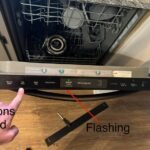
Look at the control panel for any buttons that might be stuck. Press each button gently to ensure none are jammed. Sometimes, food particles or moisture cause buttons to stick. Wipe the panel with a dry cloth to remove any dirt or residue. Stuck buttons can confuse the dishwasher’s system and trigger the blinking light.
Disable Delay Start And Child Lock
Check if the Delay Start or Child Lock features are active. These settings can prevent the dishwasher from starting. To turn off Delay Start, press the Delay Start button until the light goes off. For Child Lock, press and hold the lock button for a few seconds. This action will disable the lock and allow normal operation.
Perform A Hard Reset
Unplug the dishwasher or switch off the circuit breaker to reset it. Leave it off for about five minutes. This pause lets the dishwasher’s electronics clear any errors. After waiting, plug it back in or turn the breaker on. Close the door and try starting the dishwasher again. A hard reset often clears glitches causing the blinking blue light.
Advanced Troubleshooting Steps
Advanced troubleshooting steps help identify complex issues behind the blinking blue light. These steps go beyond simple resets and basic checks. They focus on key components that may cause the error. Understanding these areas can save time and repair costs.
Follow these detailed methods carefully. They require some technical knowledge but remain manageable for most users. Each step targets a different possible cause. Proceed one step at a time to isolate the problem.
Diagnose Control Board Errors
The control board manages all dishwasher functions. Errors here often trigger blinking lights and error codes. Start by unplugging the dishwasher for one minute. This resets the control board temporarily.
Check for visible damage or burn marks on the board. Use a multimeter to test voltage output if available. Consult the dishwasher manual for error code meanings. If the board shows faults, replacement may be necessary.
Test Heating Element Functionality
The heating element dries dishes and heats water. A faulty element can cause blinking lights and wash cycle failures. Locate the heating element at the bottom of the dishwasher.
Use a multimeter to check for continuity across the heating element terminals. No continuity means the element is broken and needs replacement. Also, inspect for visible damage or corrosion on the element.
Evaluate Sensor Performance
Sensors monitor water temperature, level, and cycle progress. Malfunctioning sensors cause error signals and blinking lights. Clean sensor surfaces gently to remove dirt or residue.
Test sensor resistance with a multimeter according to the manual’s instructions. Replace any sensor that fails the test. Proper sensor function ensures the dishwasher runs smoothly without errors.

When To Seek Professional Help
Knowing when to seek professional help for your Frigidaire Gallery dishwasher blinking blue light saves time and prevents damage. Some problems need expert tools and skills. Trying to fix these issues alone might worsen the problem. Understanding the signs that require a technician can keep your dishwasher working well longer.
Persistent Error Codes
When error codes keep showing despite resets, it’s time for help. These codes signal deeper problems inside the dishwasher’s system. A professional can read and clear codes properly. They find the root cause quickly and fix it right.
Complex Control Board Issues
The control board manages dishwasher functions. If it malfunctions, blinking lights often appear. This part is delicate and tricky to repair. Experts have the right tools to test and replace the board safely. Avoid DIY fixes for control board problems.
Component Replacement Needs
Some dishwasher parts wear out or break over time. These include sensors, switches, or the door latch. If blinking blue light points to a faulty component, replace it professionally. Proper installation ensures the dishwasher runs smoothly again.
Preventive Tips For Dishwasher Maintenance
Maintaining your Frigidaire Gallery dishwasher is key to avoiding issues like the blinking blue light. Proper care helps the machine run smoothly. It also extends the dishwasher’s life. Regular maintenance prevents small problems from turning into big repairs.
Following simple tips can keep your dishwasher in top shape. These steps save time and reduce frustration. They ensure your dishwasher cleans dishes well every time. Here are some essential preventive tips for dishwasher maintenance.
Regular Cleaning And Inspection
Clean the dishwasher’s interior regularly to stop buildup. Remove food debris from filters and spray arms. Wipe the door edges and gasket with a soft cloth. Check for any cracks or damage that could cause leaks.
Run a cleaning cycle with dishwasher cleaner once a month. This removes grease and hard water stains. Inspect the racks for rust or broken parts. Clean these areas to keep the dishwasher running quietly and efficiently.
Avoiding Common User Errors
Do not overload the dishwasher. Crowded racks block water flow and reduce cleaning power. Place dishes according to the manufacturer’s guide. Avoid blocking the spray arms or detergent dispenser.
Use the right detergent and avoid using too much. Check that the door closes firmly before starting. Do not open the door during a cycle to prevent interruptions or water leaks.
Routine Sensor And Component Checks
Check sensors and electronic components for signs of wear. Sensors detect water temperature and level, which affects cleaning. Clean sensor lenses gently with a soft cloth to keep them accurate.
Inspect the door latch to ensure it locks properly. A faulty latch can cause blinking lights and stop cycles. Test buttons and control panels for responsiveness. Replace any worn or damaged parts to avoid malfunctions.

Frequently Asked Questions
Why Is My Frigidaire Gallery Dishwasher Blue Light Flashing?
The blue light on your Frigidaire Gallery dishwasher flashes to signal errors like a door latch issue or sensor malfunction. Ensure the door closes firmly and no buttons are stuck. Try resetting by unplugging or flipping the breaker. Persistent flashing may require professional repair.
What Does Blinking Blue Light On The Dishwasher Mean?
A blinking blue light on a dishwasher signals an error like a door latch issue, stuck button, or sensor problem. Check the door latch and control panel, then try resetting the unit. Persistent blinking may require a technician to inspect sensors or the control board.
How Do I Do A Hard Reset On A Frigidaire Gallery Dishwasher?
To hard reset a Frigidaire Gallery dishwasher, turn off its power at the circuit breaker. Wait one minute, then switch the power back on. Close the dishwasher door firmly and press the start button to resume normal operation. This clears minor electronic glitches effectively.
Why Is My Dishwasher Light Blinking But Not Starting?
A blinking dishwasher light usually signals an error like a door latch issue, stuck button, or power glitch. Try resetting by unplugging or flipping the breaker. Ensure the door is fully closed and buttons aren’t stuck. Persistent issues may require a technician’s help.
Why Is My Frigidaire Gallery Dishwasher Blinking Blue?
The blinking blue light shows the dishwasher has an error or is running a cycle. It may also mean the door latch is not secure or a sensor detects an issue.
Conclusion
The blinking blue light on your Frigidaire Gallery dishwasher signals a problem. Common issues include door latch misalignment, stuck buttons, or power glitches. Start by checking the door and control panel carefully. A quick reset by turning off the power can often fix the error.
If the light keeps blinking, refer to your manual or contact a technician. Taking these steps helps keep your dishwasher running smoothly. Simple care prevents bigger issues later. Stay patient and follow the instructions for best results.