Is your DSL light blinking, and you’re not sure what it means? You’re not alone.
A blinking DSL light can be confusing and even frustrating, especially when you rely on your internet every day. But don’t worry—this blinking light is trying to tell you something important about your connection. You’ll discover exactly why your DSL light is blinking and what you can do to fix it quickly.
Keep reading, and you’ll have your internet back up and running smoothly in no time.
Why Your Dsl Light Blinks
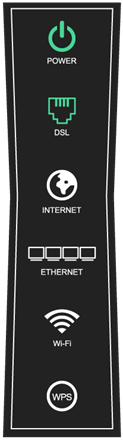
The DSL light on your modem blinks to show its current status. It signals activity between your modem and the internet service provider. This blinking can mean different things depending on the pattern and frequency. Understanding why your DSL light blinks helps you identify connection issues quickly.
Common Causes Of Blinking Lights
The DSL light blinks for several reasons. One cause is the modem trying to connect to the internet. During this time, the light flashes as it searches for a signal. Another cause is data transmission. The light blinks when data moves between your modem and the network. Sometimes, a blinking DSL light can indicate a weak or unstable line. Electrical interference or damaged cables often cause this. Firmware updates or modem resets may also trigger blinking lights.
What Different Blink Patterns Mean
A slow, steady blink usually means the modem is syncing with the network. A fast, constant blink often shows active data transfer. If the light blinks irregularly, it may point to line noise or connection problems. A blinking light that never stops could mean the modem cannot find a DSL signal. No light or a solid light often means no connection or a stable link, respectively. Recognizing these patterns helps you understand your internet’s status at a glance.
Initial Troubleshooting Steps
The DSL light blinking on your modem can indicate a connection problem. Start with basic checks to identify the issue. These steps help fix common problems quickly.
Check Physical Connections
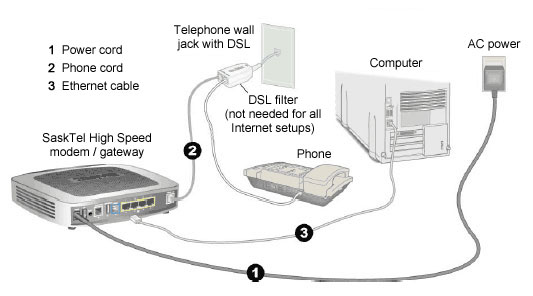
Look at all cables connected to your modem. Ensure the DSL cable plugs tightly into the phone jack. Check the power cord and Ethernet cables. Loose or damaged cables cause connection issues. Replace any worn or broken cables you find.
Restart Your Modem And Router
Turn off your modem and router. Wait for about 30 seconds. Plug them back in and power them on. Restarting resets the devices and can clear errors. Watch the DSL light as the modem powers up. It should stop blinking and become steady.
Inspect For Service Outages
Check with your internet service provider for outages in your area. Sometimes, the blinking DSL light means a wider network problem. Visit their website or call customer support. If there is an outage, wait until the service is restored.
Adjusting Modem Settings
Adjusting modem settings can help fix the issue of a blinking DSL light. The modem controls your internet connection. Small changes in settings often solve connection problems. Knowing how to access and reset your modem is important. These steps can restore a stable connection quickly.
Accessing Modem Interface
Start by connecting your computer to the modem with a cable. Open a web browser and type the modem’s IP address. Common addresses include 192.168.1.1 or 192.168.0.1. Press Enter to open the login page.
Enter the username and password. These are often “admin” for both fields unless changed. After logging in, you see the modem’s control panel. Here, you can check connection status and change settings.
Resetting To Factory Defaults
Resetting the modem returns all settings to their original state. This can fix errors from wrong configurations. Find the reset button on the back of the modem. Use a paperclip to press and hold it for 10 seconds.
The modem will restart and blink its lights. Wait a few minutes for the reboot. After reset, log in again to set up your connection. This step often clears issues causing the DSL light to blink.
Fixing Line And Signal Issues
Fixing line and signal issues is key to stopping your DSL light from blinking. Problems with the phone line or signal often cause connection drops. Checking these issues helps keep your internet stable and fast.
Follow simple steps to find and fix common problems. This saves time and avoids the need for a technician visit.
Test Phone Lines And Filters
Start by testing your phone lines for noise or damage. Use a regular phone to listen for static or crackling sounds. Such noises can disrupt your DSL signal.
Check all phone filters. These small devices stop DSL signals from mixing with voice signals. Replace any faulty or old filters. Make sure every phone or device has a filter on the same line as your DSL modem.
Reduce Interference And Noise
Interference from other devices can cause your DSL light to blink. Keep your modem away from cordless phones, microwaves, and other electronics.
Use shorter cables to connect your modem. Long cables may pick up unwanted noise. Also, avoid running cables near power lines or large appliances.
When To Contact Your Isp
DSL light blinking can signal a problem with your internet connection. Knowing when to contact your ISP saves time and frustration. Some issues need professional help to fix. Recognizing these signs helps you get support quickly.
Providing Useful Information
Before calling your ISP, gather key details. Note the pattern of the blinking light. Check if other devices have internet issues. Write down any error messages on your modem. This helps the technician understand the problem fast.
Requesting Technical Support
Contact your ISP if the blinking light stays on for long. Report if the internet is slow or drops often. Tell them about any recent changes to your setup. Ask for a technician to check your line or modem. Quick support can restore your connection sooner.
Preventing Future Dsl Light Problems
Preventing future DSL light problems helps keep your internet stable and fast. Small steps can avoid many common issues. Understanding simple care tips saves time and frustration. Follow these practical methods to protect your connection.
Regular Equipment Maintenance
Check your modem and router often. Dust and dirt can cause overheating and malfunctions. Clean vents and ports gently with a soft cloth. Restart devices regularly to clear temporary glitches. Replace old or damaged cables to keep signals strong. Keep equipment in a cool, dry place. Avoid placing devices near walls or other electronics.
Upgrading Hardware
Old devices may not work well with new internet speeds. New modems support faster connections and better signals. Check your internet plan for recommended hardware. Choose models with good reviews and compatibility. Upgrading hardware reduces blinking DSL lights and disconnections. It also improves overall network performance and stability.
Frequently Asked Questions
What Does A Blinking Dsl Light Mean?
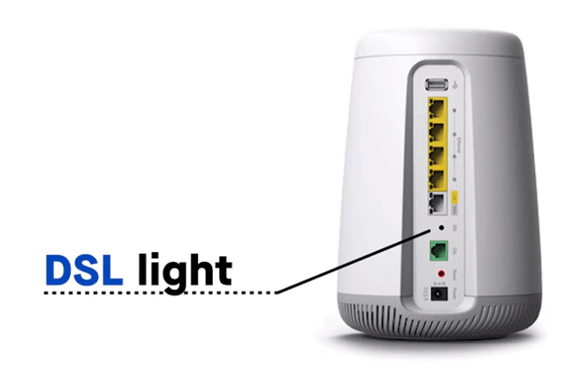
A blinking DSL light shows your modem is trying to connect to the internet. It means the device is searching for a signal from your provider. This is normal during startup or when the connection is unstable.
Why Is My Dsl Light Blinking But No Internet?
A blinking DSL light with no internet often means the connection is weak or lost. Check your phone line and cables for damage or loose plugs. Sometimes, your service provider may have an outage.
How Long Should A Dsl Light Blink During Setup?
The DSL light usually blinks for a few minutes while syncing with the network. If it keeps blinking for more than 10 minutes, there may be a problem. Restart your modem or contact your internet provider.
Can A Blinking Dsl Light Cause Slow Internet?
Yes, a blinking DSL light can indicate weak or unstable signals, leading to slow speeds. The modem struggles to maintain a steady connection. Fixing line issues can improve your internet speed.
What Should I Do If Dsl Light Keeps Blinking?
Try restarting your modem and checking all cable connections first. If blinking continues, contact your internet provider for help. They can test the line or send a technician if needed.
Conclusion
A blinking DSL light often signals a connection issue. Check cables and restart your modem first. Slow internet or no connection can result from this. Contact your internet provider if problems persist. Simple fixes often solve the blinking light problem.
Stay patient and follow these easy steps. Your internet should work smoothly again soon.