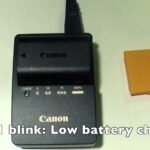
Is your Canon battery charger blinking orange and leaving you unsure about what to do next? You’re not alone.
That blinking orange light can be frustrating, especially when you need your camera ready to capture important moments. But don’t worry—this signal is your charger’s way of telling you something important about your battery’s health or charging status. You’ll discover the common reasons behind that blinking orange light and simple steps you can take to fix it.
Keep reading to get your Canon battery charger back to normal and avoid missing out on those perfect shots!
Reasons For Blinking Orange
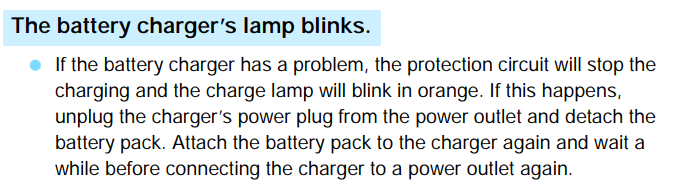
The blinking orange light on a Canon battery charger signals a problem during charging. This warning helps users identify issues early, preventing battery damage or charging failures. Understanding the common reasons behind this blinking can save time and frustration. Below are the main causes that trigger the orange light.
Battery Health Issues
Old or damaged batteries often cause the charger to blink orange. Batteries lose capacity over time and may no longer hold a proper charge. Swelling, leakage, or internal faults can also trigger the warning. Replace batteries that show physical damage or fail to charge fully.
Charger Compatibility
Using a charger not designed for your Canon battery can cause blinking. Chargers differ by model and voltage requirements. Mismatched chargers may fail to communicate with the battery correctly. Always use the official charger or a recommended equivalent for your battery type.
Power Supply Problems
Unstable or insufficient power can make the charger blink orange. Loose connections, damaged cords, or faulty outlets reduce power flow. Power surges or drops may interrupt charging cycles. Check all cables and try different power sources to rule out supply issues.
Battery Management System Activation
The Battery Management System (BMS) protects lithium-ion batteries from damage. If the battery enters sleep mode or detects abnormal conditions, the BMS activates. The charger’s orange light blinks to indicate this status. Sometimes, connecting the battery to the charger again resets the BMS and resumes normal charging.

Basic Troubleshooting
Basic troubleshooting helps fix common issues with Canon battery chargers. It focuses on simple checks and fixes anyone can do. These steps often solve the blinking orange light problem.
Follow these easy methods to get your charger working again fast.
Check Battery And Charger Connections
Ensure the battery fits well in the charger. Loose connections cause the orange light to blink. Remove the battery and insert it again firmly. Check the charger plug is fully connected to the power source. A poor connection can stop charging.
Use Compatible Charger
Always use the charger made for your Canon battery. Third-party or wrong chargers may not work right. They can cause the orange blinking light. Using the correct charger helps the battery reset and charge properly.
Clean Battery Contacts
Dirty contacts stop good connection between battery and charger. Wipe the battery terminals gently with a dry cloth. Avoid moisture or liquids. Clean contacts improve charging and stop the blinking light.
Try Plug-in Restart
Unplug the charger from the wall. Remove the battery from the charger. Wait 30 seconds. Insert the battery back and plug in the charger again. This simple restart can reset the charger and fix blinking lights.
Resetting The Battery
Resetting the battery is a key step to fix the Canon battery charger blinking orange issue. This process often revives the battery management system (BMS) and clears minor faults. Resetting can improve battery recognition and charging behavior. It can save time and money by avoiding battery replacement. Below are practical methods to reset your Canon battery safely and effectively.
Wake Up Battery Management System
The battery management system controls charging and discharging. Sometimes, it enters a sleep mode to protect the battery. Charging the battery with a compatible charger often wakes up the BMS. Insert the battery and plug in the charger. Leave it connected for at least 30 minutes. This simple step can restore normal charging and stop the orange blinking light.
Using A Donor Battery Method
This method gives the battery a small electrical boost. Use a fully charged donor battery of the same type. Connect the donor battery to the faulty one briefly with a safe connector. This can jump-start the BMS inside the dead battery. After the jolt, place the battery back in the charger. The orange blinking might stop as the battery resets.
Reset Button Options
Some Canon batteries include a small reset button. Check your battery for a tiny hole or button on the casing. Use a thin tool like a pin to press and hold the button for 10 seconds. This triggers the internal reset of the battery’s BMS. If your battery has this feature, it offers an easy way to fix charging errors.
Battery Calibration Steps
Calibrating the battery helps the charger read battery levels correctly. First, fully charge the battery until the charger light turns green. Then, use the battery in your camera until it drains completely. Finally, recharge the battery fully again. Repeat this cycle two or three times. Calibration can stop false orange blinking by syncing battery status with the charger.
When To Replace Batteries
Knowing when to replace your Canon battery is important to keep your camera working well. Batteries lose power over time and stop holding charge like before. A blinking orange light on your Canon charger often signals battery problems. This section helps you understand when it is time to get a new battery.
Signs Of Battery Wear
Check your battery for physical damage like cracks or swelling. These signs show the battery is worn out and unsafe to use. If your camera suddenly turns off or won’t start, it may be due to battery wear. A battery that heats up quickly during use also needs replacement.
Reduced Battery Life
When your battery drains faster than usual, it means its capacity is dropping. You might need to charge it more often during shoots. If your battery lasts less than half the original time, it’s time to buy a new one. Reduced battery life affects your camera’s performance and shooting experience.
Persistent Charging Issues
A blinking orange light on the charger can mean the battery isn’t charging properly. Sometimes the charger fails to recognize the battery at all. Repeated charging failures or slow charging are signs the battery is failing. Persistent issues like these show replacement is necessary to avoid camera downtime.
Avoid Risky Fixes
When your Canon battery charger blinks orange, avoid quick, risky fixes that may cause harm. Some common mistakes can damage your charger or battery further. Stay safe and protect your equipment by following simple, careful steps.
No Physical Vent Tampering
Do not try to open or poke the charger’s vents. The vents help cool the charger and prevent overheating. Tampering can cause electric shock or permanent damage. Leave the charger sealed and clean the vents gently with a dry cloth only.
Avoid Over-voltaging
Never use a charger or power source not made for your Canon battery. Using higher voltage can burn out the charger or battery. Always use the original charger or one approved by Canon. Check the charger’s label to confirm the correct voltage before plugging it in.
Safety Precautions
Unplug the charger if the orange light blinks rapidly or stays on too long. Keep the charger on a flat, dry surface away from heat and water. Avoid charging unattended to prevent fire risk. If problems persist, contact Canon support for professional help.
Professional Help And Repairs
When your Canon battery charger blinks orange, professional help can guide you. Experts know how to diagnose and fix the issue safely. They also prevent further damage to your camera or battery. Seeking repairs from trusted sources saves time and effort. It ensures your equipment works properly again.
Many problems with chargers need more than simple home fixes. Batteries and chargers involve delicate electronics. Certified technicians have the right tools and training. They can test your charger and battery to find the root cause. Then, they offer the best solution based on your situation.
Authorized Service Centers
Authorized service centers are official repair locations for Canon products. They use original parts and follow Canon guidelines. These centers maintain your camera’s warranty and quality. Staff at these centers understand Canon’s technology deeply. Visiting an authorized center reduces risks of poor repairs.
Repair Vs Replacement
Deciding between repair and replacement depends on the damage level. Small charger faults may be fixed easily. If the battery or charger is badly damaged, replacement might be better. Repairs can save money but might not last long. Replacements provide a fresh start with full performance.
Warranty Considerations
Check your warranty before getting service or repairs. Canon warranties often cover charger and battery issues. Using authorized services keeps your warranty valid. Unauthorized repairs might void your warranty. Always keep your purchase receipts and warranty papers safe.
Frequently Asked Questions
Why Is The Orange Light Blinking On My Battery Charger?
The orange light blinks on your battery charger to indicate a charging error or a faulty battery. Check battery connection and replace if needed.
How Do I Know If My Canon Battery Charger Is Working?
To check if your Canon battery charger works, plug it in with the battery inserted. The LED light should turn on or blink, indicating charging. No light or unusual blinking may mean a faulty charger or battery. Test with another battery if unsure.
How Do I Reset My Lithium-ion Battery?
Reset a lithium-ion battery by fully charging it with a compatible charger. Use a reset button if available. For deep discharge, briefly tap terminals with a good battery to wake the management system. Avoid tampering with battery vents or applying high voltage.
How To Fix Blinking Orange Light?
To fix a blinking orange light, use the correct charger and reconnect the battery. Try resetting the battery management system by fully charging or using a reset button if available. Replace the battery if blinking persists. Avoid tampering with battery vents or applying high voltage.
Why Is My Canon Battery Charger Blinking Orange?
A blinking orange light usually means the battery is charging or there is a charging issue. Check if the battery is properly placed. Sometimes, the charger signals a problem with the battery.
Conclusion
A blinking orange light on your Canon battery charger signals a charging issue. Check the battery’s connection and condition first. Use the original charger to ensure compatibility. Sometimes, resetting the battery management system helps restore charging. Avoid using damaged batteries or chargers to prevent harm.
If problems continue, consider replacing the battery or contacting support. Staying aware of these signs keeps your camera ready to capture moments. Simple steps can save time and frustration. Keep your gear charged and working smoothly for better photography results.